
FilexHost vs securememo.app
Side-by-side comparison to help you choose the right product.

FilexHost
Easily host and share any file with a simple drag and drop, getting a live URL in seconds.
Last updated: February 26, 2026
securememo.app
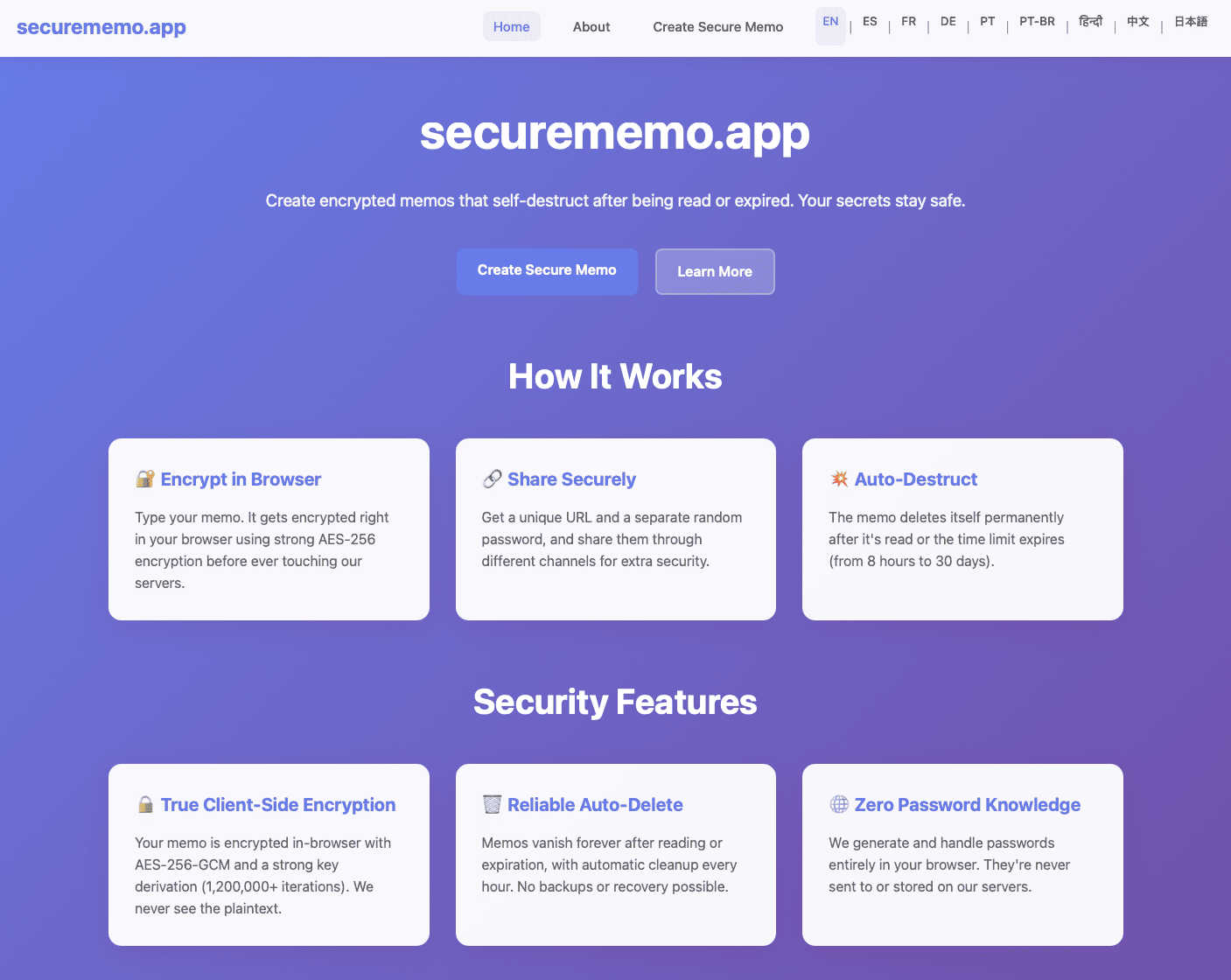
Securememo.app is an open source memo service that ensures privacy with client-side encryption and no tracking.
Visual Comparison
FilexHost

securememo.app
Feature Comparison
FilexHost
Instant Subdomains
FileXHost provides instant subdomains for every uploaded file, allowing users to share links in the format of your-file.filex.host. This feature requires zero setup, making it incredibly convenient for quick sharing.
Free SSL Encryption
Every link generated by FileXHost comes with free SSL encryption, ensuring that all shared files are securely transmitted. This feature protects user data and builds trust with recipients by providing a secure environment for file sharing.
Smart View Modes
FileXHost offers smart view modes that allow users to choose how their files are presented. Options include direct rendering for immediate viewing or a download page depending on the recipient's needs, enhancing flexibility in sharing.
Built-in File Viewers
With built-in viewers for various file types, FileXHost supports formats like PDFs, images, videos, and archives. The platform automatically renders files to provide an optimal viewing experience directly in the browser, eliminating the need for additional software.
securememo.app
Client-Side Encryption
Securememo.app employs advanced client-side encryption techniques, which means that all sensitive data is encrypted on the user’s device before it ever leaves the browser. This guarantees that only the note creator holds the decryption key, making the notes completely private and secure from unauthorized access.
Self-Destructing Notes
The service allows users to create self-destructing notes that automatically delete themselves after being viewed or after a set time. This feature is ideal for transmitting sensitive information that should not persist beyond its intended use, ensuring that information is not left vulnerable to future access.
Unique Link and Password Sharing
To share a memo securely, users generate a unique link alongside a strong, randomly generated password. The password is created entirely on the user's device and must be communicated through a separate channel. This process ensures that even if the link is intercepted, unauthorized individuals cannot access the note without the password.
Multi-Language Support
Securememo.app caters to a diverse audience by offering support in over 20 languages. This feature enhances accessibility and usability for users around the globe, making it easier for non-English speakers to utilize the service without language barriers.
Use Cases
FilexHost
Professional Reports Sharing
Professionals can utilize FileXHost to share client reports and presentations effortlessly. The ability to generate shareable links instantly allows for quick distribution and feedback, streamlining communication processes.
Developer Landing Pages
Developers can host landing pages or mock APIs using FileXHost without the hassle of server management. The platform's drag-and-drop interface makes it easy to upload HTML files or ZIP archives, allowing for rapid deployment.
Digital Products Distribution
Creators can distribute digital products, such as eBooks or software, through FileXHost. The secure sharing options, including password protection and link expiration, ensure that products are delivered safely and privately.
Educational Content Sharing
Educators can share lecture notes, multimedia resources, and study materials with students. FileXHost's ability to host various file types and render them for easy access makes it a valuable tool in educational settings.
securememo.app
Secure Personal Notes
Individuals can use Securememo.app to jot down personal thoughts or sensitive information that they do not want to store on their devices or share through traditional means. The self-destructing feature ensures that these notes are temporary and secure.
Confidential Business Communications
Businesses can utilize Securememo.app to share sensitive information, such as project details, financial data, or HR-related notes, with employees or clients. The encryption and self-destructing capabilities provide an extra layer of security for corporate communications.
Temporary Password Storage
Users can create temporary, self-destructing notes to store passwords or one-time codes. This is particularly useful for sharing login credentials for applications and services that require short-term access without leaving a digital footprint.
Educational Use
Students and educators can leverage Securememo.app to exchange notes or assignments securely. The service allows for the sharing of sensitive academic information without the risk of it being accessed by unintended parties.
Overview
About FilexHost
FileXHost is a powerful and intuitive file hosting platform designed to simplify the process of sharing files of any type. Whether you need to share documents, media files, spreadsheets, or entire websites, FileXHost offers a seamless solution that eliminates traditional barriers to file sharing. With its "Drop & Share" workflow, users can easily drag and drop files to receive instant, secure URLs for sharing without the need for complex server setups or DNS configurations. This service caters to a wide audience, including professionals sharing client reports, developers hosting landing pages, and creators distributing digital products. The main value proposition of FileXHost lies in its user-friendly interface and efficient file rendering capabilities, ensuring that recipients experience the files as intended without unnecessary downloads or plugins.
About securememo.app
Securememo.app is an innovative, privacy-centric memo service designed to help users create and share encrypted, self-destructing notes directly through their web browsers. This application is tailored for individuals who prioritize confidentiality and require a secure method to store and share sensitive information. With client-side encryption, all data is encrypted within the user's browser before it is transmitted to the Securememo servers. This ensures that only the user can access their notes, making it impossible for anyone else, including the service providers, to view the content. The platform is incredibly user-friendly, requiring no account creation, which enhances user anonymity. Securememo.app is designed for a global audience, supporting over 20 languages, allowing users worldwide to communicate sensitive information securely and efficiently. In an age of increasing data breaches and privacy violations, Securememo.app presents a robust solution for anyone needing a reliable tool for secure note-taking and sharing.
Frequently Asked Questions
FilexHost FAQ
What is FileXHost?
FileXHost is an online file hosting and sharing service that allows users to upload and share various file types easily. It simplifies the process of file distribution with instant links and smart rendering options.
Is it really free?
Yes, FileXHost offers a free plan that allows users to host up to 1,000 files with a maximum size of 25MB each. This plan is ad-supported and includes a 7-day expiry for hosted files.
What file types are supported?
FileXHost supports a wide range of file types, including documents (PDF, TXT), spreadsheets (XLSX, CSV), images (JPG, PNG), media files (MP4, MP3), and archives (ZIP), ensuring versatility for users.
How do I update my site?
To update your hosted files on FileXHost, simply upload the new version of the file using the drag-and-drop feature. The platform will automatically generate a new link for the updated file, making the process seamless.
securememo.app FAQ
How does Securememo.app ensure my notes are private?
Securememo.app uses client-side encryption to secure your notes. This means your data is encrypted in your browser before it reaches our servers, ensuring that only you can access it.
Can I recover my notes after they self-destruct?
No, once a note self-destructs, it cannot be recovered. This feature is designed to enhance security by ensuring that sensitive information does not persist after its intended use.
Do I need to create an account to use Securememo.app?
No, Securememo.app does not require account creation. This policy enhances user anonymity and makes the service simple and quick to use.
Is Securememo.app available in multiple languages?
Yes, Securememo.app supports over 20 languages, making it accessible to a global audience and allowing users from different linguistic backgrounds to utilize the service easily.