
ScopeSnap vs SupaSidebar
Side-by-side comparison to help you choose the right product.

ScopeSnap
ScopeSnap uses AI to turn your discovery notes into structured project scopes and client-ready proposals.
Last updated: March 18, 2026

SupaSidebar
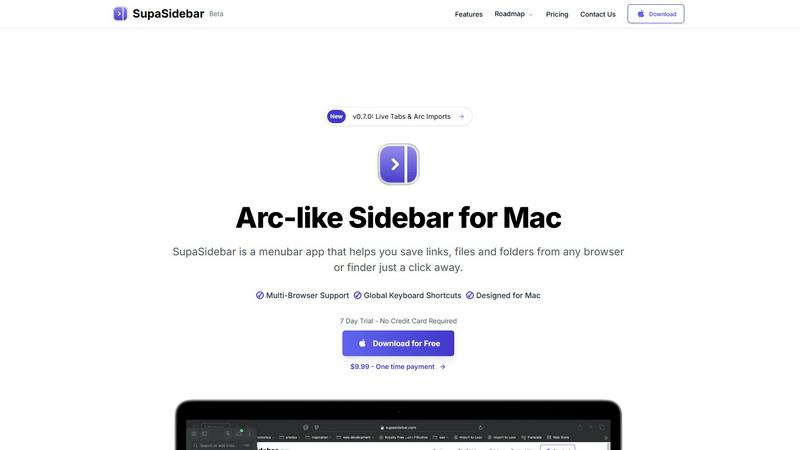
SupaSidebar is a Mac menubar app that instantly saves and accesses your links, files, and folders with ease.
Last updated: February 28, 2026
Visual Comparison
ScopeSnap

SupaSidebar
Feature Comparison
ScopeSnap
AI-Powered Scope Generation
This core feature automates the initial structuring of a project. Users can paste in raw text from discovery calls, emails, or notes. ScopeSnap's AI analyzes this content to automatically generate a structured backlog, breaking down the project idea into logical epics and detailed, estimatable scope items. It intelligently surfaces critical open questions and flags underlying assumptions that need client clarification, ensuring nothing important is missed during the planning phase.
Interactive Scope Refinement & Estimation Board
The generated scope is presented in a clear, interactive board interface. This allows users to review, edit, and reorganize scope items with ease. Teams can assign roles (e.g., frontend, backend), set time or cost estimates for each task, and directly address the open questions and assumptions flagged by the AI. This collaborative environment turns a static document into a living plan that can be iteratively refined until the scope is precise and confidently estimated.
Automated Proposal & SOW Document Creation
Once the scope backlog is finalized, ScopeSnap automatically compiles all the structured information into a professionally formatted Proposal or Statement of Work. This eliminates the tedious, hours-long process of writing these documents from scratch. The generated document is client-ready, presenting the project vision, detailed scope, timelines, estimates, and terms in a clear and polished format that can be sent directly or customized further.
Centralized Project Discovery Hub
ScopeSnap acts as a single source of truth for all pre-project discovery materials. Instead of juggling notes across different apps, users can centralize transcripts, email snippets, meeting minutes, and scope iterations within one platform. This creates a coherent narrative from the first conversation to the final proposal, improving organization and making it easy to reference original context during scope refinement.
SupaSidebar
Instant Saving
With SupaSidebar, the time-consuming process of saving resources is streamlined. You can save or copy URLs in just one shortcut: press CMD CTRL S to save and CMD CTRL C to copy the current website link directly to the sidebar. This feature enables you to capture valuable information quickly without interrupting your workflow.
Recent Activity Tracking
SupaSidebar includes a robust Recents feature that tracks every website you have accessed in the last 48 hours. This makes it easy to find your work instantly, eliminating the frustration of sifting through countless tabs or bookmarks to locate previously visited sites.
Favorites Pinning
To enhance accessibility, SupaSidebar allows you to pin your favorite items at the top of your sidebar list. This ensures that the resources you use most frequently are always within reach, allowing for quick and efficient access to your most important files, folders, and links.
Quick Search Functionality
Navigating between various applications and files can slow down your productivity. SupaSidebar's fast search feature enables you to find any file, folder, website, or app instantly by pressing CMD CTRL K and typing your query. This functionality minimizes the time spent searching and maximizes your efficiency.
Use Cases
ScopeSnap
For Freelance Developers Closing New Clients
Independent developers can use ScopeSnap to quickly turn post-discovery call notes into a compelling, detailed proposal. This professionalism builds client trust and demonstrates thoroughness. By generating a clear scope and accurate estimate rapidly, freelancers can respond to potential clients faster than competitors, increasing their chances of winning projects while ensuring their estimates are comprehensive and protect them from scope creep.
For Software Agencies Standardizing Pre-Sales
Agencies can implement ScopeSnap to create a consistent, efficient scoping process across their entire sales and technical teams. It ensures every project estimate follows the same rigorous methodology, improving accuracy and reliability. The platform reduces the time senior developers spend on administrative scoping work, allowing them to focus on billable tasks, while enabling less experienced team members to produce high-quality proposals.
For Consultants Defining Project Boundaries
Management or technical consultants who define project requirements for clients can use ScopeSnap to structure complex ideas into actionable plans. The AI's ability to surface assumptions and open questions is invaluable for ensuring all aspects of a project are considered before work begins. This leads to more precise project definitions, clearer client expectations, and a stronger foundation for project success.
For Iterative Scope Refinement with Clients
ScopeSnap facilitates a collaborative scoping process. The initial AI-generated scope and list of questions can be shared with the client in an early review cycle. This collaborative refinement ensures both parties are aligned on every detail before the formal proposal is created, significantly reducing the risk of misunderstandings and change requests after the project has commenced.
SupaSidebar
Research Organization
For students and researchers, SupaSidebar serves as an invaluable tool to keep their digital resources organized. By allowing users to save links and documents associated with their projects in one easily accessible location, they can focus on their research without the distraction of cluttered tabs.
Project Management
Professionals managing complex projects can benefit from SupaSidebar's ability to keep all relevant files and resources organized. By pinning important links and utilizing the quick search feature, users can streamline their workflow and maintain a clearer overview of their tasks and deadlines.
Efficient Browsing
Casual users who spend significant time browsing the internet will appreciate how SupaSidebar simplifies link management. By enabling quick saving and retrieval of important pages, users can avoid the chaos of tab overload and maintain a smoother browsing experience.
Streamlined App Access
For individuals who frequently switch between multiple applications, SupaSidebar provides a centralized hub for easy access. By integrating all necessary applications into one sidebar, users can quickly launch their needed tools without navigating through the clutter of their desktop or dock.
Overview
About ScopeSnap
ScopeSnap is an AI-powered platform designed to transform the chaotic, time-consuming process of project scoping and proposal creation into a streamlined, systematic workflow. It specifically serves freelance developers, consultants, and software agencies who regularly undertake custom development projects. The core challenge it addresses is the high-risk, slow transition from initial client discovery conversations to a finalized, client-ready proposal or Statement of Work (SOW). By leveraging artificial intelligence, ScopeSnap ingests raw, unstructured inputs like meeting transcripts, emails, and scattered notes. It then intelligently structures this information into a clear, detailed project backlog complete with epics, scope items, and actionable tasks. This structured foundation allows for accurate estimation and iterative refinement. Once the scope is solidified, the platform automatically generates polished, professional documents ready for client delivery. The main value proposition is eliminating guesswork, reducing administrative overhead from hours to minutes, and providing the clarity needed to set projects up for success from the very beginning.
About SupaSidebar
SupaSidebar is a meticulously crafted native macOS application designed to enhance productivity by providing an Arc-inspired sidebar directly accessible from your menu bar. It functions as a universal command center for your digital activities, allowing you to effortlessly save, organize, and retrieve links, files, folders, and applications with just a click. Targeted towards professionals, researchers, students, and anyone engaged in multitasking across multiple browsers and apps, SupaSidebar effectively addresses prevalent issues such as tab overload, inefficient application switching, and chaotic resource management. Its core value proposition lies in consolidating all essential resources into a single, visually appealing, and distraction-free sidebar, enriched with global keyboard shortcuts that operate seamlessly throughout your entire system. Furthermore, SupaSidebar ensures that all data remains securely stored on your Mac, prioritizing user privacy and performance. Whether you are immersed in extensive research, managing intricate projects, or striving for a more efficient browsing experience, SupaSidebar is the ultimate tool to help you maintain organization and achieve a state of flow in your work.
Frequently Asked Questions
ScopeSnap FAQ
What kind of input does ScopeSnap need to generate a scope?
ScopeSnap is designed to work with unstructured text from your discovery process. You can paste in content from meeting transcripts, email exchanges, bullet-point notes, or summaries from calls. The AI analyzes this text to identify key themes, features, requirements, and action items to build the initial structured project backlog.
How accurate are the AI-generated estimates?
ScopeSnap's AI is designed to structure and break down scope, not to provide final estimates on its own. The platform generates detailed, estimatable tasks. It is then up to you, the expert, to review each task and assign accurate time or cost estimates based on your team's velocity and expertise. The AI ensures completeness; you provide the precision based on your experience.
Can I customize the generated proposals?
Yes. The proposals and Statements of Work generated by ScopeSnap are built from your refined scope, estimates, and assumptions. They are provided in a polished format that is ready to send. However, you have full control to edit, add, or remove any content, insert your company branding, and adjust terms before sending the final document to your client.
Is ScopeSnap suitable for very large or complex enterprise projects?
ScopeSnap is built to handle custom software projects of varying sizes. Its systematic approach is particularly beneficial for complex projects as it forces a detailed breakdown and highlights dependencies and open questions early. For very large enterprise programs, it can be used to scope individual phases or modules, providing clarity and structure to each distinct segment of the larger initiative.
SupaSidebar FAQ
Is SupaSidebar a browser extension?
No, SupaSidebar is a native macOS application that integrates directly with your menu bar, allowing you to save and access resources from any browser or Finder without the need for a browser extension.
Which browsers does SupaSidebar work with?
SupaSidebar is compatible with all major browsers, including Safari, Chrome, Firefox, and Arc, making it versatile for various user preferences.
What macOS version do I need?
To use SupaSidebar, you need macOS version 13 or later. This ensures that you have the necessary system requirements for optimal performance.
Where is my data stored?
All data saved using SupaSidebar remains securely on your Mac. This commitment to privacy ensures that your information is not shared with third-party services, providing peace of mind for users concerned about data security.
Alternatives
ScopeSnap Alternatives
ScopeSnap is a productivity and project management tool designed to streamline the scoping and proposal process for custom software projects. It uses AI to help freelance developers and agencies transform initial ideas into structured, estimatable tasks and client-ready documents. Users often explore alternatives for various reasons, such as budget constraints, specific feature requirements, or a need for integration with their existing tech stack. Some may seek more advanced reporting, different pricing models, or platforms that cater to larger enterprise teams. When evaluating other options, consider the core functionality of AI-assisted scoping, the quality of output for proposals, ease of use, and overall value for your specific business size and project volume. The right tool should save you time, reduce estimation risk, and improve client communication.
SupaSidebar Alternatives
SupaSidebar is a Mac menubar application designed to enhance productivity by providing instant access to links, files, and folders directly from your menu bar. As a universal command center for digital workflows, it helps users, such as professionals, students, and researchers, manage their resources efficiently in a distraction-free environment. Many users seek alternatives to SupaSidebar for various reasons, including pricing, the need for additional features, or compatibility with different platforms. When choosing an alternative, it is essential to consider factors such as ease of use, integration capabilities, security, and whether the app meets specific workflow requirements to ensure it effectively addresses your organizational challenges.