
Before after Picture Maker vs RemoveTexts
Side-by-side comparison to help you choose the right product.

Before after Picture Maker
Create stunning before and after images effortlessly with our AI comparison builder in just three simple steps.
Last updated: February 26, 2026

RemoveTexts
AI-powered tool that removes text from any image in seconds — no Photoshop needed.
Visual Comparison
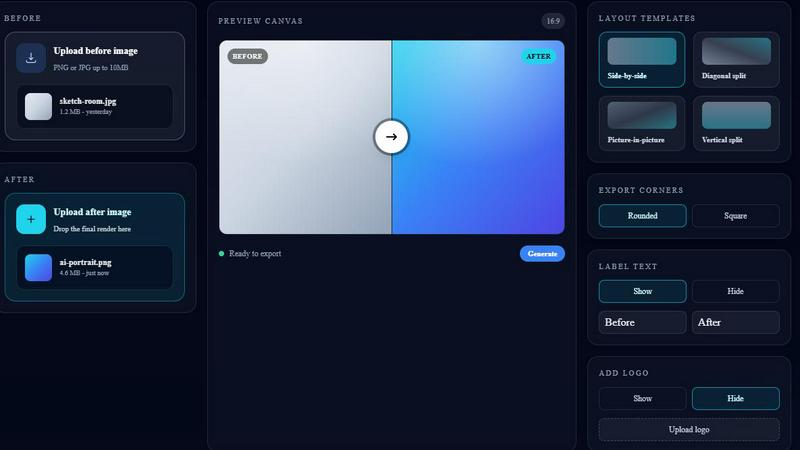
Before after Picture Maker
RemoveTexts

Overview
About Before after Picture Maker
Before after Picture Maker is an innovative, lightweight Software as a Service (SaaS) solution designed specifically for creators, marketers, and teams that require polished before and after visuals quickly and efficiently. This tool allows users to seamlessly upload their original images alongside AI-generated results, enabling them to create stunning comparison visuals in mere moments. With a variety of customizable templates, including side-by-side, diagonal, vertical, and picture-in-picture layouts, users can easily showcase transformations, progress, or product enhancements. The intuitive interface simplifies the process: upload images, choose a layout, and generate a ready-to-share comparison image with just a click. Perfect for portfolios, marketing campaigns, and social media, Before after Picture Maker streamlines visual storytelling, making it an essential tool for anyone looking to demonstrate change or improvement visually.
About RemoveTexts
No Photoshop, no manual selection - just upload and get clean results in seconds.
Perfect for cleaning screenshots, removing watermarks, or erasing unwanted text.
RemoveTexts is an AI-powered image editing tool that removes unwanted text from any image with one click. Whether it's watermarks, meme text, subtitles,date stamps, or branded overlays — our AI detects and erases text while seamlessly reconstructing the original background.
Key Features:
- Paint to Remove — Brush over specific text areas for precise control
- Auto Remove All — AI detects and removes every text element automatically
- Edit & Replace Text — Change existing text in images while matching the original style
- Remove Objects — Erase unwanted objects, logos, and visual elements
- 50+ Languages — Works with English, Chinese, Japanese, Korean, Arabic, and more Powered by state-of-the-art generative AI with 4K output quality. No design skills required. Results in seconds, not hours. Used by 100,000+ creators, marketers, and designers worldwide.