
poseup vs RemoveTexts
Side-by-side comparison to help you choose the right product.

poseup
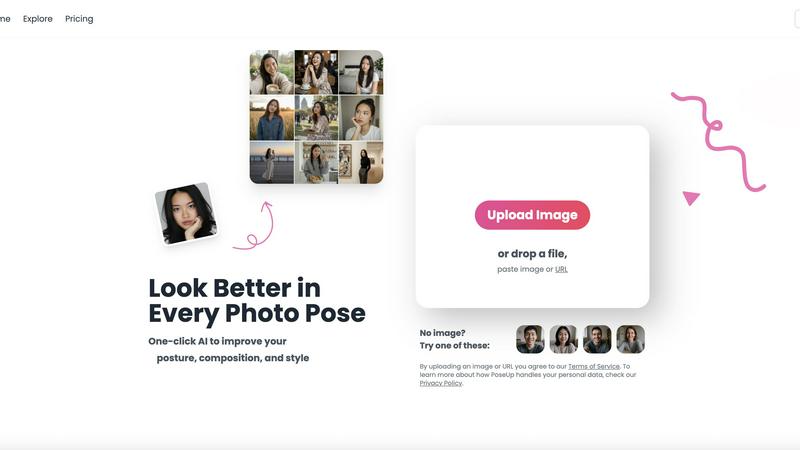
PoseUp instantly improves your photo poses and posture with one-click AI enhancement.
Last updated: February 28, 2026

RemoveTexts
RemoveTexts is an AI tool that effortlessly removes text from images in seconds, ensuring clean visuals without any editing skills needed.
Last updated: March 11, 2026
Visual Comparison
poseup
RemoveTexts

Feature Comparison
poseup
One-Click AI Pose Enhancement
PoseUp's flagship feature is its one-click simplicity. Users simply upload a photo, and the AI automatically analyzes the subject's pose, posture, and composition. It then applies intelligent adjustments to correct slouching, improve stance alignment, and create a more balanced and aesthetically pleasing frame. This eliminates the need for manual tweaking, making professional-grade photo enhancement accessible to everyone, regardless of their editing experience or photography knowledge.
Intelligent Posture Correction & Composition Analysis
The platform employs advanced AI algorithms specifically trained to detect human form and spatial arrangement. It goes beyond simple filters to analyze key elements like body angles, limb positioning, and the subject's placement within the frame. The AI suggests and implements corrections that make poses look more natural, confident, and visually appealing, effectively fixing common issues like awkward arm placement or a subject being off-center.
Multi-Format Support & Easy Upload
PoseUp ensures broad compatibility by accepting various popular image formats, including JPG, PNG, WEBP, and HEIC. The upload process is streamlined and user-friendly, allowing users to drag and drop files, paste image URLs, or select images from their device. With a file size limit of 5MB, it accommodates most standard-resolution photos, making the enhancement process quick and hassle-free from the start.
Specialized Scene Optimization
The AI is designed to deliver professional results across diverse photography scenarios. Whether the photo is a casual lifestyle shot, an outdoor adventure image, a professional headshot, a fitness showcase, or even a coffee shop work photo, PoseUp's technology adapts its enhancements to suit the context. This ensures the final image maintains a natural look appropriate for its setting while elevating its overall quality.
RemoveTexts
Paint to Remove
This feature allows users to brush over specific areas of text they wish to remove, providing precise control over the editing process. Users can select only the text they want gone, ensuring that the rest of the image remains intact.
Auto Remove All
With the Auto Remove All feature, the AI automatically detects and removes all text elements from an image with just one click. This function is perfect for users who want a quick and effortless solution to clean their images in seconds.
Edit & Replace Text
This unique feature enables users to not only remove existing text but also replace it with new text while matching the original font style. This is particularly beneficial for those who want to edit images without losing their visual integrity.
Remove Objects
In addition to text, RemoveTexts allows users to erase unwanted objects, logos, and other visual elements from images. This versatility makes it suitable for a wide range of editing tasks, enhancing the overall usability of the tool.
Use Cases
poseup
Social Media Content Creation
Social media creators, influencers, and everyday users can use PoseUp to ensure every photo posted is feed-worthy. The tool instantly improves selfies, outfit photos, and lifestyle shots by perfecting posture and composition, helping to maintain a polished and professional online aesthetic. This saves hours of manual editing and boosts engagement with higher-quality visual content.
Personal Photo Album Enhancement
Individuals can revitalize their personal photo collections, including family portraits, vacation pictures, and candid moments with friends. PoseUp can correct unintentional slouching or awkward group poses, turning good memories into great photographs that everyone looks their best in, ready for printing or digital sharing.
Professional Photography Workflow
Photographers can integrate PoseUp into their workflow as a powerful first-pass editing assistant. It can quickly batch-enhance poses from a photoshoot, providing a solid foundation before fine-tuning in professional software. This significantly speeds up the editing process, allowing photographers to focus on creative adjustments and client delivery.
Fitness & Wellness Progress Showcasing
Fitness enthusiasts, athletes, and coaches can use PoseUp to accurately showcase form and physique in progress photos or demonstration shots. The AI ensures posture is correct and the body is framed optimally, providing clear, professional-looking images that better highlight fitness achievements and proper technique for social media or personal tracking.
RemoveTexts
E-commerce Product Photo Editing
Online sellers can use RemoveTexts to eliminate watermarks or distracting text from product images, ensuring that their visuals are clean and professional. This helps improve product presentation and boosts sales potential.
Social Media Content Creation
Content creators can quickly remove unwanted text or logos from images before posting on social media platforms. This feature helps maintain a polished aesthetic that aligns with branding.
Legal Document Redaction
Legal professionals can utilize RemoveTexts to redact sensitive information from images of documents, ensuring confidentiality while preserving the overall appearance of the documents being shared.
Academic and Research Publications
Researchers and academics can remove watermarks and other text from images used in their publications, allowing for clearer visuals that enhance their written work. This ensures that readers focus on the content rather than distractions.
Overview
About poseup
PoseUp is an AI-powered photo enhancement platform designed to transform ordinary images into professional-looking photographs with a single click. Its core technology intelligently analyzes human poses, posture, and overall composition within a photo, identifying areas for improvement such as awkward stances, slouching, or unbalanced framing. The AI then applies precise, automated adjustments to create a more flattering, confident, and aesthetically pleasing result. This process democratizes advanced photo correction, making it accessible to users of all skill levels without requiring expertise in complex editing software or professional photography training.
The tool supports a wide range of image formats including JPG, PNG, WEBP, and HEIC, accepting files up to 5MB. PoseUp is built for a diverse audience, from social media creators and influencers seeking perfect feed-worthy shots, to individuals improving personal photos like selfies and family portraits. It also serves professional photographers as a rapid editing assistant and fitness enthusiasts aiming to showcase their form accurately. By automating technical refinements, PoseUp empowers users to instantly achieve a "professional photographer-level" effect, saving significant time and effort while elevating the quality of any photo containing people.
About RemoveTexts
RemoveTexts is an innovative, AI-powered image editing tool designed to effortlessly remove unwanted text from images in mere seconds. Ideal for anyone from casual users to professionals, it streamlines the process of cleaning up images without requiring any design skills. Whether you need to eliminate watermarks from product photos, erase captions from screenshots, or remove text overlays from graphics, RemoveTexts provides a fast and efficient solution. The tool employs advanced deep learning inpainting technology to analyze surrounding pixels, ensuring that the background is seamlessly reconstructed after text removal. This makes it possible to achieve professional-grade results, making the tool indispensable for creators, marketers, and designers alike. With over 100,000 images processed and a growing user base of more than 50,000 worldwide, RemoveTexts is quickly becoming the go-to choice for anyone looking to maintain clean visuals.
Frequently Asked Questions
poseup FAQ
What types of photos does PoseUp work best with?
PoseUp is specifically optimized for photos containing one or more human subjects where pose, posture, and composition are key. It works excellently for portraits, selfies, couple photos, group shots, and fitness images. The AI analyzes the human form to make intelligent adjustments, so its primary enhancements are applied to people within the frame.
How does the AI ensure my photo still looks natural after enhancement?
The AI is trained to make subtle, realistic adjustments that enhance the subject's natural appearance. Instead of applying drastic, unrealistic transformations, it focuses on correcting posture flaws and compositional imbalances that already exist. The goal is to make you look like the best version of yourself, preserving your original likeness and the photo's authentic feel.
What image formats and file sizes are supported?
PoseUp supports common image formats including JPG, PNG, WEBP, and HEIC. The maximum file size for upload is 5MB. This covers the majority of images taken on smartphones and digital cameras, ensuring wide accessibility. For best results, use clear, well-lit photos where the subject is easily distinguishable.
Is there a free way to try PoseUp?
Yes, new users can get started with free credits. The website offers "Get 50 free credits" for newcomers to test the platform's core enhancement features. This allows you to process several photos and experience the AI's capabilities before committing to a paid plan.
RemoveTexts FAQ
How does RemoveTexts work?
RemoveTexts uses advanced AI technology to analyze images and intelligently reconstruct the background after removing text. This deep learning inpainting ensures that the results are seamless and professional.
What file formats does RemoveTexts support?
RemoveTexts supports image uploads in JPG, PNG, and WebP formats, allowing users to work with various types of images without restrictions.
Is there a limit to the image size I can upload?
Yes, RemoveTexts allows users to upload images up to 10 MB in size. This ensures that the tool can handle high-quality images while maintaining quick processing times.
Can I use RemoveTexts on mobile devices?
Yes, RemoveTexts is a web-based tool, making it accessible on any device with an internet connection, including smartphones and tablets. This accessibility makes it easy to remove text on the go.
Alternatives
poseup Alternatives
PoseUp is an AI-powered tool in the image and photo enhancement category. It specializes in automatically improving human poses, posture, and photo composition with a single click, making professional-looking results accessible to users without editing expertise. Users often seek alternatives to tools like PoseUp for various reasons. Common factors include different pricing models or budget constraints, the need for specific features not offered, compatibility with certain operating systems or workflows, and preferences for tools that offer more manual control or integrate with other software platforms. When evaluating an alternative, consider the core capabilities for pose and posture correction, the ease of use and automation level, supported file formats and size limits, output quality and realism of adjustments, and overall value for your specific use case, whether for personal photos, social media, or professional work.
RemoveTexts Alternatives
RemoveTexts is an innovative AI-powered image editing tool designed for the seamless removal of unwanted text from images. It falls into the category of image and photo editing software, allowing users to easily clean up images without the need for complex software like Photoshop. Users often seek alternatives for various reasons, including pricing, specific feature sets, or compatibility with different platforms. An effective alternative should offer similar capabilities, ease of use, and support for various file types to ensure it meets user needs. When selecting an alternative to RemoveTexts, it's essential to consider the range of features offered, such as the ability to remove text automatically or manually, the quality of image output, and the user interface's simplicity. Additionally, support for multiple languages and fast processing times can significantly enhance the user experience, making the tool more versatile for different applications.