
Octopods vs Playwriter
Side-by-side comparison to help you choose the right product.

Octopods
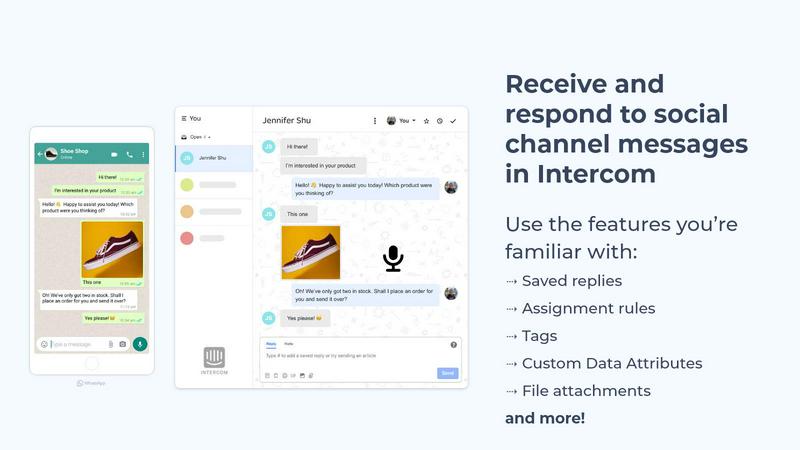
Octopods centralizes customer conversations from WhatsApp, Telegram, SMS, and more into Intercom or HubSpot for.
Last updated: February 26, 2026

Playwriter
Playwriter lets AI agents control your real Chrome browser with logins and extensions via a simple CLI.
Last updated: March 18, 2026
Visual Comparison
Octopods
Playwriter

Feature Comparison
Octopods
Native Conversation Integration
Octopods allows messaging from various channels to flow seamlessly into Intercom and HubSpot, making it easy for teams to manage all customer interactions from a single platform. This integration ensures that no extra app or inbox is needed, preserving existing workflows.
Rich Media Support
The platform supports diverse media types, including images, videos, audio files, documents, and GIFs. This rich media capability enables more engaging and effective communication with customers, enhancing their interaction experience.
Proactive Outbound Messaging
Octopods provides proactive outbound messaging features through customizable templates. This allows teams to reach out to customers based on predefined triggers or events, ensuring timely communication and improved customer engagement.
Automatic Contact Matching
To streamline communication, Octopods features automatic contact matching, which prevents duplicate entries. This ensures that customer data remains organized and accessible, allowing teams to maintain a clear view of communication history across various messaging apps.
Playwriter
Your Authenticated Browser Session
Playwriter's foundational feature is its ability to let AI agents operate within your existing Chrome browser. Instead of spawning a new, isolated headless instance, the Chrome extension attaches directly to your open tabs. This gives the agent immediate access to all your active logins, saved cookies, installed extensions (like password managers or ad blockers), and local storage. This eliminates bot detection flags from "fresh" browser fingerprints and avoids the memory overhead of running a separate Chrome process, making automation seamless and indistinguishable from human use.
Full Playwright API via a Single Tool
Unlike other MCP solutions that expose a limited, fixed set of predefined tools (like "click" or "type"), Playwriter provides agents with one powerful execute tool that can run any Playwright code. This grants the AI complete flexibility to use the entire Playwright API for navigation, interactions, waiting strategies, and complex scripting without being constrained by a wrapper's limited schema. This approach also drastically reduces context window usage by avoiding the "schema bloat" of dozens of individual tool definitions.
Advanced Debugging and Inspection Suite
Playwriter equips users with a professional-grade debugging environment for agent activities. This includes taking compact accessibility snapshots (5-20KB) instead of bulky full screenshots, setting breakpoints to pause agent execution, and live-editing code on the fly. The integrated network interception allows monitoring and modifying HTTP requests and responses. Furthermore, all agent sessions can be recorded as videos for playback and review, providing complete transparency into every action performed.
Local-First Architecture and Collaboration
All of Playwriter's operations occur locally on your machine. The extension connects to a local WebSocket relay, and the CLI communicates with it directly; no data is sent to remote servers. This architecture enables real-time collaboration between the human user and the AI agent. You can watch the agent work live in your browser, intervene to solve CAPTCHAs or consent dialogs, manually fix issues, and then hand control back to the agent to continue. It fosters a true human-in-the-loop workflow.
Use Cases
Octopods
Customer Support
Customer service teams can effectively support clients across multiple messaging platforms without leaving their primary support tools. This functionality leads to quicker response times and a more organized approach to handling customer inquiries.
Sales Follow-ups
Sales teams can engage with leads on their preferred messaging channels while ensuring that all conversations remain synchronized within Intercom or HubSpot. This capability allows for timely follow-ups and enhances the chances of conversion.
Omnichannel Messaging
With Octopods, businesses can centralize all customer conversations from different messaging apps into one consistent workflow. This approach eliminates the need for additional inboxes, simplifying management and enhancing productivity.
Team Analytics and Visibility
Managers gain valuable insights into team performance, including response times and workload across all messaging channels. This visibility allows for better resource allocation and improved service levels, driving overall team efficiency.
Playwriter
Automated Testing and QA with Real User Data
QA engineers and developers can use Playwriter to create and execute complex, end-to-end test scenarios within authenticated environments. The AI agent can log in via existing sessions and test user-specific workflows, such as purchasing items from a saved cart, interacting with a user dashboard, or validating post-login application states, using real data without hardcoding credentials.
AI-Assisted Web Research and Data Extraction
Researchers, analysts, and developers can instruct their AI agent to conduct in-depth research on websites that require login, such as private forums, subscription-based news sites, or SaaS platforms. The agent can navigate pagination, extract structured data from tables, and compile reports, all while maintaining the user's authenticated session to access gated content seamlessly.
Repetitive Task Automation and Workflow Scripting
Power users and professionals can automate mundane, repetitive web tasks that are typically bound to logged-in accounts. This includes automated report generation from business intelligence tools, routine data entry into web-based CRMs, scheduling posts on social media platforms, or monitoring changes on specific dashboard pages, freeing up significant manual effort.
Debugging and Prototyping Web Interactions
Front-end developers can collaborate with an AI agent to debug complex UI issues or prototype new user flows. By giving the agent control, they can rapidly test sequences of interactions, use the debugger to set breakpoints, intercept network calls to diagnose API problems, and visually verify behaviors through snapshots and recordings, accelerating the development cycle.
Overview
About Octopods
Octopods is an innovative communication integration tool designed to connect over 18 messaging channels, including WhatsApp, Telegram, Instagram, LINE, Viber, SMS, and WeChat, directly to your Intercom or HubSpot inbox. This platform eliminates the need for teams to switch between multiple messaging apps, allowing for seamless conversations to occur within the familiar interface of Intercom or HubSpot. By creating native conversations, Octopods enables teams to utilize essential features like tags, saved replies, assignment rules, and workflows, ensuring a consistent workflow without any context switching. Ideal for customer support, sales, and operations teams, Octopods enhances the customer experience by allowing businesses to engage with customers on their preferred messaging platforms. The setup process is quick, and importantly, no conversation data is retained, ensuring privacy and compliance. With partnerships with both Intercom and HubSpot, Octopods provides a secure, reliable solution for centralized communication.
About Playwriter
Playwriter is a revolutionary open-source tool that bridges the gap between AI agents and the real web. It solves the fundamental problem where AI agents either have no browser access or are forced to operate in a sterile, fresh browser instance with no logins, extensions, or cookies, which often triggers instant bot detection. Playwriter's core innovation is granting AI agents direct, programmable control over your actual, authenticated Chrome browser session through a simple Chrome extension and CLI. This means the agent works within a browser that already has all your logins, extensions, and settings intact, enabling it to interact with complex, real-world web applications just as a human would. It is designed for developers, QA engineers, and power users who utilize AI coding assistants like Claude in Cursor or VS Code via the Model Context Protocol (MCP) to automate web tasks, conduct testing, or scrape data from authenticated sources. Its value lies in providing a full, unfiltered Playwright automation API to agents, coupled with powerful debugging tools, all while being lightweight, local, and collaborative.
Frequently Asked Questions
Octopods FAQ
What messaging channels does Octopods support?
Octopods connects over 18 messaging channels, including WhatsApp, Telegram, Instagram, LINE, Viber, SMS, WeChat, and more, ensuring comprehensive coverage for customer communication.
How does Octopods maintain data privacy?
Octopods prioritizes data privacy by not retaining any conversation data. This ensures compliance with privacy regulations and provides peace of mind for users concerned about data security.
Is Octopods easy to set up?
Yes, Octopods is designed for quick and easy setup. Teams can integrate their messaging channels into Intercom or HubSpot in just a few minutes, allowing for immediate use without extensive training.
Can I automate workflows with Octopods?
Absolutely. Octopods supports automation and AI features, enabling teams to utilize tools like Fin AI, Breeze AI, and automated workflows across all messaging channels, just like they would with email or live chat interactions.
Playwriter FAQ
How is Playwriter different from a headless browser automation tool?
Traditional headless browsers like Puppeteer or Playwright itself spawn new, isolated browser instances with no user context. Playwriter is unique because it injects automation into your existing Chrome session. This means you avoid bot detection from fresh profiles, you don't need to manage login scripts, and you can use your personal extensions. It's automation with your context, not separate from it.
Is my browsing data secure when using Playwriter?
Yes. Playwriter operates on a strict local-first principle. The Chrome extension communicates only with a WebSocket server (relay) running on localhost:19988 on your own computer. Your browser data, cookies, and automation commands never leave your machine or are sent to any remote server. You maintain complete control and privacy over your session.
Can I use Playwriter with any AI assistant or just Claude?
Playwriter is compatible with any client that supports the Model Context Protocol (MCP), which includes popular AI-powered editors like Cursor, Windsurf, and IDEs with Claude via the MCP extension. It is not limited to a single AI model. The CLI can also be used independently of an AI, allowing you to send Playwright commands directly from your terminal.
What happens if the agent gets stuck or encounters a CAPTCHA?
This is where Playwriter's collaborative design shines. Since you are sharing your browser, you can see the agent working in real-time. If it encounters a CAPTCHA, a consent wall, or simply gets stuck on an unexpected UI element, you can manually solve or click through the obstacle. You can then temporarily disable the extension on that tab, fix the state, re-enable it, and the agent can continue its task from the new state.
Alternatives
Octopods Alternatives
Octopods is a powerful tool designed to streamline customer communication by connecting over 18 messaging channels, such as WhatsApp, Telegram, and Instagram, directly to your Intercom or HubSpot inbox. As a part of the customer support category, it enables teams to manage conversations efficiently within a single platform, eliminating the need for context switching. Users often seek alternatives to Octopods for various reasons, including budget constraints, desired features that may not be included, or specific platform compatibility needs. When searching for an alternative, it's essential to consider factors such as ease of integration, the range of supported messaging channels, user experience, and the ability to utilize advanced features like automation and analytics.
Playwriter Alternatives
Playwriter is an AI-powered automation tool that allows developers and AI agents to control the Chrome browser via a command-line interface or the Model Context Protocol. It falls into the category of browser automation and testing tools, designed to bridge the gap between AI systems and real-world web interactions. Users often explore alternatives to find a solution that best fits their specific requirements. Common reasons include budget constraints, the need for different feature sets like mobile testing or cross-browser support, integration with existing development stacks, or specific deployment models such as on-premise versus cloud-based solutions. When evaluating other options, key considerations should include the depth of browser control offered, the quality of developer tools for debugging, the method of session handling to avoid bot detection, and the overall architecture for seamless integration with AI workflows and agents.