
NanoImg vs Shrinkpad
Side-by-side comparison to help you choose the right product.
NanoImg
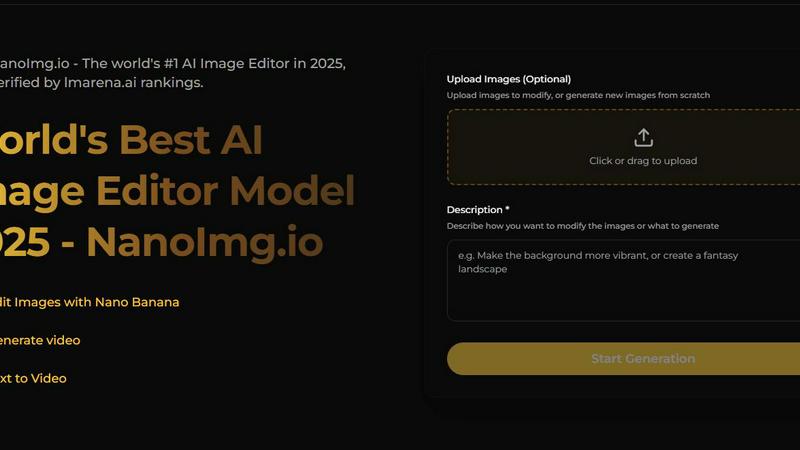
NanoImg is your all-in-one platform to generate and edit studio-quality images with AI.
Last updated: March 1, 2026

Shrinkpad
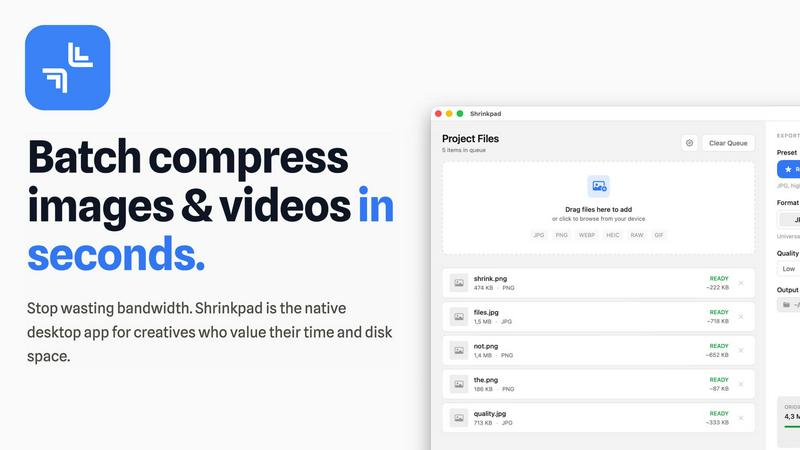
Shrinkpad batch compresses images and videos on Mac, saving space and time with optimal quality and zero manual effort.
Last updated: February 28, 2026
Visual Comparison
NanoImg
Shrinkpad
Feature Comparison
NanoImg
All-in-One AI Model Hub
NanoImg provides centralized access to a curated selection of the best AI image models, including Nano Banana Pro, Seedream 4.0, Flux Kontext, Sora 2, and GPT Image 1. This feature allows users to select the optimal model for their specific need—whether it's the fastest generation speed, best text rendering, superior editing capabilities, or cinematic video generation—without needing to switch between different platforms or services, streamlining the creative workflow significantly.
Natural Language Image Editor
The platform features an advanced AI photo editor that understands and executes commands written in plain English. Users can upload an image and instruct the editor to perform complex edits like "remove reflections," "change the outfit to formal wear," or "apply a neon background." This intuitive system maintains character and style consistency across edits, making sophisticated photo manipulation accessible to users without any technical expertise in traditional editing software like Photoshop.
Template-Driven Generation for Speed
To accelerate content creation, NanoImg offers a library of plug-and-play templates designed for immediate use in high-demand areas such as social media posts, e-commerce product scenes, advertising banners, and digital art. Users can select a template and generate a customized, professional-grade image in about 10 seconds by simply providing a basic description, drastically reducing the time from concept to final visual asset.
Multi-Tool AI Effects Suite
Beyond core generation and editing, NanoImg hosts an extensive suite of over 80 specialized AI tools and effects. This includes popular features like Face Swap, Photo to Anime, Black and White filters, Glitch effects, Vignette effects, and character generators (e.g., Spongebob Meme, Bratz Doll). This organized toolkit allows users to apply trendy, specific visual transformations with a single click, catering to viral content trends and niche creative requirements.
Shrinkpad
Lightning Fast Compression
Shrinkpad is optimized for Apple Silicon, allowing users to process thousands of files in mere minutes. Utilizing multi-threaded compression, it ensures that even extensive batches are handled efficiently without compromising performance.
Automatic Compression Settings
The application automatically analyzes the visual complexity of your files to apply the ideal compression ratio. This feature eliminates guesswork, ensuring that users achieve optimal results without artifacts, thus preserving the quality of the media.
Folder Mode
Shrinkpad's Folder Mode allows users to drag and drop entire folders, which the app automatically scans for images and videos. This feature streamlines the workflow by enabling batch processing of all detected media files with a single action, saving time and effort.
Privacy First Approach
With Shrinkpad, all processing occurs locally on the user's machine, ensuring that no files are uploaded to the cloud. This focus on privacy means that sensitive assets remain secure and confidential, giving users peace of mind while optimizing their media.
Use Cases
NanoImg
Social Media Content Creation
Marketers and influencers can use NanoImg to produce a high volume of engaging, on-brand visual content for platforms like Instagram, TikTok, and Facebook. By leveraging quick-turnaround templates and the natural language editor, users can generate viral memes, polished promotional graphics, and consistent character-based content in seconds, helping to maintain a frequent posting schedule and boost audience engagement rates dramatically.
E-commerce Product Visualization
Online store owners and managers can generate photorealistic product photos, lifestyle scenes, and mockups without the cost and time of organizing professional photoshoots. Using AI models like Flux Kontext for editing, they can place products in various contexts, change colors or styles, and create hundreds of marketing variations while perfectly maintaining brand consistency, ultimately improving product presentation and conversion rates.
Marketing and Advertising Campaigns
Agencies and in-house marketing teams can rapidly prototype and produce final visuals for ad campaigns, email newsletters, and website banners. The platform's ability to follow natural language instructions allows for quick iteration on client feedback—such as "make it more energetic" or "focus on the product"—enabling the creation of compelling campaign assets that align closely with strategic marketing goals and brand guidelines.
Creative Illustration and Digital Art
Artists and designers can utilize NanoImg as a brainstorming and creation tool to generate unique illustrations, concept art, and character designs. The fusion capabilities of models like Nano Banana allow for blending multiple image concepts, while tools like Photo to Sketch or Line Drawing provide artistic filters. This empowers creatives to explore new styles, overcome creative blocks, and produce original artwork efficiently.
Shrinkpad
Streamlining Media for Web Usage
Photographers or web designers can utilize Shrinkpad to compress large image files before uploading them to websites. This reduces load times and improves user experience without sacrificing quality, ultimately enhancing site performance.
Optimizing Assets for App Development
Developers can take advantage of Shrinkpad to compress high-resolution images and videos used in applications. By reducing file sizes, they can create lighter apps that load faster, leading to better performance on user devices.
Reducing Storage Footprint
Content creators who regularly handle large media libraries can use Shrinkpad to reclaim valuable disk space. By efficiently compressing files, they can maintain an extensive collection of assets without overwhelming their storage capacity.
Simplifying Batch Processing for Teams
Small studios and creative teams can leverage Shrinkpad's bulk processing capabilities to optimize multiple assets at once. This feature minimizes manual work and accelerates project timelines, allowing teams to focus on creativity rather than file management.
Overview
About NanoImg
NanoImg is a comprehensive, browser-based platform that consolidates the power of multiple cutting-edge artificial intelligence models into a single, intuitive workspace for image generation and editing. It is designed to democratize professional-grade visual content creation by eliminating traditional barriers such as complex software, steep learning curves, and the need for specialized prompt engineering skills. The platform integrates top-tier AI models like Nano Banana, Seedream, Flux AI, Sora 2, and GPT Image 1, offering users a versatile toolkit for any creative task. Users can generate a new image in approximately 10 seconds by simply describing their vision or by starting from plug-and-play templates tailored for e-commerce, social media, advertising, and digital art. For editing, its natural language processing understands commands like "remove the background" or "make it pop," allowing for precise adjustments while maintaining stylistic consistency. NanoImg serves a broad audience, from complete beginners seeking fast, friction-free creation to professional designers, marketers, and content creators who require efficient, high-quality outputs for social media content, product mockups, marketing campaigns, and artistic projects, all accessible directly from a web browser without any software installation.
About Shrinkpad
Shrinkpad is a robust, native macOS application designed specifically for the batch compression of images and videos directly on your Mac. This tool effectively tackles the prevalent challenges of large media files that consume valuable storage space and hinder workflow efficiency. The central value proposition of Shrinkpad is threefold: it delivers exceptional speed through local processing, ensures uncompromising privacy by keeping your files on your device, and achieves significant file size reductions without noticeable quality loss. Users can easily drag and drop hundreds of files or entire folders, configure their desired compression settings, and process everything in a matter of seconds. Unlike web-based solutions, Shrinkpad operates entirely locally using macOS frameworks, guaranteeing that sensitive files remain on your device and eliminating reliance on internet connections or cloud services. It is crafted for professionals, including photographers, designers, content creators, developers, and anyone who frequently manages high-resolution images, 4K videos, or large batches of assets, providing a solution to optimize their work for storage, web usage, or application development.
Frequently Asked Questions
NanoImg FAQ
What AI models are available on NanoImg?
NanoImg provides access to several state-of-the-art AI models in one platform. Key models include Nano Banana (best for overall generation and character consistency), Seedream 4.0 (fastest speed and 4K resolution), GPT Image 1 (superior text rendering within images), Flux Kontext (best for precise, style-preserving edits), and Sora 2 (for generating high-quality, cinematic videos). Users can choose the model that best fits their specific task.
Do I need to install any software to use NanoImg?
No installation is required. NanoImg is a completely browser-based platform. You can access all its features, including image generation, editing, and the suite of AI tools, directly through your web browser. This ensures easy access from any device with an internet connection, eliminating download and compatibility issues.
How does the natural language editing work?
The natural language editing feature allows you to edit images by typing commands in plain English. After uploading an image, you can describe the changes you want—for example, "remove the person in the background," "make the sky more dramatic," or "add a vintage filter." The AI understands these instructions and applies the corresponding edits to your image while striving to maintain its original style and quality.
Is there a free plan to try NanoImg?
Yes, NanoImg offers a free tier that allows users to generate and edit images online at no cost. This provides an opportunity to explore the platform's core capabilities, test different AI models, and use various AI tools before committing to any paid plans, making advanced AI image creation accessible to everyone.
Shrinkpad FAQ
Can I use Shrinkpad for free?
Yes, Shrinkpad offers a Free Starter version that includes essential tools for casual use, allowing users to compress images with a limit of 10 files per batch.
What file formats does Shrinkpad support?
Shrinkpad supports a wide range of formats, including JPG, PNG, WEBP, AVIF for images, and MP4, MOV for videos, ensuring compatibility with most media types.
Does Shrinkpad support video compression?
Absolutely, Shrinkpad allows users to compress various video formats alongside images, making it a versatile tool for multimedia optimization.
How do I get support?
For support, users can reach out via email at [email protected]. Additionally, the Shrinkpad website features a FAQ section to assist with common inquiries.
Alternatives
NanoImg Alternatives
NanoImg is a comprehensive, browser-based AI image generation and editing platform. It falls into the category of all-in-one creative tools that leverage multiple advanced AI models to produce studio-quality visuals from simple text descriptions. This consolidation aims to simplify the workflow for users who need both creation and sophisticated editing in one place. Users often explore alternatives for various practical reasons. These can include budget constraints, as pricing models differ significantly across the market. Others may seek platforms with a specific, specialized AI model not offered by NanoImg, or they might require different deployment options, such as a desktop application versus a web service. The need for a particular feature set, user interface style, or integration capability also drives this search. When evaluating an alternative, consider your primary use case. Key factors include the quality and style of the AI's output, the depth and ease of the editing tools, and the overall cost structure. It's also wise to assess the platform's learning curve, the speed of generation, and whether it supports the specific creative tasks you perform most often, from social media graphics to product mockups.
Shrinkpad Alternatives
Shrinkpad is a native macOS application designed specifically for batch compressing images and videos. It falls into the category of media optimization tools, aimed at users who need to manage large files efficiently while maintaining privacy and processing speed. Many users seek alternatives to Shrinkpad due to various reasons, including pricing, specific feature sets, or compatibility with different platforms. When looking for an alternative, it’s essential to consider factors such as processing speed, the ability to handle mixed media files, ease of use, and whether the tool prioritizes local processing for enhanced privacy. Additionally, users should evaluate the flexibility in compression settings and the overall effectiveness in maintaining file quality after compression.