
Linkfinder AI vs TrafficClaw
Side-by-side comparison to help you choose the right product.

Linkfinder AI
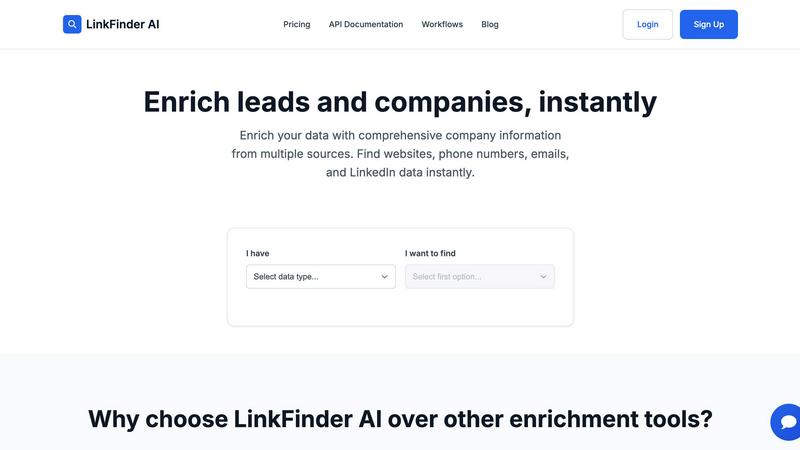
LinkFinder AI instantly enriches your leads with complete company details and contact information.
Last updated: February 27, 2026

TrafficClaw
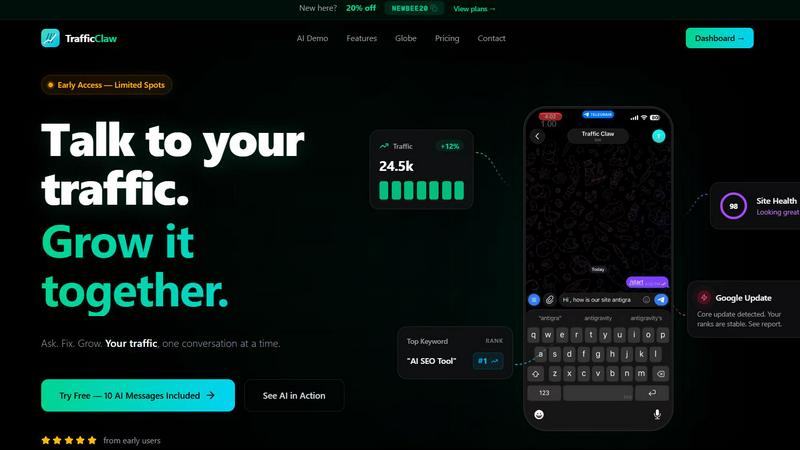
TrafficClaw is an AI analyst that talks to your live SEO and analytics data to deliver actionable growth insights.
Last updated: April 13, 2026
Visual Comparison
Linkfinder AI
TrafficClaw
Feature Comparison
Linkfinder AI
Multi-Source Data Enrichment
Linkfinder AI does not rely on a single data point. Its robust engine simultaneously cross-references and validates information from a diverse array of sources, including LinkedIn, authoritative company databases, and public records. This multi-pronged approach ensures you receive the most complete and accurate picture possible, filling in critical gaps like company websites, phone numbers, employee counts, and professional email addresses that other tools might miss.
Batch Processing & CSV Upload
Designed for efficiency at scale, this feature allows users to upload thousands of records at once via a simple CSV file. Whether you have a list of company names or LinkedIn profile URLs, Linkfinder AI can process the entire batch in minutes, not hours. This eliminates the tediousness of manual, one-by-one searches and is perfect for sales teams and marketing agencies preparing for large-scale outreach campaigns or data hygiene projects.
Real-Time API Integration
For seamless workflow automation, Linkfinder AI offers a powerful and well-documented API. This allows businesses to integrate instant data enrichment directly into their existing systems, such as CRM platforms, lead capture forms, or marketing automation tools. As new leads come in, the API can automatically enrich their records in real-time, ensuring your team always has the most current information without any manual intervention.
Intuitive User Interface
The platform is built with user experience as a priority, featuring a clean, straightforward interface that requires no training or technical expertise to navigate. Users can easily upload data, select enrichment parameters, and download results through a self-service dashboard. This design philosophy ensures that anyone on the team can leverage powerful data enrichment, accelerating adoption and maximizing productivity from day one.
TrafficClaw
AI Chat Analyst
This is the core interactive feature. You can ask natural language questions about your traffic, rankings, and user behavior. The AI analyzes your connected live data from GA4 and Search Console to provide immediate answers, supported by charts and evidence. It delivers specific verdicts and actionable recommendations, such as identifying a ranking drop due to a specific Google update or content cannibalization, rather than offering generic advice.
SEO Intelligence Suite
This feature provides deep SEO diagnostics and opportunities. It automatically monitors for keyword gaps where you could rank but don't, alerts you to content decay as older posts lose traction, and detects cannibalization issues where multiple pages compete for the same keyword. It also includes tools optimized for AI search engines, helping you structure content to perform well in evolving search landscapes like Google's Search Generative Experience.
Integrated Analytics Dashboard
TrafficClaw consolidates key metrics into a single, real-time overview. You can monitor live visitor counts, traffic trends over time, bounce rates, and conversion funnels without switching between multiple tabs or tools. This unified view provides immediate context, making it easier to spot correlations and understand the full story behind your data at a glance.
Live Visitor Globe & Embed
This unique feature allows you to visualize your website's real-time traffic on an interactive 3D globe. It shows visitor locations, referral sources, and on-site activity in a live feed. Furthermore, you can embed this globe on your own website with a single line of code, using it as a public engagement tool or internal monitor, all powered by your actual GA4 data without requiring additional tracking scripts.
Use Cases
Linkfinder AI
Supercharging Sales Prospecting
Sales teams can use Linkfinder AI to rapidly build targeted prospect lists. By starting with just a company name or LinkedIn URL, reps can instantly enrich records with direct phone numbers, verified email addresses, and company insights. This comprehensive data allows for highly personalized and effective cold outreach, significantly increasing connection and conversion rates while saving countless hours of manual research.
Enhancing Marketing Campaigns
Marketers can leverage the tool to segment and personalize campaigns with precision. Enriching a lead database with firmographic data (like industry, company size, and location) enables the creation of hyper-targeted messaging and content. This leads to improved email deliverability, higher engagement rates, and a better return on marketing investment by ensuring communications are relevant to the recipient's specific context.
Streamlining Recruitment & Talent Sourcing
Recruiters and talent acquisition specialists can utilize Linkfinder AI to source and vet candidates more efficiently. By enriching LinkedIn profile data, they can quickly gather comprehensive professional backgrounds, current company details, and contact information. This accelerates the candidate sourcing process, helps build talent pipelines, and provides richer context for initial outreach and interviews.
Conducting Competitive & Market Intelligence
Business analysts and strategists can employ the platform for thorough market research. By enriching data on a set of competitor companies or a target industry, users can gather key intelligence such as employee growth trends, technological stacks, or key personnel changes. This enriched data supports strategic decision-making, partnership identification, and comprehensive competitive landscape analysis.
TrafficClaw
Diagnosing Sudden Traffic Drops
When your analytics show an unexplained traffic decline, instead of manually cross-referencing data, you can directly ask the AI, "Why did my traffic drop last Tuesday?" The system will analyze your connected data, check for Google algorithm updates, ranking changes for key pages, or technical issues, and provide a clear verdict with the root cause and suggested fixes.
Uncovering New Keyword Opportunities
For content planning and SEO growth, you can ask the AI to "show me keyword gaps for my main topic." It will analyze your current rankings versus competitor data and search demand to identify high-potential keywords you are not currently targeting, providing a direct list of opportunities to create new content or optimize existing pages.
Performing Comprehensive Site Audits
Instead of using separate, complex auditing tools, you can request a site health check. TrafficClaw will run a deep page-level audit, evaluating performance scores, Core Web Vitals, meta data, and structural issues. It then generates a prioritized list of auto-fix suggestions to improve technical SEO and user experience efficiently.
Monitoring Real-Time Campaign Impact
When launching a new marketing campaign, blog post, or product feature, you can use the real-time dashboard and globe to monitor immediate visitor reactions. Watch live traffic sources, geographic distribution, and on-page behavior to gauge initial interest and engagement, allowing for quick, data-informed adjustments to your strategy.
Overview
About Linkfinder AI
Linkfinder AI is a premier data enrichment platform engineered to automate and enhance the process of gathering accurate company and contact information. It serves as a powerful engine for sales teams, marketers, recruiters, and business analysts who need reliable data to fuel their strategies. The core value proposition lies in its ability to transform sparse lead data into comprehensive, actionable profiles within minutes. By intelligently aggregating and validating information from a multitude of sources—including LinkedIn profiles, company databases, and public records—Linkfinder AI ensures users receive data with a 95% accuracy guarantee. This tool is indispensable for supercharging lead generation, personalizing outreach campaigns, conducting in-depth market research, and maintaining clean CRM databases. With a focus on speed, ease of use, and integration, Linkfinder AI empowers organizations of all sizes to replace manual research with automated, scalable, and highly accurate data enrichment workflows.
About TrafficClaw
TrafficClaw is an AI-powered analytics and SEO command center designed to eliminate the guesswork from understanding website performance. It directly addresses the common frustration of seeing traffic drop in Google Analytics without clear, actionable reasons. The platform connects to your real data sources, primarily Google Analytics 4 and Google Search Console, and provides an intelligent chat interface where you can ask questions in plain English. Instead of sifting through generic blog advice, you receive specific, data-backed verdicts and fixes. It's built for website owners, digital marketers, SEO specialists, and developers who need to move beyond static graphs to dynamic, conversational insights. The core value proposition is simple: stop analyzing and start asking. By unifying analytics, SEO intelligence, site audits, and content tools into one dashboard, TrafficClaw empowers users to diagnose issues, uncover opportunities, and implement growth strategies through a single, AI-driven conversation.
Frequently Asked Questions
Linkfinder AI FAQ
How accurate is the data enrichment?
Linkfinder AI guarantees a 95% accuracy rate for its enriched data. This high level of confidence is achieved through a rigorous multi-source validation process. The platform cross-references information from LinkedIn, various proprietary databases, and public records, ensuring that the data provided is not only comprehensive but also current and reliable for your business operations.
What types of data can I enrich?
You can enrich a wide variety of initial data points. The platform accepts inputs such as Company Name, LinkedIn Company URL, LinkedIn Profile URL, Lead Full Name, and LinkedIn Post URL. From these, it returns comprehensive information including company websites, phone numbers, email addresses, employee counts, industry classifications, and associated LinkedIn profile data.
Do you provide API access?
Yes, Linkfinder AI offers full API access, which is included in its Professional pricing plan. The API is well-documented and designed for easy integration, allowing developers to embed real-time data enrichment capabilities directly into their own applications, websites, CRM systems, or automated workflows for seamless data processing.
Can I process multiple entries at once?
Absolutely. Linkfinder AI is built for scale with its batch processing capability. You can upload a CSV file containing thousands of records for enrichment. The system will process the entire batch simultaneously, delivering a complete, enriched CSV file back to you in a matter of minutes, making it ideal for handling large datasets efficiently.
TrafficClaw FAQ
How does TrafficClaw access my data?
TrafficClaw uses secure, read-only Google OAuth to connect to your Google Analytics 4 and Search Console accounts. This means we can view your data to provide insights but cannot edit, delete, or modify anything within your Google accounts. Your data remains yours and is not used for training public AI models.
What is included in the free trial?
The free trial includes 10 AI messages. This allows you to fully connect your GA4 and Search Console accounts and ask a series of questions to experience the platform's core functionality, such as diagnosing traffic issues or asking for SEO insights, before committing to a paid plan.
Can I use TrafficClaw on any website?
Yes, TrafficClaw works with any website that has Google Analytics 4 and Search Console set up. It is platform-agnostic, meaning it works with sites built on WordPress, custom code, Shopify, Webflow, or any other CMS or framework, as long as the Google services are connected.
How is the AI Analyst different from ChatGPT?
The TrafficClaw AI Analyst is specifically trained and configured to analyze live website analytics and SEO data. Unlike general AI chatbots that provide advice based on public information, this AI grounds its responses in your unique, connected dataset, providing personalized verdicts, charts, and actionable steps specific to your site's performance.
Alternatives
Linkfinder AI Alternatives
Linkfinder AI is a data enrichment tool in the marketing and sales technology category. It specializes in quickly appending comprehensive company details, such as emails, websites, and LinkedIn profiles, to existing contact lists. This process helps teams enhance their lead data for more effective outreach and research. Users often explore alternatives to find a solution that better fits their specific requirements. Common reasons include budget constraints, the need for different feature sets like CRM integrations or specific data points, and platform compatibility needs. The search for a tool with a different user experience or data sourcing methodology is also frequent. When evaluating other data enrichment platforms, key considerations should include data accuracy and freshness, the breadth of contact and firmographic information provided, and ease of use. Scalability through API access, transparent pricing models, and robust compliance with data privacy regulations are also critical factors to assess for a long-term partnership.
TrafficClaw Alternatives
TrafficClaw is an AI-powered assistant in the SEO and analytics category. It connects directly to your data sources like Google Analytics and Search Console, allowing you to ask natural language questions about your traffic and performance to get specific, actionable answers. Users may explore alternatives for various reasons. Some might seek different pricing models or specific feature sets that better match their workflow. Others might require integration with additional data platforms beyond the core offerings or prefer a different user interface and experience. When evaluating an alternative, consider the depth of data source integrations, the intelligence and specificity of the AI's insights, and the overall ease of use. The goal is to find a tool that effectively translates complex data into clear, contextual guidance for your unique situation.