
Learniverse vs Zovo
Side-by-side comparison to help you choose the right product.

Learniverse
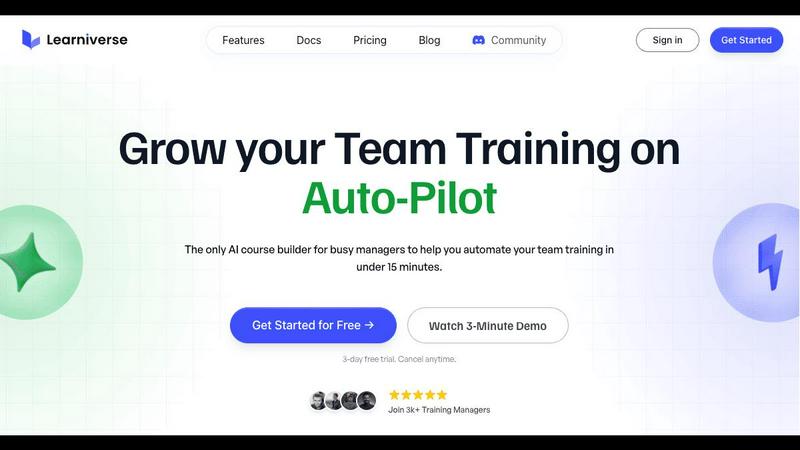
Learniverse instantly turns your documents into automated training courses for teams.
Last updated: February 28, 2026

Zovo offers 20 privacy-focused Chrome extensions for developers and writers with one subscription for all tools.
Last updated: February 26, 2026
Visual Comparison
Learniverse
Zovo

Feature Comparison
Learniverse
AI-Powered Course Generation
This core feature automates the most labor-intensive part of training development. Users can upload any existing content—PDFs, videos, documents, or recordings—and the built-in AI assistant analyzes and structures this material. It automatically creates interactive lessons, defines logical learning modules, and generates relevant quiz questions to assess comprehension, transforming scattered information into a polished course in minutes without any manual design work.
Branded Training Portal Deployment
Learniverse enables organizations to launch a professional, custom-branded learning academy swiftly. Users can apply their company logo, brand colors, and even use a custom domain to create a training portal that reflects their corporate identity. This eliminates the generic look of many training platforms and provides employees with a cohesive, polished learning experience that reinforces brand professionalism and credibility.
Integrated Progress & Engagement Analytics
The platform provides comprehensive tracking dashboards that move beyond simple completion rates. Managers can see detailed metrics on who has completed which modules, identify where learners are getting stuck, track assessment scores, and monitor overdue training across teams or the entire organization. This data-driven insight replaces spreadsheet-based tracking and enables proactive management of training effectiveness.
Conversational AI Training Assistant
Beyond initial course creation, Learniverse includes an interactive AI assistant that users can chat with to manage and update training content dynamically. Instructors can describe a new process or learning objective in plain language, and the assistant will build a corresponding module. It can also analyze new content, like a recent meeting recording, and extract key points to create supplemental lessons, making ongoing training maintenance effortless.
Zovo
BeLikeNative
BeLikeNative helps users write like native speakers with just one keystroke. It supports 80 languages, making it an invaluable tool for multilingual users who want to enhance their writing skills quickly and effortlessly.
Tab Suspender Pro
Tab Suspender Pro automatically suspends inactive tabs to save memory and improve browser performance. With smart detection and memory tracking features, users can enjoy a smoother browsing experience without the hassle of manually managing their tabs.
JSON Formatter Pro
JSON Formatter Pro allows users to format, validate, and explore JSON data right in their browser. It offers beautification and minification options, as well as a tree explorer for easy navigation, making it an essential tool for developers working with JSON.
Clipboard History Pro
Clipboard History Pro ensures that users never lose copied text again. With the ability to store up to 10,000 clips, it features instant search and smart paste functionality, allowing users to retrieve and use their copied content efficiently.
Use Cases
Learniverse
Rapid Employee Onboarding
HR and hiring managers can consolidate all onboarding materials—handbooks, compliance videos, role-specific SOPs—into a single, automated academy. New hires receive a consistent, engaging introduction to the company, complete with knowledge checks. This ensures every employee gets the same foundational training, drastically reducing the time managers spend repeating information and helping new team members become productive faster.
Standardizing Process & Compliance Training
For industries with frequent procedure updates or strict compliance requirements, Learniverse is ideal. Teams can upload the latest policy PDFs or safety manuals, and the AI instantly generates updated training courses with quizzes to verify understanding. This ensures all employees have access to the most current information through a trackable system, mitigating risk and maintaining consistent operational standards.
Converting Company Knowledge into Structured Learning
Organizations often have invaluable institutional knowledge trapped in recorded all-hands meetings, expert interview videos, or dense technical manuals. Learniverse unlocks this value by automatically transforming these unstructured assets into searchable, modular training content. This preserves critical expertise, makes it accessible to all employees, and prevents knowledge loss when subject matter experts leave the company.
Enabling Scalable Customer & Partner Education
Companies that need to train external audiences, such as clients, franchisees, or sales partners, can use Learniverse to create and scale professional academies. By turning product manuals, tutorial videos, and certification materials into interactive courses, businesses can provide a superior learning experience that strengthens partner effectiveness and customer product adoption, all within a branded portal.
Zovo
Enhancing Writing Skills
With BeLikeNative, users can improve their writing in real-time, making it ideal for students, professionals, and anyone needing to communicate effectively in multiple languages. It simplifies the writing process by providing instant rewrites.
Optimizing Browser Performance
Tab Suspender Pro is perfect for users who frequently juggle multiple tabs. By automatically suspending inactive tabs, it helps in reducing memory usage and keeping the browser responsive, making it a must-have for power users.
Simplifying JSON Workflows
Developers and data analysts can greatly benefit from JSON Formatter Pro, which streamlines the process of working with JSON data. It allows users to view, validate, and manipulate JSON with ease, thus speeding up their workflows significantly.
Managing Clipboard Content
Clipboard History Pro is a game-changer for anyone who frequently copies and pastes text. Whether for research, writing, or coding, this tool allows users to access previously copied items instantly, enhancing productivity and efficiency.
Overview
About Learniverse
Learniverse is an AI-powered Learning Management System (LMS) engineered to revolutionize corporate training by eliminating the traditional burdens of time, complexity, and manual effort. It is a zero-effort training platform specifically designed for busy teams, managers, and training coordinators who need to scale effective learning programs without dedicating weeks to course creation and platform configuration. The core value proposition of Learniverse lies in its ability to instantly transform a company's existing, scattered knowledge assets—such as PDF documents, SOPs, video recordings, and meeting notes—into a complete, interactive, and professionally branded learning academy. By leveraging advanced AI, the platform automates the entire instructional design process, structuring raw content into coherent learning paths, generating integrated quizzes, and enabling seamless progress tracking. This allows organizations to consolidate inconsistent and outdated training materials from various disparate tools into a single, authoritative hub for all learning and development activities. Ultimately, Learniverse empowers businesses to deliver engaging and consistent training that employees actually complete, freeing managers and trainers from administrative headaches and allowing them to focus on strategic, high-impact work.
About Zovo
Zovo is a comprehensive suite of 20 Chrome extensions crafted by a solo developer with over 10 years of experience and an impressive track record of $400K+ earned on Upwork, boasting a 100% success rate. The flagship extension, BeLikeNative, empowers more than 3,300 users to write like native speakers by providing one-keystroke rewrites in an impressive 80 languages. This suite includes essential tools such as Tab Suspender Pro, JSON Formatter Pro, Clipboard History Pro, Form Filler Pro, Session Manager Pro, Regex Tester Pro, and Web Scraper Lite, among others. Each extension is built with a strong commitment to privacy, ensuring that user data never leaves their device. With no data harvesting and no outside investors, Zovo prioritizes user control by allowing users to vote on features and influence the development roadmap. New extensions are released monthly, with early access provided to members. Additionally, many tools are available for free online at zovo.one, making Zovo a valuable resource for anyone looking to enhance their browser experience without compromising their privacy.
Frequently Asked Questions
Learniverse FAQ
What types of content can I upload to create a course?
Learniverse is designed to work with the content you already have. You can upload a wide variety of file types including PDF documents, PowerPoint presentations, Word docs, video files (like MP4), and audio recordings. The platform's AI will analyze the text, visuals, and audio from these sources to automatically generate structured lessons and learning modules.
How does the AI ensure the quality of the generated courses?
The AI is built to follow instructional design best practices. It structures content into logical sequences, identifies key concepts to form learning objectives, and creates relevant quiz questions based on the material to reinforce knowledge retention. While the AI handles the heavy lifting, the platform provides full editorial control, allowing you to easily review, edit, and customize any automatically generated content before publishing.
Can I track my team's progress and quiz results?
Yes, comprehensive tracking is a central feature. The platform provides an analytics dashboard where you can monitor completion rates for individuals and teams, see detailed quiz scores, identify modules where learners are struggling, and track overdue assignments. This data is presented clearly, eliminating the need for manual tracking via spreadsheets and enabling data-driven decisions about training effectiveness.
Is there a limit to how many courses or learners I can have?
Learniverse offers scalable plans to suit different organizational sizes. While specific limits depend on your chosen subscription tier, the platform is built to support growing teams. You can create multiple academies and courses, and onboard an increasing number of learners. It is recommended to review the detailed pricing plans on the Learniverse website for the most current information on user seats and feature allowances.
Zovo FAQ
What type of data does Zovo collect?
Zovo is committed to user privacy and does not collect any personal data. All operations are performed locally on the user's device, ensuring that no data is harvested or transmitted.
How can I request new features for Zovo extensions?
Users can submit feature requests directly through the Zovo platform. The developer reads every request, and the most requested features are prioritized for development.
Is there a community for Zovo users?
Yes, Zovo has a dedicated Discord community where users can interact, share feedback, and discuss features. This platform fosters collaboration and helps shape the future of Zovo extensions.
Are Zovo extensions free to use?
Many Zovo tools are available for free online at zovo.one. However, some extensions may have premium features that require a subscription for full access, providing users with options to suit their needs.
Alternatives
Learniverse Alternatives
Learniverse is an AI-powered Learning Management System (LMS) that automates the creation of training courses from existing company documents and media. It falls into the productivity and management software category, designed to help teams scale professional training with minimal manual effort. Users often explore alternatives for various reasons, such as budget constraints, the need for different feature sets like advanced reporting or specific integrations, or a preference for a platform with a different user experience or deployment model. Every organization has unique requirements for its learning and development strategy. When evaluating other platforms, key considerations include the core automation capabilities for content creation, the level of customization and branding available, ease of use for both administrators and learners, and the overall value relative to the investment. The goal is to find a solution that effectively turns existing knowledge into engaging, trackable learning without creating a significant administrative burden.
Zovo Alternatives
Zovo is a comprehensive suite of 20 privacy-first Chrome extensions designed specifically for developers and writers. This collection includes tools such as JSON Formatter, Tab Suspender, and Clipboard History, all created by a solo developer with extensive experience. Users often seek alternatives to Zovo due to various factors such as pricing, specific feature needs, or compatibility with different platforms. It’s essential to consider the overall functionality, user experience, and privacy policies of any alternative to ensure it meets your unique requirements. When searching for an alternative, look for solutions that offer similar functionalities without compromising on user privacy. Evaluate the available features, ease of use, and customer support options. Additionally, consider whether the alternative allows for user feedback and feature requests, as this can enhance your overall experience and satisfaction with the tool.