
Img Editor vs Seedream 4.5
Side-by-side comparison to help you choose the right product.

Img Editor
Create stunning AI-generated images from text in seconds with Img Editor's advanced image generation technology.
Last updated: February 28, 2026

Seedream 4.5
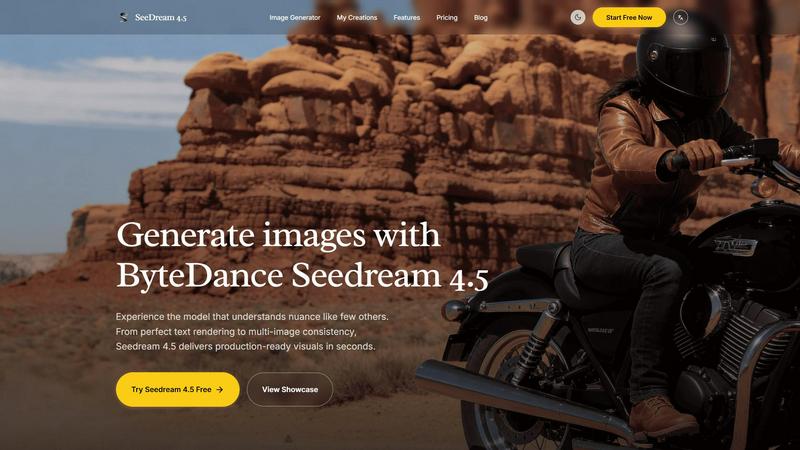
Seedream 4.5 generates nuanced, production-ready images from your text in seconds.
Last updated: February 28, 2026
Visual Comparison
Img Editor

Seedream 4.5
Feature Comparison
Img Editor
AI-Powered Image Generation
Img Editor utilizes cutting-edge AI algorithms to generate images from text descriptions, transforming user ideas into visual art within seconds. This feature is perfect for artists seeking inspiration or for anyone who wants to visualize their concepts quickly and effortlessly.
Intelligent Image Editing
With Img Editor, users can edit existing images using simple text prompts. This feature allows for intuitive adjustments, enabling users to refine their visuals according to their specific needs, whether for personal projects or professional presentations.
Community Engagement and Bonus Generations
Img Editor promotes a vibrant community where users can engage with others and share their creations. By participating in gallery submissions or community activities, users can earn unlimited bonus image generations, enhancing the creative experience and fostering collaboration.
Multiple Image Quality Options
Users can select from various image quality settings, including 1K, 2K, and 4K resolutions. This flexibility allows users to create visuals that meet their specific requirements, whether for web use, print, or digital displays, ensuring high quality and detail in every creation.
Seedream 4.5
Nuanced Prompt Understanding
Seedream 4.5 excels at interpreting complex, detailed, and layered textual descriptions. It goes beyond basic object recognition to grasp specific aesthetics, emotions, compositional elements (like camera angles and lens effects), and subtle stylistic requests, such as "authentic cheap CCTV degradation" or "warm nostalgic film-style." This deep comprehension allows for highly accurate translation of creative vision into the final image.
Production-Ready Visual Fidelity
The model is engineered to generate images that meet professional commercial standards from the first attempt. It delivers photorealistic quality, native 4K resolution support, and impeccable attention to critical details like textures, lighting, and material properties. This eliminates the need for extensive post-generation editing, providing assets that are immediately usable in marketing materials, concept art, and design projects.
Advanced Multi-Image Consistency
A key professional feature is the ability to maintain stylistic and character consistency across multiple generated images. By supporting over 14 reference images, users can guide the model to produce a series of visuals with coherent characters, settings, color palettes, and artistic styles, which is essential for storyboarding, brand campaigns, and product visualization.
Granular Generation & Editing Controls
Seedream 4.5 provides users with precise control over the output. The interface includes adjustable parameters for output quality (Basic/High), multiple aspect ratios (1:1, 9:16, 16:9, etc.), and dedicated modes for Text-to-Image and Image Editing. This granularity ensures the generated content perfectly fits its intended platform and purpose, from social media banners to print materials.
Use Cases
Img Editor
Digital Art Creation for Artists
Artists can leverage Img Editor to create original artworks from text prompts, tapping into the power of AI to explore new styles and concepts. This feature serves as a source of inspiration and a tool for rapid prototyping of artistic ideas.
Marketing Content Generation
Marketers can utilize Img Editor to generate eye-catching visuals for campaigns, social media posts, and advertisements. The ability to create tailored images that resonate with target audiences enhances the effectiveness of marketing strategies.
Educational Resources and Illustrations
Educators can use Img Editor to create custom illustrations and graphics for teaching materials. By generating relevant visuals, educators can enhance engagement and understanding in their lessons, catering to diverse learning styles.
Hobbyist Projects and Personal Use
Hobbyists and casual users can enjoy Img Editor for personal projects, such as creating custom images for gifts, home decor, or personal blogs. The platform's accessibility allows anyone to explore their creativity without financial constraints.
Seedream 4.5
Marketing & Advertising Asset Creation
Marketing teams can rapidly produce high-quality, on-brand visuals for campaigns, social media posts, website banners, and product mockups. The model's ability to render perfect text, logos, and specific scenes accelerates content production cycles and allows for easy A/B testing of different visual concepts without costly photoshoots.
Concept Art & Storyboarding
Concept artists, game developers, and filmmakers can use Seedream 4.5 to visualize characters, environments, and key scenes quickly. The multi-image consistency feature is invaluable for creating a coherent set of concept art or storyboard frames that maintain character design and atmosphere throughout a narrative sequence.
Product & Lifestyle Photography
E-commerce businesses and designers can generate photorealistic lifestyle images showcasing products in various settings. This includes creating scenes that would be difficult or expensive to stage physically, such as specific interior designs, exotic locations, or unique model interactions, all while maintaining product accuracy.
Creative Content & Illustration
Individual creators, bloggers, and illustrators can leverage the model to bring unique ideas to life, from fantastical character art and book illustrations to stylized blog graphics. The nuanced prompt understanding allows for the exploration of highly specific and creative themes, enabling the generation of unique artwork that stands out.
Overview
About Img Editor
Img Editor is a revolutionary AI-powered platform that offers advanced image generation and editing capabilities entirely for free. Designed to cater to a diverse audience including artists, designers, marketers, content creators, and hobbyists, Img Editor democratizes access to professional-grade digital art tools. Its dual-mode functionality allows users to create entirely new images from text prompts or make intelligent edits to existing images. With 10 free image generations available daily, users can also earn unlimited bonus generations through active community participation. The platform's AI understands natural language, delivering stunning visuals in various styles and resolutions, ranging from 1K to ultra-quality 4K outputs. Img Editor's primary value proposition lies in its combination of high-end AI capabilities with a user-friendly interface, ensuring that sophisticated image creation is accessible to everyone regardless of their budget or skill level.
About Seedream 4.5
Seedream 4.5 is a state-of-the-art AI image generation model developed by ByteDance, engineered to deliver professional-grade, production-ready visuals. It is designed to bridge the critical gap between creative ideation and final asset delivery for creators, designers, marketers, and businesses. The model's core value proposition lies in its unprecedented combination of speed, reliability, and high-fidelity output, enabling users to generate commercially viable imagery without traditional time and resource constraints. Seedream 4.5 distinguishes itself through an exceptional understanding of nuanced and complex creative requests, handling intricate details, specific styles, and multi-faceted scenes with precision. It is optimized for professional workflows where quality, consistency, and efficiency are non-negotiable, offering tools for granular control, precise editing, and maintaining stylistic coherence across projects. By supporting native 4K resolution and flawless execution of challenging elements like text rendering, it stands as a powerful solution for transforming detailed prompts into stunning visual realities in seconds.
Frequently Asked Questions
Img Editor FAQ
How many images can I generate daily with Img Editor?
Users can generate up to 10 images for free each day. Additionally, by participating in community activities, users can earn unlimited bonus generations, enhancing their creative opportunities.
What image quality options are available on Img Editor?
Img Editor offers several image quality settings, including 1K for standard quality, 2K for high quality, and 4K for ultra-high quality. Users can choose the resolution that best fits their project needs.
Can I edit existing images on Img Editor?
Yes, Img Editor features an intelligent image editing tool that allows users to make adjustments to existing images using text prompts. This functionality enables intuitive and user-friendly modifications.
Is Img Editor completely free to use?
Yes, Img Editor is entirely free, providing users with access to advanced AI image generation and editing tools without any cost barriers. Users can also earn bonuses through community engagement to further enhance their experience.
Seedream 4.5 FAQ
What makes Seedream 4.5 different from other AI image generators?
Seedream 4.5 is specifically engineered for professional, production-ready output. Its key differentiators are its superior understanding of complex and nuanced prompts, industry-leading consistency across multiple images using reference guides, and exceptional performance on challenging details like legible text rendering and photorealistic textures, which are often pain points in other models.
How many images can I generate for free?
The provided context indicates a "Try Seedream 4.5 Free" option, but does not specify the exact number of free generations or any limitations. Users are encouraged to visit the official Seedream website or platform to view the most current free tier details and any associated usage limits.
What is the "Reference Image" feature used for?
The Reference Image feature allows you to upload up to 5 (or more, as indicated by "14+ reference support") images to guide the generation. This is used to achieve multi-image consistency, such as maintaining a character's appearance, replicating a specific art style, or matching the color palette and mood of existing brand assets across new images.
Can I use images generated by Seedream 4.5 for commercial purposes?
Based on its description as a tool for creating "commercially viable imagery" for businesses and professionals, it is designed for commercial use. However, the specific licensing terms, copyright ownership, and any usage restrictions should be reviewed in the official Terms of Service or licensing agreement provided by ByteDance for the Seedream 4.5 model.
Alternatives
Img Editor Alternatives
Img Editor is a cutting-edge AI image generation and editing platform that operates within the Image & Photo category. It allows users to create stunning visuals from text descriptions and modify existing images through intuitive text prompts. The platform is designed to cater to a broad audience, including artists, designers, marketers, and content creators, by offering robust tools without the burden of costs commonly associated with professional-grade image creation. Users often seek alternatives to Img Editor for various reasons, such as specific feature requirements, platform compatibility, or pricing structures that better fit their needs. When choosing an alternative, it is essential to consider factors such as ease of use, the quality of output images, customization options, and the availability of advanced editing features. Additionally, understanding the technology behind the platform and its ability to meet individual creative demands can significantly influence the decision-making process.
Seedream 4.5 Alternatives
Seedream 4.5 is a state-of-the-art AI image generation model developed by ByteDance. It belongs to the image and photo category, specializing in creating production-ready, nuanced visuals from text descriptions in seconds. It is engineered for professional use, offering high-fidelity outputs with features like perfect text rendering and character consistency. Users often explore alternatives for various reasons. These can include budget constraints, as professional-grade AI tools may have premium pricing. Others might seek different feature sets, such as unique artistic styles, specific integration capabilities, or platforms with different usage terms and accessibility. The need for a tool that aligns with a particular workflow or creative niche is a common driver. When evaluating alternatives, key considerations include the quality and resolution of generated images, the model's ability to follow complex prompts accurately, and the cost structure. It's also important to assess features critical to your projects, such as consistency for character generation, editing capabilities, and the overall reliability and speed of the platform for your specific use case.