
Image3D AI vs Proofapp
Side-by-side comparison to help you choose the right product.

Image3D AI
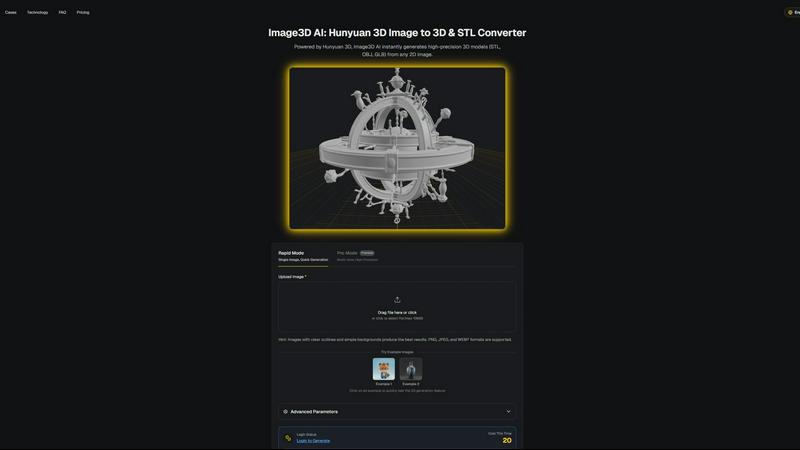
Transform any 2D image into a high-quality 3D model in minutes with Image3D AI.
Last updated: March 1, 2026

Proofapp
Proofapp lets teams leave visual feedback directly on websites to replace endless email chains.
Last updated: March 4, 2026
Visual Comparison
Image3D AI
Proofapp

Feature Comparison
Image3D AI
Powered by Hunyuan 3D Engine
At the core of Image3D AI is Tencent's proprietary Hunyuan 3D engine, a state-of-the-art AI technology specialized in 3D reconstruction. This powerful engine enables the software to perform complex inferences from 2D data, generating physically accurate and high-fidelity 3D geometry and textures. It is the technological foundation that allows for rapid, single-image conversion, setting it apart from traditional photogrammetry methods that require multiple photos.
Dual Generation Modes (Rapid & Pro)
The platform offers two primary operational modes to cater to different project requirements. Rapid Mode is designed for speed, generating a 3D model from a single image quickly, ideal for concepts and rapid prototyping. Pro Mode, a premium feature, utilizes multi-view images to achieve significantly higher precision and detail, making it perfect for creating accurate models of real-world objects for professional use cases like 3D printing and product visualization.
Multi-Format Export & PBR Support
Image3D AI provides flexible export options to fit any downstream workflow. Users can download their generated models in industry-standard formats: STL for 3D printing, OBJ for 3D editing software, and GLB for web and AR applications. Furthermore, the AI generates models with PBR (Physically Based Rendering) materials, ensuring realistic lighting and surface properties for game engines and high-end visualizations.
User-Friendly Interface with Best Practices
The tool is built with accessibility in mind, requiring no prior 3D modeling skills. The interface guides users through a simple upload-and-generate process. It also includes a comprehensive Best Practices Guide and offers free example images for testing. These resources educate users on selecting optimal source images and choosing the correct generation mode, dramatically improving the success rate and quality of conversions.
Proofapp
Visual Commenting
This core feature allows any stakeholder to click directly on a live screenshot of a webpage to leave precise, pinned feedback. This eliminates the confusion of written descriptions like "top left, under the navigation" by providing exact visual context for every comment. Users can start threaded discussions, mention teammates, and ensure all communication is tied directly to the relevant design element, making feedback loops dramatically more efficient and clear for everyone involved.
Multi-Breakpoint Testing
Proofapp automatically captures and presents screenshots of any submitted URL at both desktop and mobile viewports. This allows designers, developers, and clients to review and provide feedback on how a website or application renders across different devices simultaneously. It ensures that responsive design issues are caught and discussed early in the feedback process, preventing costly fixes later in development and guaranteeing a consistent user experience.
Secure Share Links & Client Collaboration
Projects can be shared effortlessly with clients or external stakeholders via secure, expirable links. The revolutionary aspect is that reviewers do not need to create a Proofapp account to view projects or leave comments, drastically reducing friction in the feedback collection process. This feature provides a professional, branded experience for clients while giving project owners full control over access and visibility.
Real-Time Collaboration Dashboard
All feedback is centralized in a live project dashboard where team members can see comments as they are posted. This facilitates immediate discussion, allows users to reply in threads, attach supporting files (like images or documents), and mark feedback items as resolved. Coupled with real-time notifications and Slack integration, this ensures the entire team stays aligned, progress is tracked transparently, and no feedback gets lost in siloed communication channels.
Use Cases
Image3D AI
3D Printing & Prototyping
For makers and engineers, Image3D AI acts as a powerful image-to-STL converter. It transforms sketches, logos, or photos of objects into printable 3D models in minutes. This accelerates the prototyping cycle, allowing for quick iteration and physical realization of ideas without the need for complex CAD software, making it ideal for hobbyists and professionals alike.
Game Development & Asset Creation
Game developers and digital artists can rapidly generate game-ready 3D assets from concept art or character designs. The tool's ability to produce models with clean topology and PBR material support means assets can be directly imported into popular engines like Unity or Unreal Engine, significantly speeding up the asset pipeline and pre-production phases.
E-Commerce & Product Visualization
Online retailers can enhance their storefronts by converting standard 2D product photos into interactive 3D models. These models can be used for AR previews, 360-degree viewers, or online 3D showcases, providing customers with a more immersive and informative shopping experience that can reduce returns and increase engagement.
Architecture & Design Presentation
Architects and interior designers can quickly generate basic 3D forms from sketches, floor plans, or inspiration images. This provides a valuable starting point for models, helps in communicating concepts to clients more effectively, and saves considerable time compared to modeling complex shapes from scratch in traditional software.
Proofapp
Freelancer Client Approvals
Freelancers can use Proofapp to present website designs or developments to clients in a professional, organized manner. Instead of exchanging dozens of emails with attached, annotated screenshots, they share a single Proofapp link. Clients can click to leave clear, visual feedback directly on the design, which the freelancer can then address systematically. This streamlines the revision process, reduces miscommunication, and projects a highly professional image, saving hours per project.
Agency Design Team Workflow
Design agencies managing multiple clients and complex projects utilize Proofapp to consolidate internal and external feedback. Internal teams can conduct design reviews using visual comments before sharing a polished version with the client. The platform handles multiple page reviews within a single project, keeping all feedback for a website redesign or campaign launch organized, actionable, and accessible to all relevant team members, improving internal alignment and client satisfaction.
Marketing Team Landing Page Reviews
Marketing teams launching new campaigns can use Proofapp to gather precise feedback on landing pages from copywriters, designers, product managers, and legal teams. Stakeholders can pin comments on specific headlines, images, or call-to-action buttons, ensuring every element is reviewed in context. This visual collaboration prevents last-minute changes and ensures the final page aligns perfectly with the campaign strategy before it goes live, increasing conversion effectiveness.
Development Team QA and Bug Reporting
Development teams can leverage Proofapp as a visual bug reporting and quality assurance tool. Instead of writing lengthy bug reports describing UI issues, testers and product managers can capture the live site URL, pin comments directly on the problematic element, and attach console logs or other files. This provides developers with exact visual context and all necessary details to reproduce and fix issues quickly, accelerating the development cycle.
Overview
About Image3D AI
Image3D AI is a cutting-edge software solution that fundamentally transforms the process of 3D asset creation by converting 2D images into high-quality, production-ready 3D models. Powered by Tencent's advanced Hunyuan 3D engine, this AI tool democratizes 3D modeling, making it accessible to users regardless of their technical expertise in 3D design. The core value proposition lies in its speed and simplicity; users can generate detailed 3D models from a single photograph or a series of images in a matter of seconds. This capability is invaluable for a wide range of professionals and hobbyists, including 3D printing enthusiasts, game developers, architects, product designers, and e-commerce businesses. By eliminating the need for manual, time-consuming modeling from scratch, Image3D AI streamlines workflows, accelerates project timelines, and empowers creativity. The platform supports various export formats suitable for different applications, from 3D printing (STL) to game development (OBJ, GLB), and offers distinct generation modes to balance speed with precision, ensuring the output meets the specific needs of every project.
About Proofapp
Proofapp is a visual feedback and website review platform engineered to transform the way design and development teams collaborate with clients and stakeholders. It directly addresses the costly inefficiencies of traditional feedback methods, such as endless email chains and vague revision notes, by providing a centralized, visual workspace for collecting and managing input. The core functionality is elegantly simple: users paste any website URL, and Proofapp automatically generates screenshots at both desktop and mobile breakpoints. Reviewers can then click directly on these screenshots to pin contextual comments, attach files, and engage in threaded discussions, all without requiring an account to view or participate. This visual approach ensures feedback is precise, actionable, and impossible to misinterpret. Designed for freelancers, agencies, and in-house marketing or product teams, Proofapp offers real-time notifications, Slack integration, multi-page project support, and customizable branding. With a generous free tier and a straightforward setup process that takes just minutes, Proofapp empowers teams to streamline their review cycles, reduce revision rounds by up to 60%, and save significant time every week, ultimately shipping higher-quality work faster.
Frequently Asked Questions
Image3D AI FAQ
What types of images work best with Image3D AI?
For optimal results, use high-contrast images with clear, well-defined outlines and simple, uncluttered backgrounds. Avoid blurry photos, images with poor lighting, or subjects that are partially blocked. For converting real-world objects, providing multiple views (front, side, back) in Pro Mode yields the most accurate and detailed 3D reconstruction.
What is the difference between the Rapid and Pro modes?
Rapid Mode generates a 3D model from a single image quickly, perfect for initial concepts and simple shapes. Pro Mode is a premium, multi-view mode that uses several images of an object from different angles to perform a physically accurate reconstruction, resulting in higher precision and detail, essential for professional outputs like 3D printing.
Which file format should I download for my project?
The choice depends on your intended use. Download the .STL format for 3D printing as it is the industry standard. Choose .OBJ if you plan to edit the model further in 3D software like Blender or Maya. Select .GLB for web applications, AR experiences, or game engines, as it is a compact, modern format that contains both the model and its textures in one file.
Is there a free trial or any free usage available?
Yes, Image3D AI offers a way to test the service for free. The website provides several example images that users can click to instantly generate a 3D model without any login or credit cost. This allows anyone to experience the tool's capabilities and output quality before committing to a paid plan.
Proofapp FAQ
How do reviewers leave feedback without an account?
Reviewers do not need to sign up for a Proofapp account to participate. The project owner simply generates a secure, shareable link from within their Proofapp dashboard and sends it to clients or stakeholders. When recipients open the link, they can immediately view the website screenshots and click anywhere to leave comments, attach files, and participate in discussion threads entirely as a guest, making the feedback process incredibly frictionless.
What websites or URLs can I use with Proofapp?
Proofapp works with any publicly accessible website URL. You simply paste the live URL into the platform, and it will automatically navigate to the page and capture screenshots at the predefined breakpoints. This includes staging sites, development environments, and live production websites, making it versatile for every stage of the design and development lifecycle, from initial mockup review to final pre-launch checks.
Is my data and feedback secure on the platform?
Yes, Proofapp is built with enterprise-grade security considerations. It offers secure, expirable share links for client collaboration. For teams, it provides role-based permissions to control project access. The platform also includes audit logs and follows secure data handling practices to ensure that your projects, screenshots, and feedback conversations are protected and managed responsibly.
Can I integrate Proofapp with other tools like Slack?
Absolutely. Proofapp includes a Slack integration that pushes real-time notifications directly to your chosen channels. This means when a new comment is posted on a project or a feedback thread is updated, your team can be alerted immediately within their existing workflow. This integration helps keep everyone in sync without requiring them to constantly check the Proofapp dashboard, enhancing responsiveness.
Alternatives
Image3D AI Alternatives
Image3D AI is a specialized tool in the design software category, specifically an AI-powered 2D-to-3D converter. It allows users to transform a simple photograph into a detailed, textured 3D model suitable for printing, game design, or visualization in a matter of minutes. Users often explore alternatives for various practical reasons. These can include budget constraints, as pricing models differ significantly between tools. Others may seek specific features not offered, require integration with a different software ecosystem, or need a solution that runs on a particular operating system. The search for the right tool is highly individual. When evaluating alternatives, key considerations should be the quality and fidelity of the generated 3D mesh, the supported input and export file formats for your workflow, the learning curve and user interface, and the overall cost structure. Assessing these factors against your primary use case will guide you to the most suitable option.
Proofapp Alternatives
Proofapp is a visual feedback and website review platform in the design tools category. It streamlines collaboration by allowing teams to pin comments directly on live website screenshots, keeping feedback visual and organized in one central place. Users often explore alternatives for various reasons. These can include budget constraints, the need for specific integrations with other project management software, or requirements for more advanced features like video feedback or user testing capabilities that go beyond static review. When evaluating an alternative, consider your team's core workflow needs. Key factors include the ease of use for clients, the quality of real-time collaboration tools, available integrations with your existing tech stack, and the overall value provided by the pricing plans relative to your project volume and team size.