
Hush Touch | Voice-to-Text for MacOS vs Prompt Builder
Side-by-side comparison to help you choose the right product.

Hush Touch | Voice-to-Text for MacOS
Hush Touch is an offline voice-to-text app for macOS that learns your vocabulary and delivers smart, accurate.
Last updated: February 26, 2026

Prompt Builder
Prompt Builder helps you create, refine, and manage optimized AI prompts for various models in one seamless platform.
Last updated: April 13, 2026
Visual Comparison
Hush Touch | Voice-to-Text for MacOS

Prompt Builder
Feature Comparison
Hush Touch | Voice-to-Text for MacOS
Dual Engine Recognition
Hush Touch utilizes a unique dual-engine recognition system that combines DictationTranscriber for handling natural flow and punctuation with SFSpeechRecognizer for enhancing custom vocabulary. This blend results in a highly accurate transcription process that adapts to the user's specific language needs.
Custom Vocabulary
With the ability to recognize up to 500 terms and learn from user corrections, Hush Touch is particularly adept at handling technical jargon, brand names, and specialized terminology. This feature ensures that users can dictate with confidence, knowing that their unique vocabulary will be accurately transcribed.
Smart Text Processing
The app processes voice input in real-time, employing intelligent features such as filler word removal, auto-correction, and formatting for numbered lists. These enhancements contribute to a polished output, allowing users to focus on their thoughts without getting bogged down by editing.
100% On-Device Privacy
Hush Touch prioritizes user privacy by performing all voice processing on the device itself. There is no cloud dependency or data collection, ensuring that sensitive information and dictation remain entirely private and secure.
Prompt Builder
Prompt Generator
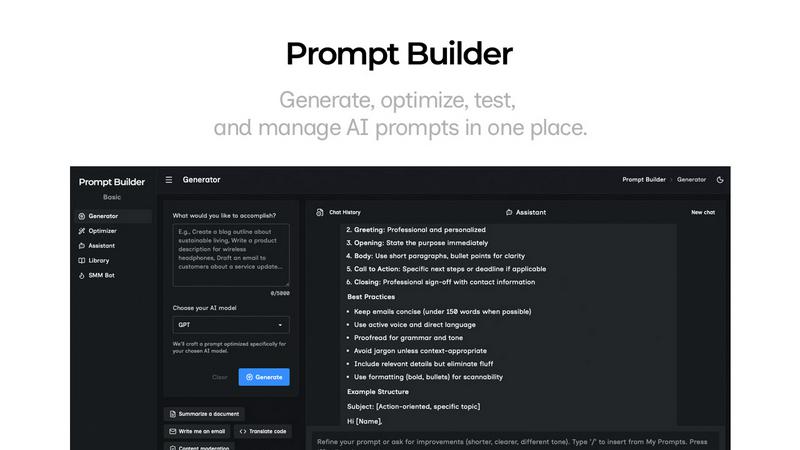
The Prompt Generator allows users to describe their ideas and select a target AI model to receive a professionally crafted prompt optimized for that specific model. This feature minimizes the time spent crafting prompts and ensures they are tailored for better results.
Chat Refinement
Users can refine their prompts directly within a built-in chat workspace. This feature enables quick iterations, allowing users to modify their prompts based on immediate feedback and suggestions from an assistant model, ensuring clarity and effectiveness.
Prompt Optimizer
The Prompt Optimizer feature lets users paste existing prompts or select them from their Library to receive enhanced versions. It focuses on improving clarity, adding constraints, and suggesting output formats, making it easier for users to produce high-quality prompts quickly.
Prompt Library
The Prompt Library is a centralized place for users to save, organize, and reuse their best prompts across different projects and teams. This feature includes search and filter options by category and model, enabling users to access their prompts efficiently and explore community-contributed prompts.
Use Cases
Hush Touch | Voice-to-Text for MacOS
Drafting Emails
Professionals can use Hush Touch to draft emails quickly and efficiently. By dictating their thoughts naturally, users can compose clear messages without the hassle of typing, making communication more streamlined.
Taking Notes
Students and professionals alike can benefit from hands-free note-taking during lectures or meetings. Hush Touch allows users to capture ideas and information in real-time, ensuring that no important details are missed.
Writing Documents
Writers can utilize Hush Touch for drafting articles, reports, or any form of documentation. The app’s smart text processing and custom vocabulary features help maintain the writer's style while enhancing productivity.
Medical Dictation
Healthcare professionals, such as physicians, can rely on Hush Touch to dictate medical notes accurately. The app’s ability to recognize specialized medical terms ensures that practitioners can maintain thorough records without interrupting their workflow.
Prompt Builder
Content Creation
Content creators can utilize Prompt Builder to generate high-quality prompts for blog posts, articles, and social media updates. By refining prompts based on audience engagement, they can produce more targeted and effective content in less time.
AI Development
Developers working on AI applications can leverage Prompt Builder to craft and test prompts that interact with various AI models. This ensures that the prompts they use are optimized for the model's strengths, leading to more accurate and relevant outputs.
Educational Purposes
Teachers and educators can use Prompt Builder to create tailored prompts for assignments or interactive learning experiences. The ability to save and refine prompts allows for more personalized learning, catering to different student needs and levels.
Marketing Campaigns
Marketing professionals can generate tailored prompts for social media, email campaigns, and advertisements. By utilizing the platform's chat refinement and community resources, they can craft compelling messages that resonate with their target audiences.
Overview
About Hush Touch | Voice-to-Text for MacOS
Hush Touch is a sophisticated voice-to-text application designed specifically for macOS users who value speed, accuracy, and privacy in their dictation processes. Standing out in a crowded market, Hush Touch runs entirely on-device, ensuring that users can dictate without relying on internet connectivity. By leveraging two powerful Apple transcription engines combined with an Apple Intelligence final pass, the app delivers cleaner and more precise transcriptions. This lightweight tool, with a mere 5.5 MB footprint, integrates seamlessly into everyday writing workflows, allowing users to draft emails, messages, notes, and documents hands-free. Users can initiate dictation using a customizable hotkey or Siri, and Hush Touch intelligently auto-inserts text after a brief pause, making the dictation experience feel natural and fluid. Tailored for individuals seeking an efficient dictation solution without cloud dependency, Hush Touch learns user vocabulary over time, improves punctuation, and removes filler words, all while maintaining the highest standards of privacy through on-device processing.
About Prompt Builder
Prompt Builder is an innovative prompt engineering workspace designed to streamline the process of writing, testing, and saving prompts for various AI models. This tool is tailored for anyone who engages with AI, from casual users to professional developers. The primary value proposition of Prompt Builder lies in its ability to transform a simple idea into a fully optimized prompt in seconds, allowing users to refine their prompts in a chat interface, save different versions, and run them effortlessly when needed. It supports a wide array of AI models, including GPT, Claude, Gemini, Llama, Mistral, DeepSeek, Grok, and Perplexity, making it a versatile choice for users across different platforms. With features like an Optimizer for enhancing existing prompts, a Library for storing reusable prompts, and an easy-to-use assistant for quick testing, Prompt Builder provides an all-in-one solution to maximize productivity and achieve more consistent, high-quality outputs.
Frequently Asked Questions
Hush Touch | Voice-to-Text for MacOS FAQ
How does Hush Touch ensure accuracy in transcription?
Hush Touch combines two Apple transcription engines and runs an Apple Intelligence final pass, all on-device. This process enhances the accuracy of the transcriptions while adapting to the user's vocabulary over time.
Is my data safe with Hush Touch?
Yes, Hush Touch operates entirely on-device, meaning there is no cloud dependency or data collection. Your voice and dictations remain private and secure on your Mac.
Can I customize the vocabulary in Hush Touch?
Absolutely. Hush Touch allows users to add up to 500 custom terms and learns from corrections made during dictation, making it ideal for technical jargon and specialized language.
What is the pricing model for Hush Touch?
Hush Touch offers a straightforward pricing model with a one-time payment of $20 for a lifetime license. There are no subscription fees, making it a cost-effective solution for voice dictation.
Prompt Builder FAQ
How does Prompt Builder improve prompt generation?
Prompt Builder enhances prompt generation by providing a structured approach that allows users to create, refine, and save prompts tailored for specific AI models. This reduces the time and effort needed to craft effective prompts.
What AI models are supported by Prompt Builder?
Prompt Builder supports a variety of AI models, including GPT, Claude, Gemini, Llama, Mistral, DeepSeek, Grok, Perplexity, and more. This wide compatibility ensures that users can work with their preferred models seamlessly.
Is there a limit to the number of prompts I can generate?
Yes, users can start with a free plan that allows 25 assistant requests per month without requiring a credit card. This gives users an opportunity to test the platform’s features before committing to a paid plan.
Can I collaborate with others using Prompt Builder?
Yes, Prompt Builder's Library feature allows users to save and organize prompts that can be shared and reused across teams and projects, promoting collaboration and efficiency in prompt development.
Alternatives
Hush Touch | Voice-to-Text for MacOS Alternatives
Hush Touch | Voice-to-Text for MacOS is an innovative voice-to-text application designed specifically for macOS users. It leverages advanced on-device processing to offer fast and accurate dictation while ensuring user privacy and eliminating reliance on cloud services. As part of the AI Assistants category, Hush Touch caters to individuals seeking efficient and seamless dictation experiences. Users often seek alternatives to Hush Touch due to varying needs such as pricing, additional features, or compatibility with different platforms. When choosing an alternative, it is essential to consider factors like transcription accuracy, ease of use, privacy measures, and the ability to operate offline. These elements can significantly impact the overall user experience and the effectiveness of the voice-to-text solution.
Prompt Builder Alternatives
Prompt Builder is a comprehensive prompt engineering workspace designed for users to write, test, and manage AI prompts efficiently. It streamlines the process of turning ideas into actionable prompts across various models like GPT, Claude, and others. As part of the AI Assistants category, it caters to individuals and teams looking to enhance their productivity with AI-generated content. Users often seek alternatives to Prompt Builder for various reasons, including pricing structures, feature sets, and compatibility with specific platforms. When choosing an alternative, it is essential to consider factors such as user interface, ease of integration with existing tools, and the availability of community resources. Ensuring that the chosen solution aligns with personal or organizational needs is crucial for maximizing effectiveness in prompt creation and management.