
Dokie AI vs Image3D AI
Side-by-side comparison to help you choose the right product.

Dokie AI
Dokie AI empowers users to effortlessly create stunning professional presentations in minutes using advanced AI technology.
Last updated: March 19, 2026

Image3D AI
Transform any 2D image into a high-quality 3D model in minutes with Image3D AI.
Last updated: March 1, 2026
Visual Comparison
Dokie AI

Image3D AI
Feature Comparison
Dokie AI
AI Generate PPT
With the AI Generate PPT feature, users can simply describe their presentation topic in plain text and receive a complete slide deck. This feature incorporates professional layouts, charts, and compelling content, eliminating the need for manual design efforts.
AI Beautify PPT
The AI Beautify PPT feature allows users to upload their existing presentations for enhancement. The AI intelligently fixes layouts and applies professional styling, transforming ordinary slides into visually appealing presentations while retaining the original content.
Speaker Notes Generation
Dokie AI automatically generates detailed speaker notes for each slide, providing users with comprehensive talking points. This feature helps presenters deliver their content confidently, ensuring that key messages are communicated effectively.
Document-to-PPT Conversion
Dokie AI supports various conversion options, including PDF to PPT, Word to PPT, and even YouTube to PPT. This versatility allows users to easily transform different types of content into engaging presentations, making it a powerful tool for diverse needs.
Image3D AI
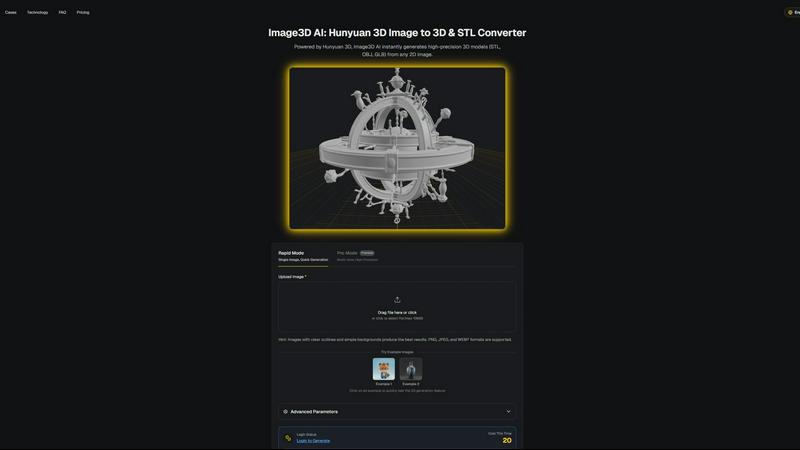
Powered by Hunyuan 3D Engine
At the core of Image3D AI is Tencent's proprietary Hunyuan 3D engine, a state-of-the-art AI technology specialized in 3D reconstruction. This powerful engine enables the software to perform complex inferences from 2D data, generating physically accurate and high-fidelity 3D geometry and textures. It is the technological foundation that allows for rapid, single-image conversion, setting it apart from traditional photogrammetry methods that require multiple photos.
Dual Generation Modes (Rapid & Pro)
The platform offers two primary operational modes to cater to different project requirements. Rapid Mode is designed for speed, generating a 3D model from a single image quickly, ideal for concepts and rapid prototyping. Pro Mode, a premium feature, utilizes multi-view images to achieve significantly higher precision and detail, making it perfect for creating accurate models of real-world objects for professional use cases like 3D printing and product visualization.
Multi-Format Export & PBR Support
Image3D AI provides flexible export options to fit any downstream workflow. Users can download their generated models in industry-standard formats: STL for 3D printing, OBJ for 3D editing software, and GLB for web and AR applications. Furthermore, the AI generates models with PBR (Physically Based Rendering) materials, ensuring realistic lighting and surface properties for game engines and high-end visualizations.
User-Friendly Interface with Best Practices
The tool is built with accessibility in mind, requiring no prior 3D modeling skills. The interface guides users through a simple upload-and-generate process. It also includes a comprehensive Best Practices Guide and offers free example images for testing. These resources educate users on selecting optimal source images and choosing the correct generation mode, dramatically improving the success rate and quality of conversions.
Use Cases
Dokie AI
Business Presentations
Professionals can use Dokie AI to create impactful business presentations quickly. By generating slides from text descriptions or enhancing existing materials, they can save time and focus on delivering compelling messages.
Educational Lectures
Educators can benefit from Dokie AI by creating visually engaging lecture slides that captivate students. The platform allows them to convert course materials and notes into polished presentations effortlessly.
Marketing Campaigns
Marketers can utilize Dokie AI to craft persuasive presentations that highlight campaign strategies and results. The ability to generate professional slides from text enables them to present information clearly and effectively.
Startup Pitches
Startup founders can harness Dokie AI to develop pitch decks that attract potential investors. The tool's capacity to beautify and structure content ensures that their ideas are presented in a visually appealing and structured manner.
Image3D AI
3D Printing & Prototyping
For makers and engineers, Image3D AI acts as a powerful image-to-STL converter. It transforms sketches, logos, or photos of objects into printable 3D models in minutes. This accelerates the prototyping cycle, allowing for quick iteration and physical realization of ideas without the need for complex CAD software, making it ideal for hobbyists and professionals alike.
Game Development & Asset Creation
Game developers and digital artists can rapidly generate game-ready 3D assets from concept art or character designs. The tool's ability to produce models with clean topology and PBR material support means assets can be directly imported into popular engines like Unity or Unreal Engine, significantly speeding up the asset pipeline and pre-production phases.
E-Commerce & Product Visualization
Online retailers can enhance their storefronts by converting standard 2D product photos into interactive 3D models. These models can be used for AR previews, 360-degree viewers, or online 3D showcases, providing customers with a more immersive and informative shopping experience that can reduce returns and increase engagement.
Architecture & Design Presentation
Architects and interior designers can quickly generate basic 3D forms from sketches, floor plans, or inspiration images. This provides a valuable starting point for models, helps in communicating concepts to clients more effectively, and saves considerable time compared to modeling complex shapes from scratch in traditional software.
Overview
About Dokie AI
Dokie AI is a state-of-the-art AI presentation maker designed to empower business professionals, educators, marketers, and startup founders in creating polished presentations effortlessly. Utilizing the advanced capabilities of Claude Opus 4.6, Dokie AI automates the design process, managing content structure, layout selection, typography, and visual design without requiring users to possess any design skills. The platform offers a variety of modes tailored to different needs: users can generate a presentation from scratch, enhance existing slides, add detailed speaker notes, or convert various document formats into engaging PowerPoint presentations. By streamlining the presentation creation process, Dokie AI allows users to focus on content while the AI handles the aesthetics, ensuring professional-quality results in just minutes.
About Image3D AI
Image3D AI is a cutting-edge software solution that fundamentally transforms the process of 3D asset creation by converting 2D images into high-quality, production-ready 3D models. Powered by Tencent's advanced Hunyuan 3D engine, this AI tool democratizes 3D modeling, making it accessible to users regardless of their technical expertise in 3D design. The core value proposition lies in its speed and simplicity; users can generate detailed 3D models from a single photograph or a series of images in a matter of seconds. This capability is invaluable for a wide range of professionals and hobbyists, including 3D printing enthusiasts, game developers, architects, product designers, and e-commerce businesses. By eliminating the need for manual, time-consuming modeling from scratch, Image3D AI streamlines workflows, accelerates project timelines, and empowers creativity. The platform supports various export formats suitable for different applications, from 3D printing (STL) to game development (OBJ, GLB), and offers distinct generation modes to balance speed with precision, ensuring the output meets the specific needs of every project.
Frequently Asked Questions
Dokie AI FAQ
How does Dokie AI work?
Dokie AI uses advanced artificial intelligence to automate the creation and enhancement of presentations. Users input text or upload existing slides, and the AI generates polished presentations with professional design elements.
What types of documents can be converted into PPT?
Dokie AI supports various conversion formats, including PDF to PPT, Word to PPT, HTML to PPT, and even YouTube videos. This versatility allows users to create presentations from multiple sources of content.
Is there a trial version of Dokie AI available?
While specific details on a trial version were not provided, users can explore the pricing plans available on the Dokie AI website to see which option best fits their needs and budget.
Can I customize the presentations created by Dokie AI?
Yes, users can edit and customize presentations generated by Dokie AI. The real-time preview feature allows for adjustments and modifications to ensure that the final product meets individual preferences and requirements.
Image3D AI FAQ
What types of images work best with Image3D AI?
For optimal results, use high-contrast images with clear, well-defined outlines and simple, uncluttered backgrounds. Avoid blurry photos, images with poor lighting, or subjects that are partially blocked. For converting real-world objects, providing multiple views (front, side, back) in Pro Mode yields the most accurate and detailed 3D reconstruction.
What is the difference between the Rapid and Pro modes?
Rapid Mode generates a 3D model from a single image quickly, perfect for initial concepts and simple shapes. Pro Mode is a premium, multi-view mode that uses several images of an object from different angles to perform a physically accurate reconstruction, resulting in higher precision and detail, essential for professional outputs like 3D printing.
Which file format should I download for my project?
The choice depends on your intended use. Download the .STL format for 3D printing as it is the industry standard. Choose .OBJ if you plan to edit the model further in 3D software like Blender or Maya. Select .GLB for web applications, AR experiences, or game engines, as it is a compact, modern format that contains both the model and its textures in one file.
Is there a free trial or any free usage available?
Yes, Image3D AI offers a way to test the service for free. The website provides several example images that users can click to instantly generate a 3D model without any login or credit cost. This allows anyone to experience the tool's capabilities and output quality before committing to a paid plan.
Alternatives
Dokie AI Alternatives
Dokie AI is a cutting-edge AI presentation maker designed to help users create professional PowerPoint slides quickly and efficiently. It caters to a diverse audience, including business professionals, educators, marketers, and startup founders, by streamlining the presentation creation process through artificial intelligence. Users often seek alternatives to Dokie AI for various reasons, such as pricing, additional features, or specific platform compatibility that may better suit their needs. When evaluating alternatives, it’s essential to consider factors such as ease of use, available functionalities, design capabilities, and pricing structures to ensure you find the best fit for your presentation requirements.
Image3D AI Alternatives
Image3D AI is a specialized tool in the design software category, specifically an AI-powered 2D-to-3D converter. It allows users to transform a simple photograph into a detailed, textured 3D model suitable for printing, game design, or visualization in a matter of minutes. Users often explore alternatives for various practical reasons. These can include budget constraints, as pricing models differ significantly between tools. Others may seek specific features not offered, require integration with a different software ecosystem, or need a solution that runs on a particular operating system. The search for the right tool is highly individual. When evaluating alternatives, key considerations should be the quality and fidelity of the generated 3D mesh, the supported input and export file formats for your workflow, the learning curve and user interface, and the overall cost structure. Assessing these factors against your primary use case will guide you to the most suitable option.