
Crops vs Linkfinder AI
Side-by-side comparison to help you choose the right product.

Crops
Crops uses AI to organize creative assets, catch errors, and streamline team approvals.
Last updated: February 28, 2026

Linkfinder AI
LinkFinder AI instantly enriches your leads with complete company details and contact information.
Last updated: February 27, 2026
Visual Comparison
Crops

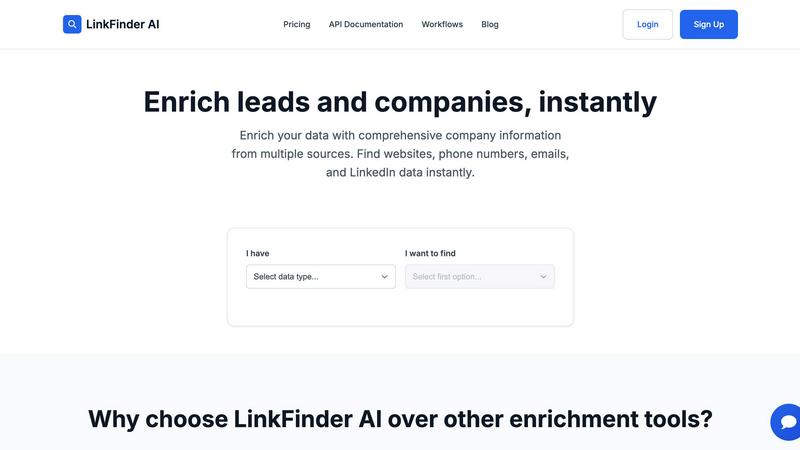
Linkfinder AI
Feature Comparison
Crops
Smart Asset Organization
Crops transforms your creative library into an instantly searchable, intelligently organized system. Using AI, the platform automatically tags and categorizes every uploaded asset, from images to videos. Assets can be placed in multiple project boards or collections without creating duplicates, ensuring logical organization that mirrors your team's workflow. This eliminates the hours typically spent hunting for files across drives and communication platforms, allowing your team to find the right asset in seconds and maintain creative momentum.
Streamlined Review & Approval Workflows
This feature centralizes all feedback and approvals directly on the asset itself, ending the chaos of scattered comments. Stakeholders can provide clear, contextual feedback using visual annotations directly on designs. Teams can track approval status through customizable workflows and share secure review links that require no login for external collaborators. This structured process ensures everyone knows what is approved, drastically reducing revision cycles and enabling faster campaign launches.
AI-Powered Quality Control
Crops proactively safeguards your work by using AI to scan assets for errors before they reach stakeholders or go live. The system instantly checks for dozens of potential issues, including typos, grammar errors, accessibility problems related to text color and size, and the presence of placeholder text like "Lorem ipsum." By integrating these automated checks into your workflow, you can catch mistakes human eyes often miss, ensuring flawless, professional output every time.
Secure & Professional Sharing
This capability simplifies the process of distributing assets for feedback or final delivery while maintaining brand professionalism and security. Users can generate password-protected links with customizable expiration dates and download permissions. Recipients can review and comment without needing to create an account, reducing friction for clients and stakeholders. This eliminates email attachment limitations and presents your work in a polished, branded environment.
Linkfinder AI
Multi-Source Data Enrichment
Linkfinder AI does not rely on a single data point. Its robust engine simultaneously cross-references and validates information from a diverse array of sources, including LinkedIn, authoritative company databases, and public records. This multi-pronged approach ensures you receive the most complete and accurate picture possible, filling in critical gaps like company websites, phone numbers, employee counts, and professional email addresses that other tools might miss.
Batch Processing & CSV Upload
Designed for efficiency at scale, this feature allows users to upload thousands of records at once via a simple CSV file. Whether you have a list of company names or LinkedIn profile URLs, Linkfinder AI can process the entire batch in minutes, not hours. This eliminates the tediousness of manual, one-by-one searches and is perfect for sales teams and marketing agencies preparing for large-scale outreach campaigns or data hygiene projects.
Real-Time API Integration
For seamless workflow automation, Linkfinder AI offers a powerful and well-documented API. This allows businesses to integrate instant data enrichment directly into their existing systems, such as CRM platforms, lead capture forms, or marketing automation tools. As new leads come in, the API can automatically enrich their records in real-time, ensuring your team always has the most current information without any manual intervention.
Intuitive User Interface
The platform is built with user experience as a priority, featuring a clean, straightforward interface that requires no training or technical expertise to navigate. Users can easily upload data, select enrichment parameters, and download results through a self-service dashboard. This design philosophy ensures that anyone on the team can leverage powerful data enrichment, accelerating adoption and maximizing productivity from day one.
Use Cases
Crops
Accelerating Marketing Campaign Launches
Marketing teams managing multi-channel campaigns can use Crops to centralize all creative assets—from social media graphics to video ads. The intelligent organization and instant searchability prevent delays in finding files, while streamlined approval workflows ensure all stakeholder feedback is consolidated and acted upon quickly. AI quality checks catch last-minute errors, allowing the team to meet tight deadlines and launch campaigns faster with confidence.
Managing Brand Consistency for Large Organizations
For companies with multiple departments or global teams, Crops serves as the single source of truth for all brand assets. The platform ensures everyone uses the correct, latest versions of logos, templates, and imagery. AI-powered tagging and organization make it easy for anyone in the organization to find approved assets, preventing off-brand work and maintaining a consistent brand identity across all touchpoints.
Streamlining Client and Agency Collaboration
Creative agencies can leverage Crops to manage projects for multiple clients efficiently. They can create separate, secure workspaces for each client, share proofs via secure links, and gather feedback directly on the assets. The clear audit trail of approvals and AI error-checking before client presentations enhances professionalism, reduces revision rounds, and builds client trust by delivering error-free work.
Ensuring Error-Free Product Launches
E-commerce and product teams can utilize Crops to manage the vast library of product images, descriptions, and marketing materials required for a launch. The AI quality control feature is critical for scanning product copy for typos and checking that all placeholder text is replaced. This systematic review prevents costly errors from going live on product pages, protecting brand reputation and ensuring a smooth customer experience.
Linkfinder AI
Supercharging Sales Prospecting
Sales teams can use Linkfinder AI to rapidly build targeted prospect lists. By starting with just a company name or LinkedIn URL, reps can instantly enrich records with direct phone numbers, verified email addresses, and company insights. This comprehensive data allows for highly personalized and effective cold outreach, significantly increasing connection and conversion rates while saving countless hours of manual research.
Enhancing Marketing Campaigns
Marketers can leverage the tool to segment and personalize campaigns with precision. Enriching a lead database with firmographic data (like industry, company size, and location) enables the creation of hyper-targeted messaging and content. This leads to improved email deliverability, higher engagement rates, and a better return on marketing investment by ensuring communications are relevant to the recipient's specific context.
Streamlining Recruitment & Talent Sourcing
Recruiters and talent acquisition specialists can utilize Linkfinder AI to source and vet candidates more efficiently. By enriching LinkedIn profile data, they can quickly gather comprehensive professional backgrounds, current company details, and contact information. This accelerates the candidate sourcing process, helps build talent pipelines, and provides richer context for initial outreach and interviews.
Conducting Competitive & Market Intelligence
Business analysts and strategists can employ the platform for thorough market research. By enriching data on a set of competitor companies or a target industry, users can gather key intelligence such as employee growth trends, technological stacks, or key personnel changes. This enriched data supports strategic decision-making, partnership identification, and comprehensive competitive landscape analysis.
Overview
About Crops
Crops is a specialized, AI-powered Digital Asset Management (DAM) platform engineered to solve the persistent workflow challenges that hinder creative and marketing teams. It functions as a centralized workspace designed to eliminate operational chaos, including hours lost searching for files, feedback scattered across disparate channels like email and Slack, costly errors slipping into final production, and perpetual confusion over file versions. The platform's core mission is to give creative teams back their time by automating tedious tasks and providing systematic control over the entire asset lifecycle. Crops achieves this by integrating four fundamental capabilities: intelligent asset organization, streamlined review and approval processes, proactive AI-powered quality control, and secure, professional sharing. By consolidating these critical functions into a single, intuitive system, Crops empowers teams to maintain strict brand consistency, dramatically accelerate campaign velocity, and ship creative work with absolute confidence. Ultimately, it allows creative professionals to redirect their focus from administrative friction to creating high-impact campaigns that drive conversions and business growth.
About Linkfinder AI
Linkfinder AI is a premier data enrichment platform engineered to automate and enhance the process of gathering accurate company and contact information. It serves as a powerful engine for sales teams, marketers, recruiters, and business analysts who need reliable data to fuel their strategies. The core value proposition lies in its ability to transform sparse lead data into comprehensive, actionable profiles within minutes. By intelligently aggregating and validating information from a multitude of sources—including LinkedIn profiles, company databases, and public records—Linkfinder AI ensures users receive data with a 95% accuracy guarantee. This tool is indispensable for supercharging lead generation, personalizing outreach campaigns, conducting in-depth market research, and maintaining clean CRM databases. With a focus on speed, ease of use, and integration, Linkfinder AI empowers organizations of all sizes to replace manual research with automated, scalable, and highly accurate data enrichment workflows.
Frequently Asked Questions
Crops FAQ
How does Crops' AI organize and tag assets?
Crops uses advanced AI algorithms to analyze the content of uploaded assets. It examines images, detects text within them, and understands context to automatically generate relevant tags, keywords, and categories. This metadata makes assets instantly searchable using natural language queries, so searching for "hero image from Q3 marketing campaign" yields precise results without manual tagging.
Can external clients or stakeholders use Crops without an account?
Yes, a key feature of Crops is its seamless external collaboration. You can generate a secure, shareable link for any asset or collection. Recipients can click the link to view, comment, and approve work directly in their browser without any need to sign up, create an account, or download software, making the feedback process incredibly efficient for all parties.
What specific errors does the AI Quality Control feature catch?
The AI Quality Control scanner is designed to catch a wide range of common creative errors. This includes spelling and grammatical mistakes in text, accessibility issues like poor color contrast or text size, the presence of placeholder text (e.g., "Lorem ipsum" or "Insert here"), and can be configured to check for brand guideline adherence, such as incorrect logo usage or off-brand colors.
How does Crops handle different versions of the same file?
Crops maintains a clear version history for every asset. When a new version of a file is uploaded, the platform keeps the previous versions accessible, allowing teams to review or revert if needed. The system clearly indicates the latest approved version, eliminating confusion and preventing the use of outdated files in projects or campaigns.
Linkfinder AI FAQ
How accurate is the data enrichment?
Linkfinder AI guarantees a 95% accuracy rate for its enriched data. This high level of confidence is achieved through a rigorous multi-source validation process. The platform cross-references information from LinkedIn, various proprietary databases, and public records, ensuring that the data provided is not only comprehensive but also current and reliable for your business operations.
What types of data can I enrich?
You can enrich a wide variety of initial data points. The platform accepts inputs such as Company Name, LinkedIn Company URL, LinkedIn Profile URL, Lead Full Name, and LinkedIn Post URL. From these, it returns comprehensive information including company websites, phone numbers, email addresses, employee counts, industry classifications, and associated LinkedIn profile data.
Do you provide API access?
Yes, Linkfinder AI offers full API access, which is included in its Professional pricing plan. The API is well-documented and designed for easy integration, allowing developers to embed real-time data enrichment capabilities directly into their own applications, websites, CRM systems, or automated workflows for seamless data processing.
Can I process multiple entries at once?
Absolutely. Linkfinder AI is built for scale with its batch processing capability. You can upload a CSV file containing thousands of records for enrichment. The system will process the entire batch simultaneously, delivering a complete, enriched CSV file back to you in a matter of minutes, making it ideal for handling large datasets efficiently.
Alternatives
Crops Alternatives
Crops is a specialized Digital Asset Management (DAM) platform designed for creative and marketing teams. It uses AI to organize assets, streamline approvals, and catch errors, aiming to solve common workflow bottlenecks and save teams significant time. Users often explore alternatives to find a solution that aligns perfectly with their specific needs. Common reasons include budget constraints, the need for different feature sets like deeper marketing automation integrations, or a requirement for a platform that scales with a larger or more distributed organization. The specific structure of a team's workflow can also prompt a search for a different tool. When evaluating alternatives, key considerations should include core DAM functionality like organization and search, the robustness of review and approval tools, the level of automation and AI assistance offered, and overall security and scalability. The ideal platform should centralize assets and feedback to eliminate chaos and accelerate creative production.
Linkfinder AI Alternatives
Linkfinder AI is a data enrichment tool in the marketing and sales technology category. It specializes in quickly appending comprehensive company details, such as emails, websites, and LinkedIn profiles, to existing contact lists. This process helps teams enhance their lead data for more effective outreach and research. Users often explore alternatives to find a solution that better fits their specific requirements. Common reasons include budget constraints, the need for different feature sets like CRM integrations or specific data points, and platform compatibility needs. The search for a tool with a different user experience or data sourcing methodology is also frequent. When evaluating other data enrichment platforms, key considerations should include data accuracy and freshness, the breadth of contact and firmographic information provided, and ease of use. Scalability through API access, transparent pricing models, and robust compliance with data privacy regulations are also critical factors to assess for a long-term partnership.