
Cosy vs Perkoon
Side-by-side comparison to help you choose the right product.

Cosy automates Slack community onboarding and moderation to save you time.
Last updated: February 28, 2026

Perkoon enables free, unlimited peer-to-peer file transfers without signup, ensuring your files remain private and.
Last updated: March 4, 2026
Visual Comparison
Cosy
Perkoon

Feature Comparison
Cosy
Automated Onboarding Sequences
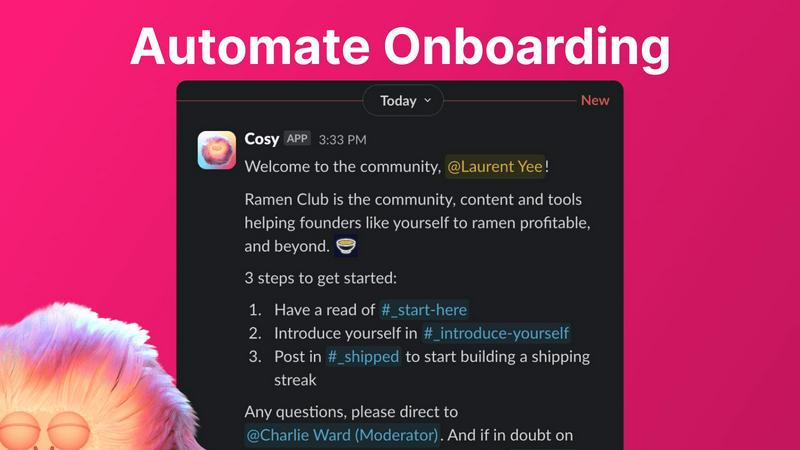
Create and automate up to 10 distinct welcome DM sequences for new members, sent either from you, a team member, or the Cosy bot. Fully customize messages with member names, links, and emojis, and set precise time delays—from immediately to months in the future. This ensures every new joiner receives a warm, timely welcome, even outside business hours, saving administrators hours of manual outreach and follow-up while ensuring no one is overlooked.
Automated Member Introductions
Grow engagement by automatically connecting community members through direct introductions in DMs. Opted-in members are randomly paired on a customizable cadence (every 1-4 weeks) and introduced in a three-person DM including the Cosy bot. The system avoids recent matches to enhance serendipity. This feature automates the networking process, fostering relationships and building a highly engaged community where connections happen on autopilot.
Slack-Native Member Directory
Build a simple, searchable directory of all community members without ever leaving Slack. Administrators can create custom profiles with up to 10 fields (text, single-select, or multi-select). Members can be prompted to fill out their profiles via automated DMs or a manual nudge. Using a slash command or the Cosy app, members can then search and filter profiles to find the right people, strengthening community ties and discoverability.
Content Highlights & Moderation Tools
Instantly surface the most valuable conversations with slash commands. Use /most-engaged-messages to find top posts in a channel, or /most-engaged-messages-all for insights across all public channels. The /unreplied-messages command helps identify posts needing attention. Additionally, Cosy provides tools to instantly flag abusive or spam messages, helping maintain a healthy, positive community environment directly within Slack.
Perkoon
Peer-to-Peer File Transfer
Perkoon’s flagship feature utilizes P2P technology to facilitate direct file transfers between users' browsers. This method ensures that files are sent without limits, accounts, or delays, making it a truly free service. Since the files never pass through a central server, users enjoy enhanced privacy and security.
Encrypted Cloud Storage
When the recipient is offline, Perkoon provides secure cloud storage for file transfers. This paid feature ensures that files remain encrypted while stored on Perkoon’s servers, giving users peace of mind that their data is protected until it can be delivered.
AI Integration
Perkoon is built for the age of AI, featuring built-in automation tools that allow AI agents to interact with the service. This functionality streamlines the file transfer process, making it easy for machines to send and receive files without requiring manual input or screen scraping.
Referral and Rewards Program
Perkoon offers a unique referral program that incentivizes users to share the service with others. When a user refers a friend who then joins and transfers files, both parties receive extra storage, creating a mutually beneficial ecosystem that encourages growth and community engagement.
Use Cases
Cosy
For Scaling Online Communities
Community managers running growing Slack-based groups can use Cosy to automate essential but repetitive tasks. Automated onboarding ensures consistent welcome experiences for hundreds of new members. Simultaneously, automated introductions and a searchable directory help prevent the community from feeling impersonal as it scales, maintaining high engagement and retention rates without proportional increases in manual management time.
For Founder-Led Networks & Startups
Founders building networks for customers, peers, or beta testers can leverage Cosy to foster a tight-knit environment efficiently. The tool allows them to automate initial touchpoints and connections, making members feel personally welcomed and connected from day one. This helps build strong founder-member relationships and a loyal community, which is crucial for feedback, advocacy, and product development, all without the founder being constantly online.
For Professional Associations & Masterminds
Professional groups focused on networking and knowledge sharing benefit greatly from Cosy's structured introduction system and member directory. By automatically facilitating 1:1 connections between members with shared interests (via profile data), Cosy transforms a static Slack into a dynamic networking engine. The content highlight features also allow moderators to easily surface and celebrate insightful discussions, adding value for all members.
For Educational Cohorts & Courses
Instructors and program managers using Slack for course communities can employ Cosy to enhance the student experience. Automated onboarding sequences can deliver crucial resources, schedules, and welcome messages. The member directory helps students find peers for collaboration based on skills or interests, while content tools allow facilitators to quickly identify and respond to unanswered questions, ensuring no learner is left behind.
Perkoon
Personal File Sharing
Individuals can easily share large files with friends or family without worrying about size limits or the need for an account. Whether it's sending photos, videos, or documents, Perkoon ensures a seamless transfer experience.
Business Collaborations
Teams can utilize Perkoon to share large files securely during projects. The P2P transfer method allows for instant file delivery, facilitating collaboration without the frustrations of traditional file-sharing methods.
Offline File Delivery
Users can send files to recipients who are not currently online by utilizing Perkoon’s encrypted cloud storage. This feature is particularly useful for delivering important documents or large files that need to be accessed later.
Automation for Developers
Developers can integrate Perkoon into their applications or workflows using the built-in AI integration. This allows for automated file transfers and interactions, enhancing productivity and simplifying processes within tech environments.
Overview
About Cosy
Cosy is a powerful, Slack-native application engineered to transform standard Slack workspaces into vibrant, self-sustaining communities. It is specifically designed for community managers, founders, and team leaders who utilize Slack as their primary hub and seek to enhance member experience, improve retention, and scale their operations efficiently. The core value proposition of Cosy lies in its deep, seamless integration within Slack itself. Unlike external platforms that force members to switch contexts, Cosy operates entirely within the familiar Slack interface, automating the manual, time-consuming tasks of community management. This allows leaders to foster genuine connection and sustained engagement without constant hands-on effort. By automating personalized onboarding sequences, facilitating meaningful member-to-member introductions, providing a built-in and searchable directory, intelligently surfacing valuable content, and offering moderation tools, Cosy systematically cultivates community health. The result is a significant saving of administrative hours each week while creating a more cohesive, engaged, and truly "cosy" environment where the community can thrive organically from within the tools they already use daily.
About Perkoon
Perkoon is an innovative file transfer service designed for individuals and businesses seeking a straightforward and reliable way to move files without the usual complications associated with traditional services. It stands out by prioritizing user privacy and offering a hassle-free experience without hidden fees or mandatory sign-ups. Through its unique peer-to-peer (P2P) technology, Perkoon allows users to send files directly between browsers in real-time, eliminating size limits and ensuring that the data remains private. This feature is entirely free, as it incurs no costs for Perkoon. For situations where the recipient is offline, Perkoon provides an encrypted cloud storage option, enabling seamless file retrieval at a minimal cost that supports server operations. Additionally, Perkoon is designed with automation in mind, featuring built-in tools that allow AI agents to interact with the service directly. This makes it an ideal solution for both everyday users and tech-savvy individuals who require more from their file transfer services.
Frequently Asked Questions
Cosy FAQ
How does Cosy handle privacy and data?
Cosy operates entirely within your Slack workspace and adheres to Slack's platform security and data policies. The app only accesses information necessary for its features, such as member names for introductions and profile data for the directory, with permissions granted during installation. Member introductions are opt-in, and administrators have full control over the data collected in custom directory fields.
Can I customize the messages sent by Cosy?
Yes, Cosy offers extensive customization for all automated messages. For onboarding sequences, you can fully customize the message content, include the member's name, add links and emojis, and set specific time delays. For member introductions, you can customize the introductory message template. This allows you to maintain your community's unique voice and tone.
What happens if a member replies to an automated DM?
If an onboarding DM is configured to be sent from you or a team member (using a Slack token), the recipient can reply like in a normal DM conversation, and the replies will go to that person's Slack inbox. If the message is sent from the Cosy bot, the bot does not currently respond to replies. For introduction DMs, the conversation includes both members and the Cosy bot, and all parties can reply to kickstart the chat.
Is there a free plan available?
Yes, Cosy offers a free plan for communities with up to 250 members. For communities needing to support more than 250 members, Cosy provides a 30-day free trial of its unlimited members plan, allowing you to fully test all features at scale before committing to a paid subscription.
Perkoon FAQ
What makes Perkoon free?
Perkoon’s P2P file transfer service is free because it operates without the costs associated with central servers. The company only charges for encrypted cloud storage, which covers server expenses while keeping the primary service accessible to all users.
Is my data safe with Perkoon?
Yes, your data is safe with Perkoon. P2P transfers do not touch the servers, ensuring privacy. For cloud storage, files are encrypted, and Perkoon cannot view the content being transferred, providing users with confidence in their data security.
Which browsers are compatible with Perkoon?
Perkoon works seamlessly with Chrome, Edge, and Brave, offering no limits on file transfers. However, users of Firefox and Safari may encounter some restrictions due to browser limitations.
Can I use Perkoon for machine-to-machine transfers?
Absolutely. Perkoon is designed to accommodate automated processes and machine-to-machine interactions. The dedicated integration allows AI agents to communicate with the service directly, facilitating efficient transfers without manual intervention.
Alternatives
Cosy Alternatives
Cosy is a Slack-native productivity and community management tool. It automates key tasks like member onboarding, introductions, and moderation directly within Slack, helping leaders save time and build more engaged communities. Users may seek alternatives for various reasons. These can include budget constraints, a need for features beyond Slack automation, or a requirement to manage communities on platforms other than Slack. Some may also look for different pricing models or more specialized moderation capabilities. When evaluating alternatives, consider your primary community platform, the specific workflows you need to automate, and your budget. Key factors include the depth of integration with your chosen platform, the flexibility of automation rules, the quality of analytics, and the overall ease of use for both administrators and members.
Perkoon Alternatives
Perkoon is a peer-to-peer file transfer service that allows users to send files directly between browsers without any signup requirements. It falls under the productivity and management category, providing a hassle-free way to move files securely. Users often seek alternatives to Perkoon for various reasons, including the desire for specific features, pricing structures, or compatibility with different platforms. It’s essential to consider factors such as ease of use, security measures, and whether the service meets your unique file transfer needs when exploring alternatives. When searching for an alternative to Perkoon, prioritize services that offer similar functionalities, such as unlimited file sizes and privacy-focused operations. Look for platforms that cater to your specific use case, whether you need cloud storage options, automation tools, or user-friendly interfaces. Additionally, ensure that any alternative maintains a commitment to user privacy and data security, as these are crucial elements for a reliable file transfer service.