
Before after Picture Maker vs Coloring Book Engine
Side-by-side comparison to help you choose the right product.

Before after Picture Maker
Create stunning before and after images effortlessly with our AI comparison builder in just three simple steps.
Last updated: February 26, 2026

Coloring Book Engine
Create stunning coloring books and engaging promo videos effortlessly with a streamlined local workflow.
Last updated: February 28, 2026
Visual Comparison
Before after Picture Maker
Coloring Book Engine

Feature Comparison
Before after Picture Maker
Easy Image Upload
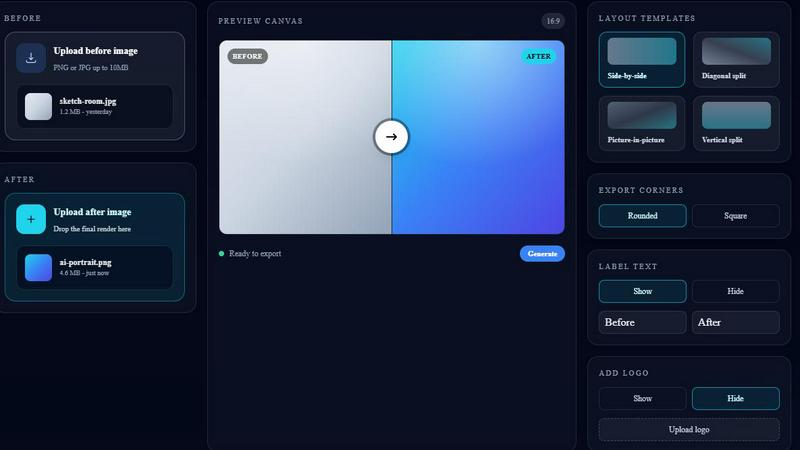
The Before after Picture Maker makes it incredibly easy to upload your images. Users can simply drag and drop their original 'before' image and the AI-generated 'after' image into the designated upload areas. Supporting formats like PNG and JPG, this feature ensures versatility and convenience, allowing files up to 10MB to be processed effortlessly.
Customizable Layout Templates
The platform offers a diverse range of layout templates to suit various presentation needs. Users can select from side-by-side, diagonal split, vertical split, or picture-in-picture formats. This level of customization allows for tailored visuals that fit the specific context of your project, whether for marketing, social media, or portfolio showcases.
Export Options
Before after Picture Maker provides users with multiple export options to refine their images further. You can choose between rounded or square corners for your comparison visuals, as well as customize label text and add a logo. This flexibility ensures that each image can be tailored to meet branding requirements and aesthetic preferences.
SEO Optimization
Built with SEO in mind, Before after Picture Maker enables users to create clear and optimized comparison images. This feature is particularly beneficial for improving search visibility, thanks to keywords such as “before after image maker,” “AI comparison image,” and “side-by-side comparison.” This ensures that your visuals not only look good but also reach the intended audience effectively.
Coloring Book Engine
Comprehensive Workflow Management
CBE streamlines the entire coloring book creation process through a well-defined six-step workflow. From planning and sketching to final book production, coloring, asset generation, and video creation, every step is designed to make the process efficient and straightforward.
BYOK AI Integration
With the Bring Your Own Key feature, creators can utilize their own AI models and manage their costs effectively. This integration allows for greater flexibility in choosing the AI tools that best suit individual needs, all while ensuring data privacy.
KDP-Ready Formatting
Coloring Book Engine takes the guesswork out of publishing. It automatically formats your book to meet the specific technical requirements of Amazon KDP, including correct margins and single-sided pagination, so you can confidently upload your files without worrying about technical errors.
Automated Video Creation
CBE allows users to transform static pages into engaging video content easily. You can create short coloring clips suitable for platforms such as TikTok and YouTube Shorts, enhancing your marketing reach and audience engagement while promoting your coloring books.
Use Cases
Before after Picture Maker
Portfolio Showcases
Artists and designers can leverage Before after Picture Maker to create compelling portfolio showcases that highlight their work's evolution. By presenting before and after images, they can effectively demonstrate their skills and the impact of their creative process on the final product.
AI Art Progress
For creators working in AI-generated art, this tool serves as a perfect platform to display the progression of their work. By showcasing the transformation from initial drafts to the final AI-enhanced artwork, artists can engage their audience and illustrate the capabilities of AI in creative processes.
Product Transformations
Businesses can utilize Before after Picture Maker to visually communicate product transformations. Whether it's a before-and-after demonstration of a renovation, new product launch, or service improvement, this tool provides a clear visual narrative that can enhance marketing materials and customer understanding.
Social Media Proof
In the digital age, social proof is essential for building credibility. Before after Picture Maker allows users to create eye-catching visual comparisons for social media platforms, demonstrating results and transformations that can engage followers and encourage shares, ultimately driving brand awareness.
Coloring Book Engine
Independent Authors and Illustrators
Independent authors and illustrators can leverage CBE to create professional-quality coloring books without needing extensive technical knowledge. The user-friendly interface and automated features simplify the entire production process.
Small Publishers
Small publishing houses can utilize CBE to streamline their workflows, enabling them to produce multiple titles efficiently. The batch processing capabilities allow for scaling projects from single books to complete series.
Educational Institutions
Schools and educational programs can use Coloring Book Engine to create custom coloring books for learning purposes. This can enhance student engagement and provide unique educational resources tailored to specific curricula.
Social Media Influencers
Content creators and social media influencers can benefit from the automated video creation feature, allowing them to generate promotional videos effortlessly. This can help boost their online presence and attract a larger audience for their coloring books.
Overview
About Before after Picture Maker
Before after Picture Maker is an innovative, lightweight Software as a Service (SaaS) solution designed specifically for creators, marketers, and teams that require polished before and after visuals quickly and efficiently. This tool allows users to seamlessly upload their original images alongside AI-generated results, enabling them to create stunning comparison visuals in mere moments. With a variety of customizable templates, including side-by-side, diagonal, vertical, and picture-in-picture layouts, users can easily showcase transformations, progress, or product enhancements. The intuitive interface simplifies the process: upload images, choose a layout, and generate a ready-to-share comparison image with just a click. Perfect for portfolios, marketing campaigns, and social media, Before after Picture Maker streamlines visual storytelling, making it an essential tool for anyone looking to demonstrate change or improvement visually.
About Coloring Book Engine
Coloring Book Engine (CBE) is an advanced desktop application meticulously crafted for creators aiming to establish a professional coloring book business. It transcends basic PDF generation by providing a comprehensive toolkit that supports the entire production journey, from the initial concept to the final marketing materials. This software is ideal for illustrators, authors, entrepreneurs, and small publishers who wish to efficiently produce high-quality books while avoiding ongoing subscription fees. The core value proposition of CBE lies in its integrated approach, which simplifies print-ready book formatting for platforms such as Amazon KDP, ensuring correct margins, bleed, and pagination. Additionally, it automates the generation of reusable assets and promotional coloring videos for social media platforms like TikTok and YouTube Shorts. A remarkable feature is its BYOK (Bring Your Own Key) AI integration model, granting creators control over AI costs, model selection, and data privacy, as they can utilize their own API keys or compatible local AI models running on their GPU.
Frequently Asked Questions
Before after Picture Maker FAQ
How do I upload images to Before after Picture Maker?
To upload images, simply drag and drop your original 'before' image and the AI-generated 'after' image into their respective upload areas on the platform. The tool supports PNG and JPG formats up to 10MB.
What layout templates does Before after Picture Maker offer?
Before after Picture Maker offers a variety of layout templates, including side-by-side, diagonal split, vertical split, and picture-in-picture formats. This allows users to choose the best presentation style for their specific needs.
Can I customize my comparison images?
Yes, users can customize their comparison images by selecting rounded or square corners, adding label text, and uploading a logo. This ensures that the final image aligns with your branding requirements.
Is Before after Picture Maker optimized for SEO?
Absolutely. The tool is designed to create clear and optimized comparison images that can enhance search visibility using keywords relevant to before/after comparisons. This helps ensure your visuals reach a broader audience.
Coloring Book Engine FAQ
Is Coloring Book Engine a desktop app or a cloud service?
Coloring Book Engine is a standalone desktop application that runs locally on your computer, ensuring that the majority of tasks are performed offline, protecting your data.
What exactly does it speed up for coloring book creators?
CBE accelerates the entire coloring book creation process by providing a streamlined workflow that combines ideation, design, formatting, and marketing, all within one platform.
Is this a subscription?
No, Coloring Book Engine operates on a one-time payment model. Users have lifetime access to the software without the burden of subscription fees, only paying for API usage as needed.
Can I use this tool without AI?
Yes, CBE offers an optional AI-free workflow where you can create hand-crafted art without AI involvement. The software will still assist you in packaging and preparing your coloring book for publication.
Alternatives
Before after Picture Maker Alternatives
Before/After Picture Maker is a lightweight software-as-a-service (SaaS) tool designed for creators and teams who need to produce polished before-and-after visuals quickly and efficiently. It falls under the category of design tools, allowing users to upload original images alongside AI-generated results. Users can choose from various customizable templates and features to craft visually appealing comparisons. Many users seek alternatives to Before/After Picture Maker for several reasons, including pricing, specific feature sets, or compatibility with their preferred platforms. When considering alternatives, it's essential to evaluate aspects such as user interface, customization options, integration capabilities, and overall value for the intended use case. Ensuring that the alternative meets both functional and budgetary needs will help users find the right fit for their projects.
Coloring Book Engine Alternatives
Coloring Book Engine is a specialized desktop application designed for creators looking to produce professional-quality coloring books and promotional content. As part of the design tools category, it provides a comprehensive workflow that simplifies the process of creating print-ready materials and marketing assets. Users often seek alternatives for various reasons, such as pricing structures, specific feature sets, and compatibility with different platforms or workflows. When considering alternatives, it is essential to evaluate factors such as the ease of use, the availability of required features, cost-effectiveness, and the flexibility of the software to adapt to your unique creative needs. A robust alternative should provide a seamless experience that enhances productivity without compromising quality or requiring ongoing subscription fees.