
Code Word Solver - Missing Words Finder vs StudyPal
Side-by-side comparison to help you choose the right product.

Code Word Solver - Missing Words Finder
Easily solve codewords with our intuitive tool by entering known letters to find missing words and definitions.
Last updated: February 26, 2026

StudyPal
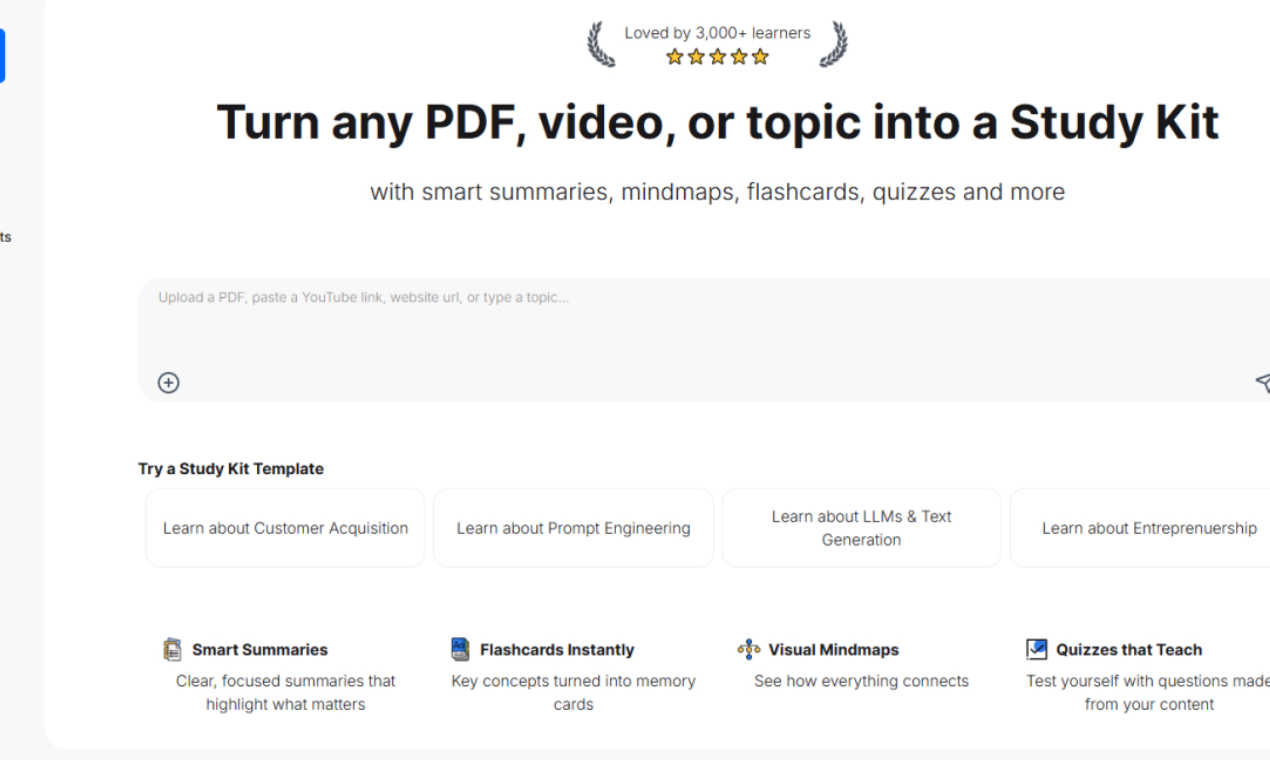
StudyPal instantly creates study kits from your PDFs, videos, and topics.
Last updated: March 1, 2026
Visual Comparison
Code Word Solver - Missing Words Finder

StudyPal
Feature Comparison
Code Word Solver - Missing Words Finder
Single Pattern Solving
With the single pattern solving feature, users can input a specific word pattern to receive a list of matching candidates. This functionality is particularly useful for players who may have identified some letters in a word but are unsure of the complete spelling. By entering the known letters and using placeholders for unknown ones, the solver filters through an extensive database to provide relevant suggestions, enhancing the puzzle-solving experience.
Multi-Pattern Solving
The multi-pattern solving feature allows users to input two word patterns simultaneously. This is particularly beneficial when the same number-to-letter relationships appear across different words in a puzzle. By solving linked words side-by-side, users can leverage known relationships to decode multiple parts of the puzzle, making it easier to fill in gaps quickly and efficiently.
Flexible Pattern Input
Code Word Solver offers a flexible pattern input system, allowing users to enter what they know while accounting for unknown letters. Users can utilize periods (.) or question marks (?) for unique unknown letters and specify repeated unknown letters using numbers. For example, entering "112.2" would yield matches like "llama," ensuring that the solver maintains consistency in letter representation throughout the puzzle.
Customizable Difficulty Dictionaries
Understanding that different puzzles cater to varying skill levels, Code Word Solver provides users with the option to select from multiple dictionary sizes. Users can choose from hard (260k words), normal (115k words), or easy (20k words) dictionaries, ensuring that the tool aligns with their puzzle-solving expertise and preferences. This customization enhances the overall user experience by catering to a wide range of players.
StudyPal
Multi-Format Content Transformation
StudyPal seamlessly ingests information from a wide array of sources. Users can upload PDFs, paste links to YouTube educational videos, or simply type in a topic of interest. The AI then processes this raw content, extracting key concepts and foundational knowledge to build a cohesive learning module from scratch, eliminating the need to switch between different tools or platforms for different content types.
Comprehensive Study Kit Creation
Every input is transformed into a rich, all-in-one Study Kit. This kit is not a simple document but an interactive learning package. It automatically includes a clear summary distilling the core ideas, a set of flashcards for key term memorization, a visual mind map to illustrate relationships between concepts, and an auto-generated quiz to assess understanding. This structured approach caters to various learning styles within a single workflow.
Interactive AI Tutor
Beyond static materials, StudyPal features a built-in, conversational AI tutor. As users work through their Study Kits, they can ask follow-up questions in real time for deeper clarification. The tutor provides explanations, offers examples, and helps overcome specific points of confusion, simulating the benefit of a one-on-one study session available anytime, day or night.
Smart Templates & Community Resources
To help users get started instantly, StudyPal offers pre-made Study Kit templates on popular topics like Machine Learning, Prompt Engineering, and Entrepreneurship. These templates demonstrate the tool's capabilities and provide immediate value. The platform is also trusted by a community of over 3,000 learners, as indicated by its high user rating, lending social proof to its effectiveness.
Use Cases
Code Word Solver - Missing Words Finder
Casual Puzzle Solvers
For casual puzzle solvers who enjoy codeword puzzles as a leisurely activity, Code Word Solver provides a straightforward way to enhance their gameplay. By using the single pattern solving feature, these users can easily find words that fit their existing patterns without the need for extensive guessing.
Competitive Puzzle Enthusiasts
Competitive puzzle enthusiasts who thrive on solving codeword puzzles quickly can benefit from the multi-pattern solving feature. This capability allows them to tackle complex puzzles more efficiently by solving interconnected words, thus improving their overall speed and accuracy during competitions.
Educators and Language Learners
Educators and language learners can use Code Word Solver as a valuable tool to reinforce vocabulary and letter recognition. By inputting patterns and discovering matching words, learners can enhance their language skills while engaging in a fun and interactive way.
Community Contributors
Community members who encounter words not present in the solver's database can contribute to the tool's growth. By submitting new words or definitions, they help expand the coverage of the solver, allowing future users to benefit from an increasingly comprehensive word list, thus enhancing the tool's effectiveness.
StudyPal
Academic Exam Preparation
Students can upload their textbook chapters, lecture slides in PDF format, or educational video playlists to rapidly generate revision kits. The flashcards aid in memorizing dates, formulas, and definitions, while the mind maps help visualize complex theories. The quizzes serve as perfect mock tests, making study sessions far more productive and targeted toward exam success.
Professional Skill Development
Working professionals aiming to learn a new software, understand market trends, or acquire industry certifications can use StudyPal to break down lengthy whitepapers, training manuals, or online course videos. They can create focused kits on specific skills, using the AI tutor to clarify practical applications, thereby accelerating their competency and career growth efficiently.
Research Paper & Article Analysis
Researchers, writers, and analysts who need to synthesize information from multiple academic papers or long-form articles can upload PDFs to StudyPal. The tool will generate concise summaries and mind maps that highlight the main arguments, methodologies, and conclusions, making comparative analysis and literature review significantly faster and more systematic.
Lifelong Learning & Hobby Mastery
Curious individuals exploring a new language, historical period, or scientific concept can simply type the topic into StudyPal. The platform builds a foundational learning kit from scratch. Enthusiasts can deepen their knowledge by adding relevant YouTube documentaries or articles, using the interactive elements to make self-directed learning structured and enjoyable.
Overview
About Code Word Solver - Missing Words Finder
Code Word Solver - Missing Words Finder is a specialized tool designed to help puzzle enthusiasts crack codeword puzzles with ease. These puzzles replace letters with numbers, requiring players to decipher the relationships between numbers and letters. For anyone who enjoys tackling these brain teasers, this tool eliminates the frustration of guesswork and allows users to focus on solving the puzzle confidently. Whether you are a casual player looking for a fun challenge or a dedicated puzzle solver aiming to improve your skills, this tool streamlines the decoding process. It offers an intuitive interface where users can input known patterns and receive potential matches, enabling them to crack complex codewords faster and more efficiently.
About StudyPal
StudyPal is an advanced AI-powered learning platform designed to revolutionize how individuals absorb and retain information. It functions as a comprehensive study companion by transforming diverse content sources—including PDF documents, YouTube videos, and typed topics—into fully interactive and structured study kits. The core value proposition of StudyPal lies in its ability to automate the labor-intensive process of creating study materials, saving users countless hours of manual note-taking and organization. Each generated kit is systematically curated to include multiple learning modalities: concise summaries, visual mind maps, digital flashcards, and personalized quizzes. Furthermore, its integrated AI tutor provides real-time, contextual answers to questions, ensuring clarity on complex subjects. This versatile tool is engineered for a broad audience, from students cramming for critical exams and professionals upskilling for career advancement to curious lifelong learners exploring new domains. By offering personalized, on-demand learning resources, StudyPal significantly enhances comprehension, boosts long-term retention, and makes mastering any topic more efficient and engaging.
Frequently Asked Questions
Code Word Solver - Missing Words Finder FAQ
How do I input patterns into the Code Word Solver?
To input patterns, enter the letters you already know, using periods (.) or question marks (?) for unknown letters. For repeated unknown letters, use numbers to maintain consistency. For example, "11.E" would match "ooze."
What dictionary sizes can I choose from?
Code Word Solver offers three dictionary sizes to choose from: hard (260k words), normal (115k words), and easy (20k words). This allows users to select a word list that best fits their puzzle-solving style and difficulty level.
Can I submit new words or definitions?
Yes, users can submit new words or definitions to enhance the tool's database. If you come across a word that is not in the database or if you wish to add a meaning, you can contribute to help improve the solver's coverage over time.
Is Code Word Solver suitable for beginners?
Absolutely! Code Word Solver is designed to cater to all skill levels. With customizable dictionary options and user-friendly features, beginners can easily engage with the tool while learning the intricacies of codeword puzzles.
StudyPal FAQ
What types of files can I upload to create a Study Kit?
StudyPal currently supports PDF documents for text-based content. For video content, you can paste a direct link from YouTube. Additionally, you can start a kit entirely from scratch by simply typing or pasting text on any topic you wish to learn about, providing great flexibility in your source material.
How does the AI tutor work?
The AI tutor is integrated directly into your Study Kit. As you review the generated summaries, mind maps, or flashcards, you can type questions into the chat interface about the material. The AI analyzes the context from your kit and provides detailed, conversational explanations to help clarify concepts, offer examples, and ensure you fully understand the topic.
Are the pre-made Study Kit templates free to use?
Yes, StudyPal offers a selection of pre-made Study Kit templates on topics like Customer Acquisition and Machine Learning for users to try. These templates allow you to experience the full functionality of the platform—including summaries, mind maps, flashcards, and quizzes—before creating your own, demonstrating the tool's value immediately.
Can I use StudyPal on my mobile device?
While the provided context does not specify dedicated mobile app details, the comprehensive and cloud-based nature of StudyPal suggests it is accessible via web browsers on various devices, including smartphones and tablets. This allows learners to access their study kits and AI tutor for on-the-go learning and revision anytime, anywhere.
Alternatives
Code Word Solver - Missing Words Finder Alternatives
Code Word Solver - Missing Words Finder is an online tool designed to assist users in solving codeword puzzles efficiently. It falls within the category of puzzle-solving applications, offering features that help decode letters and numbers based on known patterns. Users often seek alternatives due to various reasons, such as pricing, specific feature sets, or compatibility with different platforms. Identifying the right alternative involves considering factors like ease of use, the robustness of the word database, and the adaptability of tools to fit individual puzzle-solving styles. When exploring alternatives, prioritize features that enhance your puzzle-solving experience. Look for user-friendly interfaces, comprehensive dictionaries that cater to varying skill levels, and the ability to handle complex patterns. Additionally, community support for expanding word coverage can significantly enhance the effectiveness of any chosen tool, making it essential to assess how well alternatives facilitate user contributions and updates to their word lists.
StudyPal Alternatives
StudyPal is a leading AI-powered study tool in the education and learning category. It streamlines studying by converting PDFs, videos, and topics into interactive summaries, flashcards, mindmaps, and quizzes. This all-in-one approach helps users save time and improve knowledge retention. Users often explore alternatives for various reasons. Some may seek different pricing models or free tiers with fewer limitations. Others might need specific features not offered, prefer a different user interface, or require compatibility with certain platforms or learning management systems. The search for the right tool is highly personal. When evaluating an alternative, consider your primary needs. Key factors include the types of content sources supported, the quality and interactivity of the generated study aids, the availability of an AI tutor or support feature, and overall cost-effectiveness. The best choice aligns closely with your individual study habits and goals.