
Clipt vs SeeDance Ai
Side-by-side comparison to help you choose the right product.

Clipt streamlines video editing by automating transcription, captioning, and resizing, letting you focus on.
Last updated: February 26, 2026

Seedance AI is a multimodal video generator that creates polished, sound-synced videos from text, images, audio, or video inputs.
Last updated: April 13, 2026
Visual Comparison
Clipt

SeeDance Ai
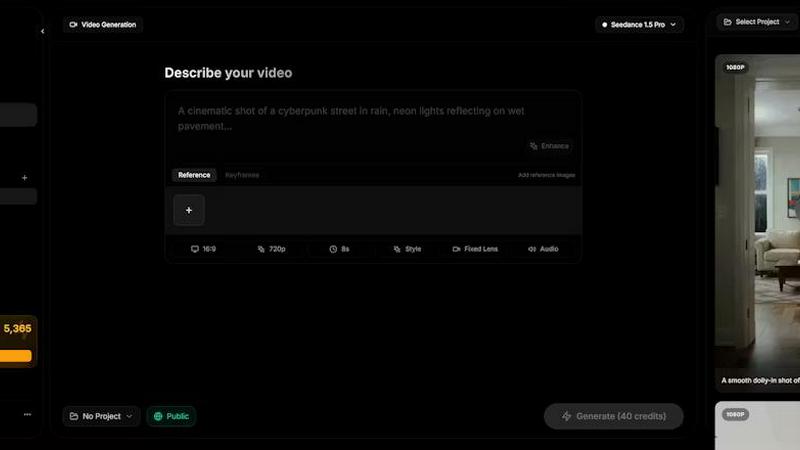
Feature Comparison
Clipt
Video Ingestion and Captioning
Clipt enables users to easily ingest videos from over 50 websites or upload their own raw files. It automatically creates accurate captions, allowing for greater accessibility and engagement. Users can customize these captions with various fonts, colors, and animation presets to match their brand’s aesthetic.
Slideshow Maker
Transform your ideas into viral slideshow carousels with Clipt’s Slideshow Maker. This feature utilizes AI to write scripts, generate images, and add voice narration. Users simply describe their vision, and the AI plans out over five slides, each complete with captions, image prompts, and coherent descriptions, streamlining the creative process.
Talking Heads
Clipt’s Talking Heads feature allows you to create professional spokesperson videos without any need for cameras or studios. By typing in your script, the AI generates unique avatars that deliver your content with varying expressions and styles. This capability is perfect for businesses looking to enhance their branding through consistent character representation.
AI Character Generation
With Clipt, you can create unique and realistic AI characters that can be used across multiple videos. By providing a natural language description of your ideal character, the AI generates four distinct variations to choose from. This feature ensures brand consistency by allowing the same character to appear across all your video content.
SeeDance Ai
Multimodal Reference System
This core feature allows users to upload and tag up to 12 reference files—including images, videos, and audio clips—directly within their text prompt using the @ symbol (e.g., @Image1, @Video1). This system treats uploaded assets as precise instructions, enabling creators to specify exact character faces, camera movements from reference clips, and audio beats. It eliminates the guesswork of traditional text-only prompting, providing granular control over the final generated video's visual and auditory elements.
Native Audio-Visual Synchronization
Unlike tools that add sound as a post-processing step, SeeDance AI generates audio and video simultaneously within the same model pass. This ensures perfect timing, where sound effects, footsteps, background music, and character dialogue are intrinsically synced to the visual action on a frame-by-frame basis. The result is professional-grade coherence, making post-production sound design optional and significantly streamlining the creation of polished, ready-to-publish content.
Consistent Character & Identity Lock
A common flaw in AI video is character drift, where a subject's appearance changes between shots. SeeDance AI employs a cross-attention reference system that locks in facial geometry, clothing, style, and even fine details like logos and text across different scenes and shots. This ensures 100% consistency, making the platform exceptionally powerful for serialized content, branded campaigns, and any project requiring a recognizable character or product to appear multiple times.
Precise Motion & Camera Control
Users can achieve exact cinematic movements by uploading a reference video. The platform can analyze and replicate specific camera behaviors such as dolly zooms, tracking shots, orbital movements, or handheld shakes. Furthermore, it applies this same fidelity to human motion, allowing complex choreography, dance routines, or action sequences from a reference to be accurately transferred to generated characters, respecting skeletal integrity and realistic physics.
Use Cases
Clipt
Content Marketing
Marketers can leverage Clipt to produce engaging video content for campaigns. By using the Slideshow Maker or Talking Heads, they can create promotional material that captures attention on social media platforms and enhances brand visibility.
Educational Content
Educators and trainers can utilize Clipt to create informative videos and tutorials. The ability to generate captions and voice narration allows for clearer communication of complex ideas, making learning more accessible to a diverse audience.
Social Media Engagement
Influencers and social media managers can benefit from Clipt’s quick and efficient video creation tools. With the ability to produce eye-catching, shareable content, users can drive higher engagement rates and grow their online presence.
Product Reviews and Testimonials
Businesses can create authentic product reviews and testimonials using the Talking Heads feature. By generating spokesperson videos that resonate with their target audience, brands can build trust and credibility in their offerings.
SeeDance Ai
Marketing & Advertising Clips
Create high-impact promotional videos, product demos, and branded content without the cost of a full production crew. The ability to maintain consistent product shots and spokesperson avatars across multiple scenes ensures professional, cohesive campaigns that can be rapidly iterated and deployed for social media, websites, and digital ads.
Social Media & Viral Content
Produce engaging, trend-driven content for platforms like TikTok, Instagram Reels, and YouTube Shorts. The multi-shot sequencing and synced audio capabilities are perfect for creating dynamic dance videos, comedic skits, and visually captivating clips designed to capture attention and drive engagement in a fast-paced social media environment.
Creative Storytelling & Short Films
Empower independent filmmakers and digital artists to bring narrative ideas to life. The director-level control over shot composition, character consistency, and integrated sound design allows for the creation of short films, music videos, and animated stories with a cinematic feel, all generated from text and reference inputs.
Educational & Explainer Videos
Develop clear and compelling instructional content. The platform can visualize complex concepts, animate diagrams, and use consistent presenter avatars to create smooth, professional explainer videos. The native audio sync is particularly valuable for ensuring narration matches on-screen action perfectly.
Overview
About Clipt
Clipt is a revolutionary AI-powered video content creation tool designed for individuals and businesses seeking to produce high-quality videos effortlessly. It allows users to ingest videos from popular platforms such as YouTube, X, LinkedIn, TikTok, and Instagram, or upload raw video files. The platform excels in generating word-accurate captions with customizable fonts, colors, and animation presets, ensuring that your videos are not just visually appealing but also accessible. Clipt’s cloud rendering capabilities streamline the video production process, allowing for quick turnaround times. Whether you are a marketer, educator, content creator, or social media manager, Clipt provides the tools to create engaging, shareable content that resonates with your audience. With additional features like the Slideshow Maker and Talking Heads, Clipt empowers users to craft compelling narratives and professional spokesperson videos without the need for extensive filming equipment.
About SeeDance Ai
SeeDance AI is a state-of-the-art multimodal AI video generation platform designed for professional creators and marketers. It transforms text prompts, images, audio clips, and video references into high-quality, cinematic multi-shot videos with native audio-visual synchronization. The platform addresses critical industry pain points like "anatomical drift," inconsistent character identity, and unsynchronized sound by generating video and audio together in a single, coherent model pass. With director-level control over motion, camera work, and scene composition, SeeDance AI functions as an automated production pipeline rather than a simple clip generator. It is ideal for producing marketing content, social media clips, dance and choreography videos, and narrative storytelling, offering a specialized hub for workflows that demand high-fidelity output, smooth physics, and strict prompt adherence without flickering or degradation in quality.
Frequently Asked Questions
Clipt FAQ
How many characters can I create?
You can create multiple characters with Clipt, allowing for diverse representation across your video content. There is no specific limit to the number of characters you can design.
Can I use characters across different video types?
Yes, once you create an AI character, you can use it across various video types, ensuring consistent branding and messaging throughout your content.
Are the characters unique to me?
Each character you create is generated based on your specifications and is unique to your account. You can customize their appearance and personality traits to align with your brand identity.
Can I edit a character after creating it?
Yes, Clipt allows for editing of characters after they have been created. You can adjust their appearance and personality traits as needed to better fit your evolving content strategy.
SeeDance Ai FAQ
What is SeeDance AI?
SeeDance AI is a multimodal AI video generation platform. It converts text prompts along with optional image, audio, or video references into cinematic, multi-shot video clips with synchronized sound. It distinguishes itself by generating audio and video together in one pass, ensuring high fidelity, consistent characters, and realistic motion for professional-grade output.
How does the @ reference system work?
The @ reference system allows you to upload assets (images, videos, audio) and tag them directly in your text prompt. For example, writing "A character with the face of @Image1 dancing to the beat of @Audio1" instructs the model to use those specific references as direct inputs. This provides precise control over visual elements, motion, and sound, moving beyond vague text descriptions.
Can SeeDance AI create consistent characters across different videos?
Yes. A key feature of SeeDance AI is its ability to maintain character consistency. Using its cross-attention reference system, it locks in details like facial features, hairstyle, and clothing from a reference image. This ensures the same character can appear identically across multiple generated scenes and videos, which is essential for serialized content.
What are the available AI models on SeeDance AI?
The platform offers several model versions, including SeeDance 2.0, SeeDance 1.5 Pro, SeeDance 1.0, and SeeDance 1.0 Pro. Each iteration offers improvements in areas like motion realism, prompt adherence, and audio-visual synchronization, with SeeDance 2.0 representing the most advanced capabilities for professional workflows.
Alternatives
Clipt Alternatives
Clipt is an innovative tool designed for automating video editing tasks, including transcription, caption styling, and rendering. It falls under the marketing category, catering to teams that want to streamline their editing processes and focus more on storytelling rather than technical details. Users often seek alternatives to Clipt due to varying needs such as budget constraints, specific feature sets, or compatibility with different platforms. When searching for an alternative, it's crucial to consider factors like pricing, user interface, supported file types, and the specific functionalities that best align with your workflow. Look for options that not only meet your immediate requirements but also offer scalability and additional features that can enhance your team's productivity in the long run.
SeeDance Ai Alternatives
SeeDance Ai is a specialized AI video generation platform focused on creating cinematic, multi-shot videos from text, images, audio, and video inputs. It belongs to the advanced category of AI cinematography tools, distinguished by its emphasis on director-level control and high-fidelity motion physics. Users often explore alternatives for various practical reasons. These can include budget constraints, as professional AI tools may have pricing tiers that don't align with every user's needs. Others might seek different feature sets, such as simpler interfaces, specific export formats, or integration with other creative platforms. The search can also be driven by a need for a different use case focus, like more abstract animation versus the realistic human motion SeeDance Ai excels in. When evaluating an alternative, key considerations should include the core output quality, particularly in motion smoothness and anatomical consistency. Assess the tool's specialization—whether it's a generalist video generator or tailored for specific styles like marketing or dance. Finally, examine the control offered over the final product, the transparency of pricing, and the security of your data and generated assets.