
ClipMake vs DR Checker
Side-by-side comparison to help you choose the right product.

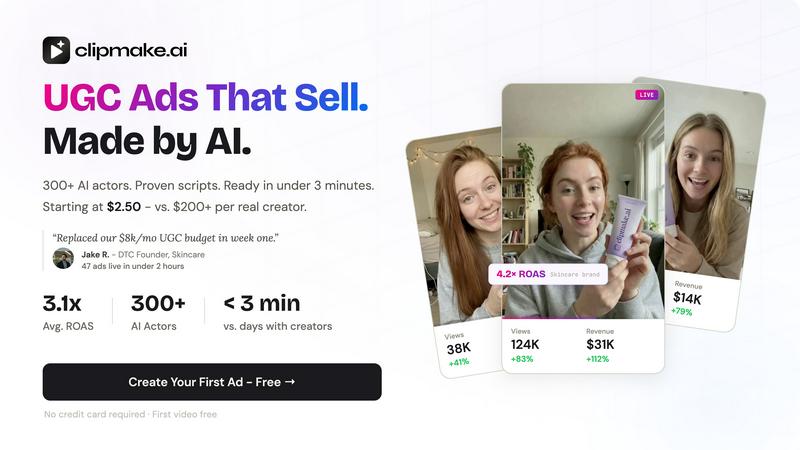
ClipMake instantly creates realistic video ads with AI actors for social media, starting at just $2.50 per video.
Last updated: April 13, 2026

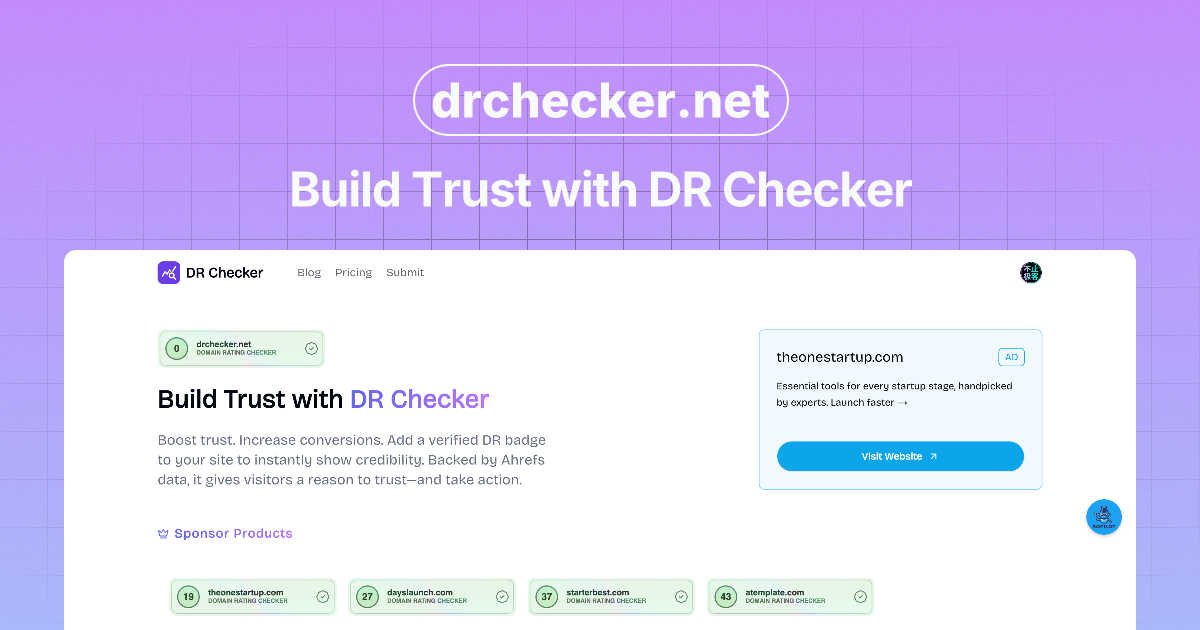
DR Checker verifies your website's trust signals to build visitor confidence.
Visual Comparison
ClipMake
DR Checker
Feature Comparison
ClipMake
AI Actor Library & Custom Avatars
ClipMake offers a curated selection of over 300 licensed AI actors, categorized by style such as energetic, aesthetic, or professional. These digital personas feature natural lip sync, realistic facial expressions, and authentic body language. Users can select a pre-made actor that matches their brand's desired energy or create a custom avatar for a unique brand representative. This eliminates the logistical challenges and costs of hiring real actors while providing full ownership of the generated content with no ongoing usage fees.
Intelligent Script & Hook Generation
The platform automates the copywriting process by generating video scripts and attention-grabbing hooks based on high-performing ad structures proven across direct-to-consumer (DTC) and e-commerce verticals. This feature draws from data-driven insights to create compelling narratives, pain-point solutions, and persuasive calls-to-action, ensuring your ad copy is optimized for engagement and conversion right from the start, saving countless hours on creative ideation and copywriting.
Dynamic Product Placement & Scene Templates
Users can upload a product image, and ClipMake's AI seamlessly integrates it into the video scene. The AI actor is shown realistically holding, using, or interacting with the product. This is combined with a library of 20+ scene templates for various ad formats like unboxing, testimonial, tutorial, lifestyle, and before/after scenarios. This allows for quick creation of diverse ad angles that showcase products in authentic, relatable contexts that resonate with social media audiences.
Pro Realism & Voice-Matched Dubbing
For ultra-realistic output, ClipMake offers a Pro Realism mode with enhanced rendering and precise lip synchronization. Its standout VocalMatch technology enables voice-matched dubbing in 20+ languages. Unlike generic text-to-speech, this feature preserves each AI actor's unique vocal characteristics and emotional tone in the translated audio, ensuring the delivery sounds natural and authentic in any target market, which is crucial for global campaign localization.
DR Checker
Advanced Website Crawling
DR Checker employs sophisticated crawling technology that systematically navigates through your entire website structure, much like a search engine bot. This deep-crawl capability ensures it examines every page, post, and asset to build a complete map of all internal and external links. This thoroughness is crucial for identifying hard-to-find broken links on infrequently visited pages or within complex site architectures, providing a comprehensive audit report that leaves no stone unturned.
Broken Link & 404 Error Detection
This core feature automatically scans for and catalogs all broken links and URLs that return HTTP error status codes, most commonly the 404 "Not Found" error. DR Checker precisely identifies the source page containing the bad link and the target URL that is failing, allowing for quick and direct remediation. This is vital for eliminating user frustration and preventing negative signals to search engines that can harm your site's credibility and search rankings.
Security & Malicious Link Screening
Beyond simple breakage, DR Checker enhances website security by screening external links for potential threats. It identifies connections to expired domains, suspicious websites, or known malicious sources that could compromise visitor safety or your site's integrity. This proactive security check helps prevent your site from inadvertently directing users to harmful content, which is essential for maintaining trust and protecting your brand's reputation.
Actionable SEO & Maintenance Reports
The platform consolidates all findings into clear, organized, and actionable reports. These reports highlight the severity and location of each issue, often categorizing them by error type for efficient prioritization. This transforms raw data into a straightforward maintenance checklist, enabling both technical and non-technical users to understand exactly what needs to be fixed to optimize site performance and SEO health effectively.
Use Cases
ClipMake
High-Volume Creative Testing for Performance Marketers
Marketing teams and media buyers can use ClipMake to systematically test dozens of ad variations across different hooks, actors, scripts, and value propositions. By generating a large volume of creatives at a low cost per video, marketers can rapidly identify top-performing assets, iterate on winners, and eliminate underperformers. This data-driven approach to creative optimization helps lower customer acquisition costs (CAC) and improve overall return on ad spend by constantly feeding algorithms with fresh, high-potential content.
Rapid Creative Production for E-commerce Brands
E-commerce brands, especially in DTC, lifestyle, and beauty, can leverage ClipMake to maintain a constant pipeline of fresh ad creative. Instead of relying on a slow, expensive process of briefing creators, scheduling shoots, and editing, brands can paste a product link, choose a presenter, and generate a ready-to-publish ad in minutes. This enables frequent ad refreshes, which are critical for combating ad fatigue and maintaining campaign performance across social media platforms.
Localizing Campaigns for Global Markets
Brands expanding into new international markets can use ClipMake's voice-matched dubbing to quickly localize their top-performing ad creatives. By translating scripts and having the AI actor deliver them in the local language while retaining their natural voice, companies can create culturally resonant ads without the need for reshoots with local talent. This significantly accelerates global rollout timelines and reduces the production costs associated with multi-market campaigns.
Supplementing UGC Strategy with Scalable AI Content
Businesses that utilize real user-generated content can integrate ClipMake to fill content gaps and scale their output. While authentic UGC is valuable, it can be inconsistent and slow to procure. ClipMake provides a reliable, on-demand source of UGC-style content that matches brand guidelines, ensuring a steady stream of professional-looking testimonials, tutorials, and lifestyle ads to support product launches, promotions, and always-on advertising efforts.
DR Checker
Routine Website Health Audits
Website administrators and owners can use DR Checker for scheduled, routine audits of their site's link health. By running monthly or quarterly scans, they can proactively identify and fix broken links before they accumulate and negatively impact user experience or SEO. This regular maintenance is key to preserving a professional, functional online presence and avoiding the gradual decay that affects all websites over time.
Pre-Launch Website Quality Assurance
Developers and agencies can integrate DR Checker into their pre-launch checklist for new websites or major updates. Scanning the site before it goes live ensures that all internal links work correctly and that no placeholder or test links point to invalid or insecure external resources. This final quality check helps launch a polished, professional product and prevents embarrassing errors from reaching the public.
SEO Optimization and Ranking Protection
Digital marketers and SEO specialists utilize DR Checker to protect and improve a website's search engine rankings. Search engines penalize sites with excessive broken links, viewing them as poorly maintained. By systematically finding and fixing these issues, marketers can eliminate negative SEO factors, improve crawl efficiency for search engine bots, and ensure that link equity is passed correctly throughout the site.
Enhancing User Experience and Trust
For any business relying on its website for conversions, lead generation, or information dissemination, a seamless user experience is paramount. DR Checker helps maintain this by ensuring visitors never encounter dead-end 404 pages from broken internal links. Furthermore, by removing links to suspicious external sites, it protects users and builds trust, encouraging longer site visits and higher engagement rates.
Overview
About ClipMake
ClipMake is an AI-powered video generation platform designed to revolutionize digital advertising for e-commerce brands and performance marketers. It specializes in producing high-volume, user-generated content (UGC) style video ads without the need for human creators, video shoots, or manual editing. The core value proposition lies in its ability to drastically reduce the time, cost, and complexity associated with traditional ad creative production. Users can generate a finished, professional-quality video ad in under three minutes by simply selecting from a diverse library of over 300 AI actors, inputting product details, and choosing from proven ad templates. The platform intelligently combines natural voiceovers, dynamic product placement, and authentic actor performances to create compelling ads tailored for platforms like Meta and TikTok. By enabling rapid batch creation of dozens of ad variations, ClipMake empowers businesses to test creative angles at an unprecedented scale, turning creative testing from a budgetary constraint into a strategic advantage for optimizing campaign performance and return on ad spend (ROAS).
About DR Checker
DR Checker is a comprehensive, web-based diagnostic service engineered to safeguard and optimize websites by meticulously auditing their link infrastructure. It serves as an essential tool for website owners, developers, and digital marketers who are responsible for maintaining a site's health, security, and search engine performance. The core function of DR Checker is to perform deep scans of a website to identify problematic links, including broken links (404 errors), invalid URLs, expired domains, and, critically, links to potentially malicious or suspicious external sites. By uncovering these hidden issues, DR Checker provides actionable insights that empower users to proactively clean their site, thereby protecting visitor experience, preserving SEO rankings, and maintaining a trustworthy online reputation. The platform utilizes advanced crawling technology to navigate and analyze complex website structures, ensuring no problematic link goes unnoticed. Designed with accessibility in mind, its intuitive interface demystifies website maintenance, making professional-grade auditing and optimization achievable for users of all technical skill levels. In its current state, please note that this deployment is temporarily paused.
Frequently Asked Questions
ClipMake FAQ
How realistic are the AI actors in ClipMake?
The AI actors in ClipMake are designed with advanced synthesis technology to deliver high levels of realism. They feature natural lip-syncing to the audio, expressive facial movements, and believable body language. The platform also offers a Pro Realism mode for ultra-realistic rendering. User testimonials and case studies indicate that the output quality is sufficient to perform competitively against real UGC in live A/B tests on major advertising platforms.
Can I use the videos commercially? Are there usage fees?
Yes, all videos generated with ClipMake are fully owned by the user and cleared for commercial use. The platform uses licensed AI actors, and there are no additional usage fees, royalties, or rights management concerns. You have the full right to publish the videos on social media, run them as paid ads, use them on your website, or distribute them through any other marketing channel.
What is the typical turnaround time for a video?
ClipMake is built for speed. The standard process from selecting an actor to receiving a downloadable video ad takes under three minutes. This rapid turnaround is consistent whether you are creating a single video or using the batch generation feature to produce dozens of variations in one session, enabling truly agile and responsive creative production.
How does the product placement feature work?
The product placement feature is straightforward. You upload a clear image of your product (often a hero image from your store). ClipMake's AI then intelligently places this product into the chosen scene template. The AI actor will be animated to naturally hold, display, or interact with the product image as if it were a physical object, creating a convincing and integrated showcase within the video narrative.
DR Checker FAQ
What does DR Checker actually scan?
DR Checker performs a comprehensive scan of your website by crawling through all accessible pages. It analyzes the HTML code to extract every hyperlink, checking both internal links (pointing to other pages on your site) and external links (pointing to other websites). It then tests each link to verify its HTTP status, validity, and in some cases, the safety reputation of the external domain.
How often should I run a scan with DR Checker?
The frequency depends on how dynamic your website is. For a static brochure site, a quarterly scan may be sufficient. For active blogs, news sites, or large e-commerce platforms with frequently changing content, a monthly or even weekly scan is recommended to quickly catch new broken links that appear from edited content or expired external resources.
Can DR Checker handle very large websites?
Yes, the advanced crawling technology powering DR Checker is designed to handle websites of various sizes, including large ones with thousands of pages. The crawler is engineered to navigate complex structures and can be configured to respect robots.txt directives while systematically indexing your site's content to ensure a complete audit.
What should I do after receiving a report from DR Checker?
The actionable report provides a list of identified issues. You should prioritize fixing broken internal links by updating or removing them within your content management system (CMS). For broken external links, you can either find a new, valid source to link to or remove the reference. For links flagged as potentially malicious, they should be removed immediately to protect your users.