
claude ide vs Prompt Builder
Side-by-side comparison to help you choose the right product.

claude ide
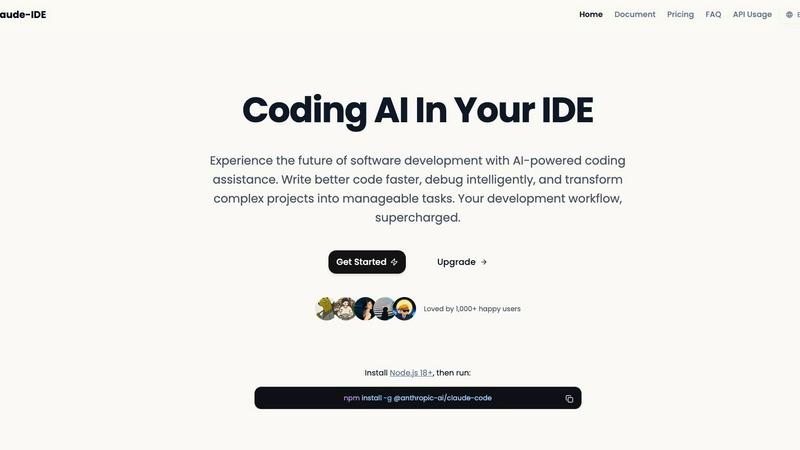
Claude IDE is an affordable AI coding assistant that works directly in your terminal and VS Code.
Last updated: March 1, 2026

Prompt Builder
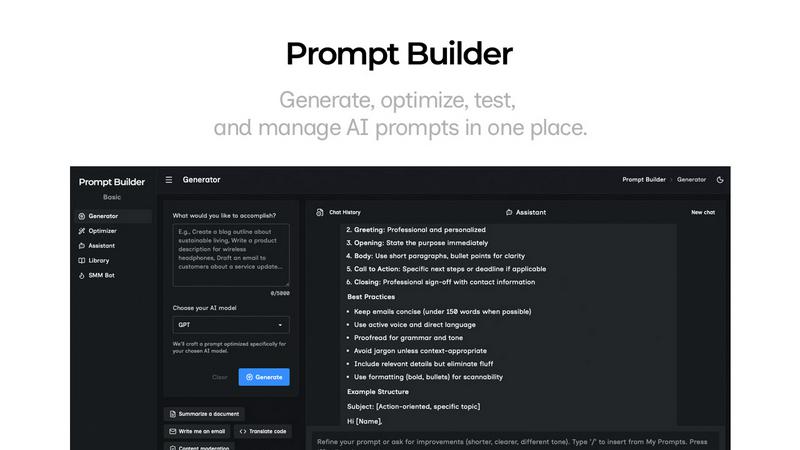
Prompt Builder helps you create, refine, and manage optimized AI prompts for various models in one seamless platform.
Last updated: April 13, 2026
Visual Comparison
claude ide
Prompt Builder
Feature Comparison
claude ide
Intelligent Codebase Understanding
Claude IDE analyzes and comprehends your entire project structure, architecture, and dependencies, not just isolated lines of code. This holistic understanding allows it to make coordinated, intelligent suggestions and execute accurate multi-file edits. It automatically grasps how different components interact, ensuring that its assistance is contextually relevant and functionally sound for your specific project.
Deep IDE and Terminal Integration
The tool operates natively within your development environment, living directly inside your terminal and IDE. This deep integration with VS Code and JetBrains platforms means there is no need to switch between windows or applications. You can interact with Claude, request analyses, and implement changes without ever leaving your coding workspace, maintaining focus and streamlining your development process.
End-to-End Development Workflow Management
Claude IDE integrates with GitHub, GitLab, and command-line tools to manage the complete software development lifecycle. It can read issues, write corresponding code, execute tests, and even help submit pull requests—all from within your terminal. This feature consolidates multiple tools into one assistant, transforming fragmented workflows into a cohesive, efficient pipeline.
Powerful Multi-File Editing Capabilities
Leveraging its deep codebase comprehension, Claude IDE can execute complex edits that span across multiple files. Whether you're refactoring a module, updating dependencies, or implementing a new feature, the assistant ensures changes are consistent and accurate across the entire project. This reduces manual errors and saves significant time compared to making interconnected changes file-by-file.
Prompt Builder
Prompt Generator
The Prompt Generator allows users to describe their ideas and select a target AI model to receive a professionally crafted prompt optimized for that specific model. This feature minimizes the time spent crafting prompts and ensures they are tailored for better results.
Chat Refinement
Users can refine their prompts directly within a built-in chat workspace. This feature enables quick iterations, allowing users to modify their prompts based on immediate feedback and suggestions from an assistant model, ensuring clarity and effectiveness.
Prompt Optimizer
The Prompt Optimizer feature lets users paste existing prompts or select them from their Library to receive enhanced versions. It focuses on improving clarity, adding constraints, and suggesting output formats, making it easier for users to produce high-quality prompts quickly.
Prompt Library
The Prompt Library is a centralized place for users to save, organize, and reuse their best prompts across different projects and teams. This feature includes search and filter options by category and model, enabling users to access their prompts efficiently and explore community-contributed prompts.
Use Cases
claude ide
Rapid Project Onboarding and Familiarization
When joining a new project or exploring an unfamiliar codebase, Claude IDE can instantly analyze and explain the entire structure. It provides a high-level overview of the project's purpose, architecture, main components, and key features within seconds, dramatically reducing the learning curve and helping developers become productive much faster.
From Issue Triage to Code Implementation
Developers can use Claude IDE to manage tasks from start to finish. The assistant can read a GitHub or GitLab issue, understand the requirements, and then proceed to write the necessary code, run tests, and prepare the changes for submission. This turns the terminal into a centralized command center for the entire development task cycle.
Complex Code Refactoring and Updates
For tasks like updating a library, changing an API, or restructuring a significant portion of the code, Claude IDE is invaluable. Its understanding of dependencies and project-wide impact allows it to plan and execute widespread edits safely and efficiently, ensuring the codebase remains functional and consistent after the changes.
Intelligent Debugging and Problem-Solving
When encountering bugs or unexpected behavior, developers can ask Claude IDE for help. By analyzing error messages, stack traces, and the relevant code sections in context, the assistant can suggest potential causes and solutions, often identifying issues that might be missed during manual debugging.
Prompt Builder
Content Creation
Content creators can utilize Prompt Builder to generate high-quality prompts for blog posts, articles, and social media updates. By refining prompts based on audience engagement, they can produce more targeted and effective content in less time.
AI Development
Developers working on AI applications can leverage Prompt Builder to craft and test prompts that interact with various AI models. This ensures that the prompts they use are optimized for the model's strengths, leading to more accurate and relevant outputs.
Educational Purposes
Teachers and educators can use Prompt Builder to create tailored prompts for assignments or interactive learning experiences. The ability to save and refine prompts allows for more personalized learning, catering to different student needs and levels.
Marketing Campaigns
Marketing professionals can generate tailored prompts for social media, email campaigns, and advertisements. By utilizing the platform's chat refinement and community resources, they can craft compelling messages that resonate with their target audiences.
Overview
About claude ide
Claude IDE is a sophisticated AI-powered coding assistant designed to integrate seamlessly into a developer's existing workflow. It embeds the advanced capabilities of Claude Opus 4.6 directly into your terminal and popular integrated development environments (IDEs) like VS Code and JetBrains products. This tool transcends simple code snippet suggestions by offering a comprehensive, context-aware understanding of your entire codebase. It enables developers to write higher-quality code more efficiently, debug with intelligent insights, and deconstruct complex projects into actionable tasks. Primarily built for individual developers, students, and hobbyists, Claude IDE delivers professional-grade AI assistance through a transparent and affordable pricing model. Its core value proposition lies in eliminating disruptive context switching, providing deep project-wide analysis, and making powerful AI development tools accessible to a broader audience without prohibitive costs.
About Prompt Builder
Prompt Builder is an innovative prompt engineering workspace designed to streamline the process of writing, testing, and saving prompts for various AI models. This tool is tailored for anyone who engages with AI, from casual users to professional developers. The primary value proposition of Prompt Builder lies in its ability to transform a simple idea into a fully optimized prompt in seconds, allowing users to refine their prompts in a chat interface, save different versions, and run them effortlessly when needed. It supports a wide array of AI models, including GPT, Claude, Gemini, Llama, Mistral, DeepSeek, Grok, and Perplexity, making it a versatile choice for users across different platforms. With features like an Optimizer for enhancing existing prompts, a Library for storing reusable prompts, and an easy-to-use assistant for quick testing, Prompt Builder provides an all-in-one solution to maximize productivity and achieve more consistent, high-quality outputs.
Frequently Asked Questions
claude ide FAQ
What is Claude IDE and how does it differ from other AI coding assistants?
Claude IDE is an AI coding assistant that integrates directly into your terminal and IDE, powered by Claude Opus 4.6. Its key differentiator is its deep, project-wide understanding. Unlike tools that only see snippets, Claude IDE analyzes your entire codebase, enabling coordinated multi-file edits and context-aware suggestions that truly fit your project's architecture and dependencies.
Which development environments does Claude IDE support?
Claude IDE is deeply integrated with popular development environments to work where you do. It offers full integration with Visual Studio Code (VS Code) and JetBrains IDEs. Most importantly, it operates natively within your system terminal, providing powerful AI assistance regardless of your primary editor.
How do I get started with Claude IDE?
Getting started is straightforward. First, ensure you have Node.js 18 or higher installed on your system. Then, you can install the Claude IDE package globally by running the command npm install -g @anthropic-ai/claude-code in your terminal. After installation, you can begin using it within your terminal or configured IDE.
Can Claude IDE work with my version control systems?
Yes, Claude IDE features seamless integration with major version control platforms. It can connect to and interact with GitHub and GitLab repositories directly from your terminal. This allows it to read issues, understand branch contexts, and assist with the entire workflow, including preparing and managing code for commits and pull requests.
Prompt Builder FAQ
How does Prompt Builder improve prompt generation?
Prompt Builder enhances prompt generation by providing a structured approach that allows users to create, refine, and save prompts tailored for specific AI models. This reduces the time and effort needed to craft effective prompts.
What AI models are supported by Prompt Builder?
Prompt Builder supports a variety of AI models, including GPT, Claude, Gemini, Llama, Mistral, DeepSeek, Grok, Perplexity, and more. This wide compatibility ensures that users can work with their preferred models seamlessly.
Is there a limit to the number of prompts I can generate?
Yes, users can start with a free plan that allows 25 assistant requests per month without requiring a credit card. This gives users an opportunity to test the platform’s features before committing to a paid plan.
Can I collaborate with others using Prompt Builder?
Yes, Prompt Builder's Library feature allows users to save and organize prompts that can be shared and reused across teams and projects, promoting collaboration and efficiency in prompt development.
Alternatives
claude ide Alternatives
Claude IDE is an AI coding assistant that integrates directly into development environments like VS Code and the terminal. It belongs to the category of AI-powered development tools, designed to understand entire codebases and assist with writing, debugging, and project management from within a developer's existing workflow. Users often explore alternatives for various reasons. These can include seeking different pricing models, requiring specific features not offered, needing compatibility with other platforms or IDEs, or simply wanting to compare the capabilities and value propositions of different tools in a competitive market. When evaluating an alternative, key considerations should include the depth of integration with your primary tools, the AI's ability to understand project context beyond single files, the overall cost and transparency of the pricing model, and the specific development tasks the tool is optimized to assist with, such as code generation, debugging, or refactoring.
Prompt Builder Alternatives
Prompt Builder is a comprehensive prompt engineering workspace designed for users to write, test, and manage AI prompts efficiently. It streamlines the process of turning ideas into actionable prompts across various models like GPT, Claude, and others. As part of the AI Assistants category, it caters to individuals and teams looking to enhance their productivity with AI-generated content. Users often seek alternatives to Prompt Builder for various reasons, including pricing structures, feature sets, and compatibility with specific platforms. When choosing an alternative, it is essential to consider factors such as user interface, ease of integration with existing tools, and the availability of community resources. Ensuring that the chosen solution aligns with personal or organizational needs is crucial for maximizing effectiveness in prompt creation and management.