
BlitzCut vs SeeDance Ai
Side-by-side comparison to help you choose the right product.

BlitzCut
BlitzCut is an AI video editor that quickly removes silence and adds captions to turn raw clips into shareable videos.
Last updated: February 26, 2026

Seedance AI is a multimodal video generator that creates polished, sound-synced videos from text, images, audio, or video inputs.
Last updated: April 13, 2026
Visual Comparison
BlitzCut

SeeDance Ai
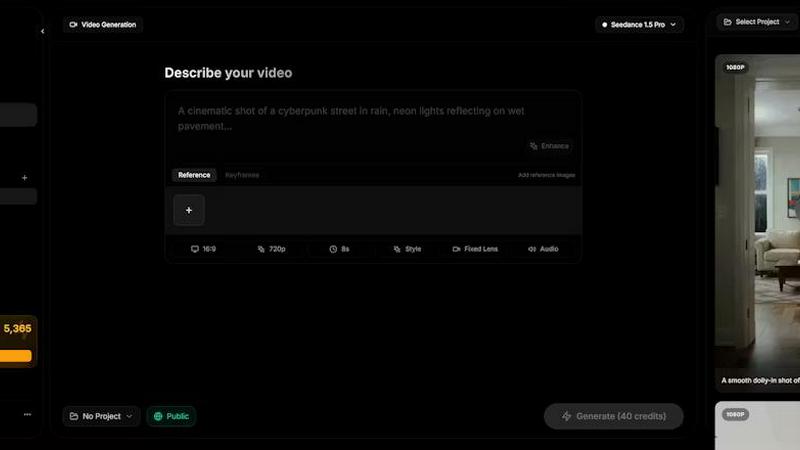
Feature Comparison
BlitzCut
Automatic Silence Removal
BlitzCut's automatic silence removal feature allows users to eliminate all pauses and silent gaps in their videos instantly. This AI-driven functionality saves creators an immense amount of time, which is typically wasted in manual editing. By processing silence detection in real-time, BlitzCut ensures that your content remains engaging and concise, enhancing viewer retention.
AI Captions
With an impressive accuracy rate of over 95%, the AI captions feature automatically generates captions for your videos in various viral styles. This allows creators to enhance accessibility and engagement, making their content more appealing to a broader audience. The fast and efficient captioning process means you can have fully captioned videos ready for posting within minutes.
Text-Based Editing
BlitzCut introduces a revolutionary text-based editing feature that allows users to edit their videos by deleting sentences directly from the transcription. This intuitive approach simplifies the editing process, making it easy to cut out unwanted content without needing to scrub through lengthy video footage, thus saving time and effort.
Mobile-First Design
Designed specifically for mobile devices, BlitzCut is optimized for iPhone, iPad, and Mac. This mobile-first approach allows creators to edit videos on the go, providing the flexibility to create and publish content anytime and anywhere. The user-friendly interface ensures that even beginners can navigate the app with ease.
SeeDance Ai
Multimodal Reference System
This core feature allows users to upload and tag up to 12 reference files—including images, videos, and audio clips—directly within their text prompt using the @ symbol (e.g., @Image1, @Video1). This system treats uploaded assets as precise instructions, enabling creators to specify exact character faces, camera movements from reference clips, and audio beats. It eliminates the guesswork of traditional text-only prompting, providing granular control over the final generated video's visual and auditory elements.
Native Audio-Visual Synchronization
Unlike tools that add sound as a post-processing step, SeeDance AI generates audio and video simultaneously within the same model pass. This ensures perfect timing, where sound effects, footsteps, background music, and character dialogue are intrinsically synced to the visual action on a frame-by-frame basis. The result is professional-grade coherence, making post-production sound design optional and significantly streamlining the creation of polished, ready-to-publish content.
Consistent Character & Identity Lock
A common flaw in AI video is character drift, where a subject's appearance changes between shots. SeeDance AI employs a cross-attention reference system that locks in facial geometry, clothing, style, and even fine details like logos and text across different scenes and shots. This ensures 100% consistency, making the platform exceptionally powerful for serialized content, branded campaigns, and any project requiring a recognizable character or product to appear multiple times.
Precise Motion & Camera Control
Users can achieve exact cinematic movements by uploading a reference video. The platform can analyze and replicate specific camera behaviors such as dolly zooms, tracking shots, orbital movements, or handheld shakes. Furthermore, it applies this same fidelity to human motion, allowing complex choreography, dance routines, or action sequences from a reference to be accurately transferred to generated characters, respecting skeletal integrity and realistic physics.
Use Cases
BlitzCut
Social Media Content Creation
Creators looking to produce engaging social media content will find BlitzCut invaluable. The speed and efficiency of the editing process enable them to post daily, keeping their audience engaged with fresh content without compromising quality.
Influencer Marketing
Influencers can use BlitzCut to quickly edit their promotional videos, ensuring they meet the fast-paced demands of brand partnerships. The automatic silence removal and AI captions features allow influencers to maintain a high standard of professionalism with minimal effort.
Educational Video Production
Educators and trainers can leverage BlitzCut to create tutorial videos and online courses. The automatic captioning feature enhances accessibility for diverse audiences, while the quick editing capabilities allow educators to focus on content rather than technicalities.
Event Highlights
For videographers capturing events, BlitzCut streamlines the process of creating highlight reels. The ability to quickly remove silences and add captions helps in crafting engaging recaps that can be shared promptly after the event concludes.
SeeDance Ai
Marketing & Advertising Clips
Create high-impact promotional videos, product demos, and branded content without the cost of a full production crew. The ability to maintain consistent product shots and spokesperson avatars across multiple scenes ensures professional, cohesive campaigns that can be rapidly iterated and deployed for social media, websites, and digital ads.
Social Media & Viral Content
Produce engaging, trend-driven content for platforms like TikTok, Instagram Reels, and YouTube Shorts. The multi-shot sequencing and synced audio capabilities are perfect for creating dynamic dance videos, comedic skits, and visually captivating clips designed to capture attention and drive engagement in a fast-paced social media environment.
Creative Storytelling & Short Films
Empower independent filmmakers and digital artists to bring narrative ideas to life. The director-level control over shot composition, character consistency, and integrated sound design allows for the creation of short films, music videos, and animated stories with a cinematic feel, all generated from text and reference inputs.
Educational & Explainer Videos
Develop clear and compelling instructional content. The platform can visualize complex concepts, animate diagrams, and use consistent presenter avatars to create smooth, professional explainer videos. The native audio sync is particularly valuable for ensuring narration matches on-screen action perfectly.
Overview
About BlitzCut
BlitzCut is an innovative AI-powered video editing tool designed to revolutionize the way content creators, influencers, and marketers edit their videos for social media platforms like TikTok, Instagram Reels, and YouTube Shorts. With a mission to make professional-quality video editing accessible to everyone, BlitzCut emphasizes speed, simplicity, and convenience. The tool automates tedious editing tasks, allowing users to focus on their creative process rather than getting bogged down by lengthy editing workflows. BlitzCut's unique features, such as automatic silence removal and AI-generated captions, streamline the editing process to ensure that users can produce high-quality content in just minutes, making daily posting a sustainable reality for busy creators.
About SeeDance Ai
SeeDance AI is a state-of-the-art multimodal AI video generation platform designed for professional creators and marketers. It transforms text prompts, images, audio clips, and video references into high-quality, cinematic multi-shot videos with native audio-visual synchronization. The platform addresses critical industry pain points like "anatomical drift," inconsistent character identity, and unsynchronized sound by generating video and audio together in a single, coherent model pass. With director-level control over motion, camera work, and scene composition, SeeDance AI functions as an automated production pipeline rather than a simple clip generator. It is ideal for producing marketing content, social media clips, dance and choreography videos, and narrative storytelling, offering a specialized hub for workflows that demand high-fidelity output, smooth physics, and strict prompt adherence without flickering or degradation in quality.
Frequently Asked Questions
BlitzCut FAQ
How does BlitzCut use AI to enhance video editing?
BlitzCut employs AI technology to automate repetitive tasks such as silence removal and captioning. This enables creators to focus on their storytelling and creative vision without getting bogged down by time-consuming manual edits.
Is BlitzCut available for free?
Yes, BlitzCut is free to download and does not require users to create an account to get started. This accessibility allows anyone to dive into video editing without barriers.
Can I export videos directly to social media from BlitzCut?
Absolutely! BlitzCut allows users to export their edited videos in full quality HDR directly to platforms like TikTok, Instagram, and YouTube, streamlining the posting process.
What devices are compatible with BlitzCut?
BlitzCut is designed for mobile devices, specifically optimized for iPhone, iPad, and Mac. This ensures a seamless editing experience for users on the go.
SeeDance Ai FAQ
What is SeeDance AI?
SeeDance AI is a multimodal AI video generation platform. It converts text prompts along with optional image, audio, or video references into cinematic, multi-shot video clips with synchronized sound. It distinguishes itself by generating audio and video together in one pass, ensuring high fidelity, consistent characters, and realistic motion for professional-grade output.
How does the @ reference system work?
The @ reference system allows you to upload assets (images, videos, audio) and tag them directly in your text prompt. For example, writing "A character with the face of @Image1 dancing to the beat of @Audio1" instructs the model to use those specific references as direct inputs. This provides precise control over visual elements, motion, and sound, moving beyond vague text descriptions.
Can SeeDance AI create consistent characters across different videos?
Yes. A key feature of SeeDance AI is its ability to maintain character consistency. Using its cross-attention reference system, it locks in details like facial features, hairstyle, and clothing from a reference image. This ensures the same character can appear identically across multiple generated scenes and videos, which is essential for serialized content.
What are the available AI models on SeeDance AI?
The platform offers several model versions, including SeeDance 2.0, SeeDance 1.5 Pro, SeeDance 1.0, and SeeDance 1.0 Pro. Each iteration offers improvements in areas like motion realism, prompt adherence, and audio-visual synchronization, with SeeDance 2.0 representing the most advanced capabilities for professional workflows.
Alternatives
BlitzCut Alternatives
BlitzCut is an AI-powered video editing solution designed to streamline the video creation process for content creators. As a part of the content creation category, it focuses on automating tedious tasks such as silence removal and captioning, allowing users to produce engaging videos quickly. Users often seek alternatives to BlitzCut for various reasons, including pricing, specific feature sets, or compatibility with different platforms and devices. When choosing an alternative, it is essential to consider factors like the speed of the editing process, the accuracy of automated features, the ease of use, and the ability to access the tool on preferred devices. Evaluating whether the alternative can meet the specific needs of your content creation style is also crucial for ensuring a seamless workflow.
SeeDance Ai Alternatives
SeeDance Ai is a specialized AI video generation platform focused on creating cinematic, multi-shot videos from text, images, audio, and video inputs. It belongs to the advanced category of AI cinematography tools, distinguished by its emphasis on director-level control and high-fidelity motion physics. Users often explore alternatives for various practical reasons. These can include budget constraints, as professional AI tools may have pricing tiers that don't align with every user's needs. Others might seek different feature sets, such as simpler interfaces, specific export formats, or integration with other creative platforms. The search can also be driven by a need for a different use case focus, like more abstract animation versus the realistic human motion SeeDance Ai excels in. When evaluating an alternative, key considerations should include the core output quality, particularly in motion smoothness and anatomical consistency. Assess the tool's specialization—whether it's a generalist video generator or tailored for specific styles like marketing or dance. Finally, examine the control offered over the final product, the transparency of pricing, and the security of your data and generated assets.