
Before after Picture Maker vs Gomotion
Side-by-side comparison to help you choose the right product.

Before after Picture Maker
Create stunning before and after images effortlessly with our AI comparison builder in just three simple steps.
Last updated: February 26, 2026

Gomotion
Gomotion generates stunning AI-powered motion graphics for creators and marketers, making animation effortless and.
Last updated: February 28, 2026
Visual Comparison
Before after Picture Maker
Gomotion

Feature Comparison
Before after Picture Maker
Easy Image Upload
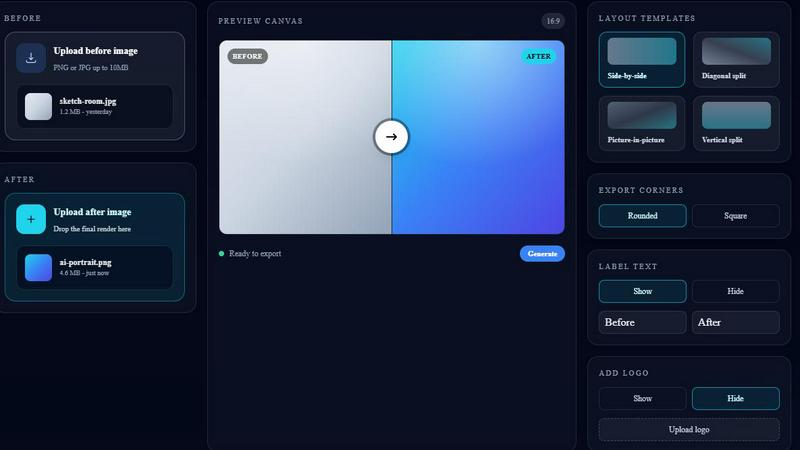
The Before after Picture Maker makes it incredibly easy to upload your images. Users can simply drag and drop their original 'before' image and the AI-generated 'after' image into the designated upload areas. Supporting formats like PNG and JPG, this feature ensures versatility and convenience, allowing files up to 10MB to be processed effortlessly.
Customizable Layout Templates
The platform offers a diverse range of layout templates to suit various presentation needs. Users can select from side-by-side, diagonal split, vertical split, or picture-in-picture formats. This level of customization allows for tailored visuals that fit the specific context of your project, whether for marketing, social media, or portfolio showcases.
Export Options
Before after Picture Maker provides users with multiple export options to refine their images further. You can choose between rounded or square corners for your comparison visuals, as well as customize label text and add a logo. This flexibility ensures that each image can be tailored to meet branding requirements and aesthetic preferences.
SEO Optimization
Built with SEO in mind, Before after Picture Maker enables users to create clear and optimized comparison images. This feature is particularly beneficial for improving search visibility, thanks to keywords such as “before after image maker,” “AI comparison image,” and “side-by-side comparison.” This ensures that your visuals not only look good but also reach the intended audience effectively.
Gomotion
Transform Words Into Motion
Gomotion allows users to animate text effortlessly from a simple prompt. By simply describing how you want your text to move, the platform instantly generates animations for titles, captions, and logos with a cinematic flair. This feature is especially useful for product demos and for creators who seek professional results without the complexities of traditional animation software.
Discover the Narrative Mode
With the Gomotion Narrative Mode, users can create end-to-end, ready-to-publish ads. This feature enables users to turn written scripts into fully animated stories, complete with synchronized images and videos. This tool is ideal for marketers looking to produce engaging advertisements or short videos in just a matter of minutes.
Design for Any Screen
Gomotion is built to cater to a variety of screen sizes, ranging from mobile devices to desktop displays. This flexibility ensures that your animations will look perfect across all platforms, whether you're designing a product teaser for Instagram, TikTok, or other social media channels.
Complex Animations Made Simple
Gomotion simplifies the process of creating complex animations, including animated charts and simulations. Users can generate visually engaging animated charts from any data, making it an ideal tool for explainer videos, simulations, and impactful presentations that require clarity and visual appeal.
Use Cases
Before after Picture Maker
Portfolio Showcases
Artists and designers can leverage Before after Picture Maker to create compelling portfolio showcases that highlight their work's evolution. By presenting before and after images, they can effectively demonstrate their skills and the impact of their creative process on the final product.
AI Art Progress
For creators working in AI-generated art, this tool serves as a perfect platform to display the progression of their work. By showcasing the transformation from initial drafts to the final AI-enhanced artwork, artists can engage their audience and illustrate the capabilities of AI in creative processes.
Product Transformations
Businesses can utilize Before after Picture Maker to visually communicate product transformations. Whether it's a before-and-after demonstration of a renovation, new product launch, or service improvement, this tool provides a clear visual narrative that can enhance marketing materials and customer understanding.
Social Media Proof
In the digital age, social proof is essential for building credibility. Before after Picture Maker allows users to create eye-catching visual comparisons for social media platforms, demonstrating results and transformations that can engage followers and encourage shares, ultimately driving brand awareness.
Gomotion
Marketing Professionals
Marketing professionals can leverage Gomotion to create compelling animations for their campaigns. Whether it's a product launch, advertisement, or promotional video, the AI-powered tool allows for quick turnaround times, enabling marketers to keep up with fast-paced marketing demands.
Social Media Managers
Social media managers can benefit from Gomotion by producing eye-catching animations tailored for various platforms. The ability to design for any screen ensures that their content is visually appealing and optimized for engagement across different social media channels.
Small Business Owners
For small business owners who lack dedicated design resources, Gomotion offers an accessible solution for producing high-quality animations. By allowing users to create professional-looking content with minimal effort, it empowers small businesses to compete effectively in a crowded market.
Motion Design Enthusiasts
Motion design enthusiasts can use Gomotion to expedite their workflow and enhance their creative projects. The platform's user-friendly interface and powerful AI capabilities mean that users can focus more on creativity and storytelling rather than getting bogged down by technical complexities.
Overview
About Before after Picture Maker
Before after Picture Maker is an innovative, lightweight Software as a Service (SaaS) solution designed specifically for creators, marketers, and teams that require polished before and after visuals quickly and efficiently. This tool allows users to seamlessly upload their original images alongside AI-generated results, enabling them to create stunning comparison visuals in mere moments. With a variety of customizable templates, including side-by-side, diagonal, vertical, and picture-in-picture layouts, users can easily showcase transformations, progress, or product enhancements. The intuitive interface simplifies the process: upload images, choose a layout, and generate a ready-to-share comparison image with just a click. Perfect for portfolios, marketing campaigns, and social media, Before after Picture Maker streamlines visual storytelling, making it an essential tool for anyone looking to demonstrate change or improvement visually.
About Gomotion
Gomotion is an innovative AI-powered platform designed to revolutionize the world of motion design by enabling the rapid creation of digital animations. It combines the professional-grade capabilities of traditional animation software like Adobe After Effects with the intuitive, prompt-based generation features found in modern AI tools. This unique blend empowers users to create high-quality, stylistically consistent brand animations instantly. Whether you're a marketing professional, a social media manager, a small business owner, or a motion design enthusiast, Gomotion is crafted to fit your needs. By eliminating the steep learning curves and costly software typically associated with motion design, Gomotion democratizes access to high-end animation tools. Users can input text descriptions or image prompts, and the AI swiftly translates these into complete motion graphics sequences. This automation of complex tasks such as keyframing and asset animation allows users to turn their creative ideas into polished visual content within seconds, significantly speeding up production timelines and enhancing overall creative output.
Frequently Asked Questions
Before after Picture Maker FAQ
How do I upload images to Before after Picture Maker?
To upload images, simply drag and drop your original 'before' image and the AI-generated 'after' image into their respective upload areas on the platform. The tool supports PNG and JPG formats up to 10MB.
What layout templates does Before after Picture Maker offer?
Before after Picture Maker offers a variety of layout templates, including side-by-side, diagonal split, vertical split, and picture-in-picture formats. This allows users to choose the best presentation style for their specific needs.
Can I customize my comparison images?
Yes, users can customize their comparison images by selecting rounded or square corners, adding label text, and uploading a logo. This ensures that the final image aligns with your branding requirements.
Is Before after Picture Maker optimized for SEO?
Absolutely. The tool is designed to create clear and optimized comparison images that can enhance search visibility using keywords relevant to before/after comparisons. This helps ensure your visuals reach a broader audience.
Gomotion FAQ
How does Gomotion generate animations?
Gomotion utilizes advanced AI algorithms to interpret user input, whether it is a text description or an image prompt. The AI then generates complete motion graphics sequences based on the provided information, allowing for rapid animation production.
Is Gomotion suitable for beginners?
Absolutely! Gomotion is designed to be user-friendly, making it accessible for beginners who may not have prior experience in motion design. The intuitive prompt-based system allows anyone to create stunning animations without needing extensive training or knowledge.
Can I use Gomotion for commercial purposes?
Yes, users can create animations for commercial use, including advertisements, product launches, and social media content. Gomotion allows for the production of professional-grade animations suitable for various business needs.
What types of files can I import into Gomotion?
Gomotion supports the import of various file types, including images for brand integration. Users can easily bring their brand assets into the platform to create animations that align with their branding strategy and visual identity.
Alternatives
Before after Picture Maker Alternatives
Before/After Picture Maker is a lightweight software-as-a-service (SaaS) tool designed for creators and teams who need to produce polished before-and-after visuals quickly and efficiently. It falls under the category of design tools, allowing users to upload original images alongside AI-generated results. Users can choose from various customizable templates and features to craft visually appealing comparisons. Many users seek alternatives to Before/After Picture Maker for several reasons, including pricing, specific feature sets, or compatibility with their preferred platforms. When considering alternatives, it's essential to evaluate aspects such as user interface, customization options, integration capabilities, and overall value for the intended use case. Ensuring that the alternative meets both functional and budgetary needs will help users find the right fit for their projects.
Gomotion Alternatives
Gomotion is an innovative AI-powered platform designed for creating high-quality motion graphics, primarily targeting marketers and digital creators. It streamlines the animation process by allowing users to generate visual content through intuitive text or image prompts, making professional-grade animation accessible to a broader audience. This democratization of motion design eliminates traditional barriers such as steep learning curves and costly software, positioning Gomotion as a go-to tool for various users. Users often seek alternatives to Gomotion for several reasons, including pricing concerns, specific feature requirements, or platform compatibility needs. As digital animation evolves, users may look for tools that offer unique capabilities, enhanced user interfaces, or integrations with existing workflows. When evaluating alternatives, it’s essential to consider factors such as ease of use, the range of features offered, pricing structures, and the level of customer support available to ensure the chosen solution meets individual or business needs.