
Beesift vs Zovo
Side-by-side comparison to help you choose the right product.

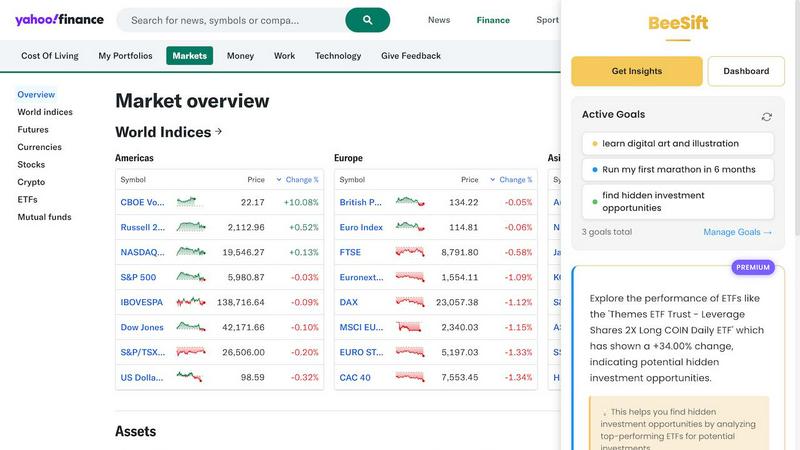
BeeSift is a Chrome extension that extracts actionable insights from any webpage, aligning with your personal goals.
Last updated: March 1, 2026

Zovo offers 20 privacy-focused Chrome extensions for developers and writers with one subscription for all tools.
Last updated: February 26, 2026
Visual Comparison
Beesift
Zovo

Feature Comparison
Beesift
Goal-Aligned Insights
BeeSift provides users with insights that are directly aligned with their personal or professional goals. This feature allows users to extract actionable information that progresses their objectives, avoiding unnecessary fluff and distractions.
Privacy-First Design
With a robust privacy policy, BeeSift does not track browsing history or store any personal data. Users can browse confidently, knowing that their goals and insights are kept private and secure, fostering a worry-free experience.
Simple Keyboard Shortcut
Using BeeSift is incredibly easy and efficient. With a simple keyboard shortcut (Ctrl+Shift+K), users can transform any webpage into a personalized opportunity scanner, quickly extracting the most relevant insights without hassle.
Insight Management Dashboard
BeeSift includes a user-friendly dashboard that enables users to manage their extracted insights effectively. Each insight is automatically tagged to relevant goals, making it easy to organize and retrieve information for future reference.
Zovo
BeLikeNative
BeLikeNative helps users write like native speakers with just one keystroke. It supports 80 languages, making it an invaluable tool for multilingual users who want to enhance their writing skills quickly and effortlessly.
Tab Suspender Pro
Tab Suspender Pro automatically suspends inactive tabs to save memory and improve browser performance. With smart detection and memory tracking features, users can enjoy a smoother browsing experience without the hassle of manually managing their tabs.
JSON Formatter Pro
JSON Formatter Pro allows users to format, validate, and explore JSON data right in their browser. It offers beautification and minification options, as well as a tree explorer for easy navigation, making it an essential tool for developers working with JSON.
Clipboard History Pro
Clipboard History Pro ensures that users never lose copied text again. With the ability to store up to 10,000 clips, it features instant search and smart paste functionality, allowing users to retrieve and use their copied content efficiently.
Use Cases
Beesift
For Students
Students can leverage BeeSift to extract key concepts and recommended resources from educational content. Whether studying for exams or conducting research, they can find the most relevant information efficiently.
For Professionals
Professionals can utilize BeeSift to cut through the noise of industry news and reports, extracting trends and insights that are crucial for making informed decisions in their careers.
For Researchers
Researchers can benefit from BeeSift by finding implementation details and best practices hidden within lengthy academic articles and documentation, enabling them to focus on what truly matters.
For Lifelong Learners
Individuals who are passionate about continuous learning can use BeeSift to identify learning paths and resources aligned with their interests, helping them to advance their knowledge without getting overwhelmed by excessive content.
Zovo
Enhancing Writing Skills
With BeLikeNative, users can improve their writing in real-time, making it ideal for students, professionals, and anyone needing to communicate effectively in multiple languages. It simplifies the writing process by providing instant rewrites.
Optimizing Browser Performance
Tab Suspender Pro is perfect for users who frequently juggle multiple tabs. By automatically suspending inactive tabs, it helps in reducing memory usage and keeping the browser responsive, making it a must-have for power users.
Simplifying JSON Workflows
Developers and data analysts can greatly benefit from JSON Formatter Pro, which streamlines the process of working with JSON data. It allows users to view, validate, and manipulate JSON with ease, thus speeding up their workflows significantly.
Managing Clipboard Content
Clipboard History Pro is a game-changer for anyone who frequently copies and pastes text. Whether for research, writing, or coding, this tool allows users to access previously copied items instantly, enhancing productivity and efficiency.
Overview
About Beesift
BeeSift is a revolutionary Chrome extension designed to address the growing challenge of information overload in our digital age. By acting as a personal research assistant, BeeSift intelligently filters through the vast amount of content available online, extracting only the most relevant insights that align with your predefined personal or professional objectives. Its primary value proposition lies in saving time and enhancing focus; instead of sifting through thousands of words, users receive a concise list of 3-8 actionable insights tailored to their specific goals with a simple keyboard shortcut (Ctrl+Shift+K). This tool is indispensable for ambitious individuals, including students, researchers, professionals, founders, and lifelong learners, who need to efficiently gather knowledge, organize ideas, and accelerate their learning or project execution without getting lost in endless details. With a strong commitment to user privacy, BeeSift does not store browsing history or track visited sites, ensuring that all user data, goals, and extracted insights remain completely private.
About Zovo
Zovo is a comprehensive suite of 20 Chrome extensions crafted by a solo developer with over 10 years of experience and an impressive track record of $400K+ earned on Upwork, boasting a 100% success rate. The flagship extension, BeLikeNative, empowers more than 3,300 users to write like native speakers by providing one-keystroke rewrites in an impressive 80 languages. This suite includes essential tools such as Tab Suspender Pro, JSON Formatter Pro, Clipboard History Pro, Form Filler Pro, Session Manager Pro, Regex Tester Pro, and Web Scraper Lite, among others. Each extension is built with a strong commitment to privacy, ensuring that user data never leaves their device. With no data harvesting and no outside investors, Zovo prioritizes user control by allowing users to vote on features and influence the development roadmap. New extensions are released monthly, with early access provided to members. Additionally, many tools are available for free online at zovo.one, making Zovo a valuable resource for anyone looking to enhance their browser experience without compromising their privacy.
Frequently Asked Questions
Beesift FAQ
How is BeeSift different from ChatGPT?
BeeSift is specifically designed to focus on your unique goals, unlike ChatGPT, which serves a general-purpose function. BeeSift filters content through the lens of your objectives, ensuring the insights are relevant and actionable.
Does BeeSift work on all websites?
Yes, BeeSift is compatible with any webpage, including articles, documentation, forums, social media, and research papers. If the content is accessible, BeeSift can extract valuable insights from it.
Is my data private with BeeSift?
Absolutely. BeeSift processes page content to generate insights, but it does not store your browsing history or track the websites you visit. Your goals and saved insights are maintained locally in your browser for privacy.
Can I change my goals anytime?
Yes, users can update their goals as often as needed. BeeSift is designed to adapt quickly, ensuring that insights extracted align with your most current focus and objectives.
Zovo FAQ
What type of data does Zovo collect?
Zovo is committed to user privacy and does not collect any personal data. All operations are performed locally on the user's device, ensuring that no data is harvested or transmitted.
How can I request new features for Zovo extensions?
Users can submit feature requests directly through the Zovo platform. The developer reads every request, and the most requested features are prioritized for development.
Is there a community for Zovo users?
Yes, Zovo has a dedicated Discord community where users can interact, share feedback, and discuss features. This platform fosters collaboration and helps shape the future of Zovo extensions.
Are Zovo extensions free to use?
Many Zovo tools are available for free online at zovo.one. However, some extensions may have premium features that require a subscription for full access, providing users with options to suit their needs.
Alternatives
Beesift Alternatives
BeeSift is a Chrome extension that operates in the productivity and management category, specifically designed to alleviate the challenges of information overload. It functions as a personal research assistant, extracting goal-aligned insights from web pages to streamline the content consumption process. Users often seek alternatives to Beesift for various reasons, including pricing considerations, the need for additional features, or compatibility with different platforms. When searching for an alternative, it is essential to look for tools that maintain a focus on privacy, offer user-friendly interfaces, and effectively filter relevant information based on specific goals. When evaluating alternatives, consider factors such as the quality of insight extraction, the speed of processing, and the ease of use. It's important to find a solution that seamlessly integrates into your existing workflow while providing the necessary functionality to support your personal or professional objectives. Ultimately, the right alternative should enhance productivity and cater to unique user needs without sacrificing data privacy or usability.
Zovo Alternatives
Zovo is a comprehensive suite of 20 privacy-first Chrome extensions designed specifically for developers and writers. This collection includes tools such as JSON Formatter, Tab Suspender, and Clipboard History, all created by a solo developer with extensive experience. Users often seek alternatives to Zovo due to various factors such as pricing, specific feature needs, or compatibility with different platforms. It’s essential to consider the overall functionality, user experience, and privacy policies of any alternative to ensure it meets your unique requirements. When searching for an alternative, look for solutions that offer similar functionalities without compromising on user privacy. Evaluate the available features, ease of use, and customer support options. Additionally, consider whether the alternative allows for user feedback and feature requests, as this can enhance your overall experience and satisfaction with the tool.